Lucidspark Review : Features, Collaboration Tools, and the 5 Best Alternatives

Introduction To Lucidspark
If you’ve ever sat through a remote brainstorming session where half the team is talking over each other and the other half is silently multitasking, you know how badly a good virtual whiteboard is needed. I spent several weeks running actual team workshops on Lucidspark to see if it genuinely solves that problem or just adds another tool to the pile.
Quick answer: Lucidspark is a cloud-based virtual whiteboard built for real-time brainstorming, collaboration, and visual planning. It’s ideal for distributed teams running workshops, retrospectives, and strategic planning sessions. It’s intuitive enough for beginners, yet flexible enough for complex facilitation — though it’s not the cheapest option, and a few advanced features feel locked behind higher-tier plans.
In this guide, you’ll get:
- A full breakdown of Lucidspark’s features based on real usage
- An honest look at its collaboration tools and how they perform in live sessions
- Current 2026 pricing details
- A comparison table with star ratings
- The 5 best Lucidspark alternatives, with pros and cons for each
- A practical checklist to help you decide if it’s right for your team
- Answers to the most common questions people ask before signing up
By the end, you’ll know exactly whether Lucidspark deserves a spot in your team’s toolkit.
What Is Lucidspark?
Lucidspark is a virtual whiteboard platform developed by Lucid Software, the same company behind Lucidchart. Launched in 2020, it was built specifically to replicate — and in some ways improve upon — the experience of standing around a physical whiteboard with sticky notes, markers, and a room full of ideas.
Unlike diagramming tools that focus on precision and structure, Lucidspark is designed for the messy, early-stage part of collaboration: brainstorming, mapping out ideas, running retrospectives, and turning scattered thoughts into organized plans.
According to Lucid Software’s own reporting, the company serves millions of users across organizations including Google, GE, and NBC Universal, positioning Lucidspark as one of the more established players in the visual collaboration space.
I’ll admit, when I first opened Lucidspark, I expected something similar to Miro. And while there’s definite overlap, a few design choices set it apart almost immediately.
Lucidspark Features: What You Actually Get
1. Infinite Canvas
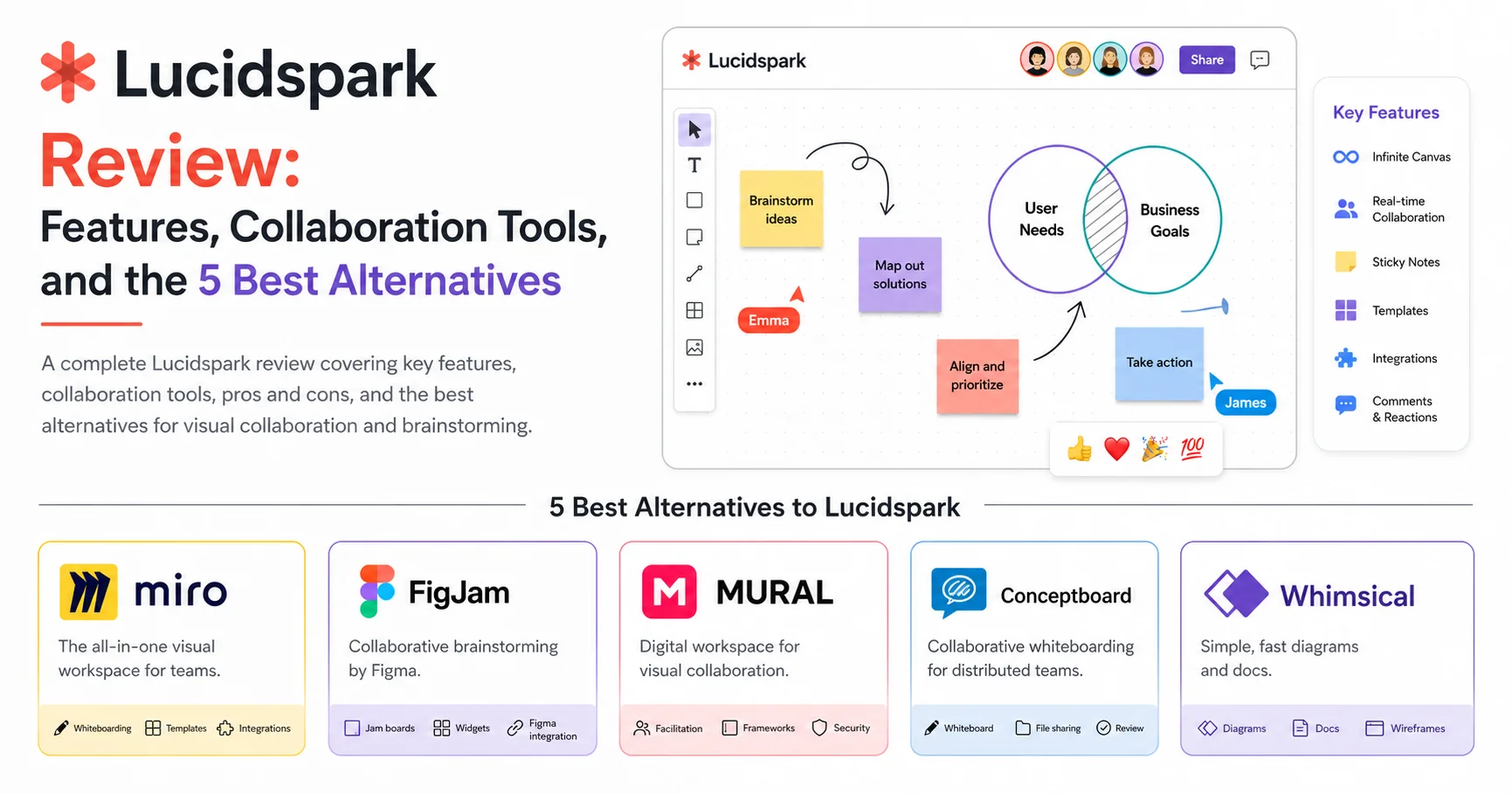
The canvas scrolls and zooms infinitely in every direction, which sounds like a small thing until you’re 45 minutes into a workshop and realize you’ve run out of room on a fixed-size board elsewhere. I never once hit a wall (literally) during my testing.
2. Sticky Notes and Freeform Drawing
Sticky notes are the bread and butter of any whiteboard tool, and Lucidspark’s implementation feels natural. You can color-code them, resize them, and group them instantly. The freeform drawing tool uses pressure sensitivity on supported devices, which made sketching quick diagrams feel surprisingly close to using an actual pen.
3. Collaborator Colors and Cursors
Every participant gets a distinct cursor color, so during live sessions, you can actually see who’s contributing what in real time. This sounds minor, but in a 15-person workshop, it’s the difference between organized chaos and actual chaos.
4. Timer Tool
A built-in timer lets facilitators set time limits for specific brainstorming activities. I used this during a sprint retrospective, and it genuinely kept the team focused — nobody wants to be the one still typing when the timer hits zero.
5. Voting and Reactions
Team members can vote on sticky notes or ideas using emoji reactions or a dedicated voting session feature. This turned out to be one of the most useful features for prioritization exercises, removing the need for a separate polling tool entirely.
6. Templates Library
Lucidspark offers templates for retrospectives, SWOT analysis, mind maps, user journey maps, and more. For beginners, this is a huge time-saver — you’re not staring at a blank canvas wondering where to start.
7. Breakout Boards
For larger sessions, you can split participants into smaller breakout boards, let them work independently, and then merge their outputs back into the main board. This feature alone makes Lucidspark genuinely useful for workshops beyond 10-12 people.
8. Integration With Lucidchart
If your team also uses Lucidchart for diagramming, Lucidspark integrates directly with it, allowing you to move content between a brainstorming board and a structured flowchart without exporting and re-importing files.
⚠️ Important: Breakout boards and some advanced facilitation tools are only available on higher-tier plans. If your team relies heavily on large-group workshops, check plan limits before committing to a Standard subscription.
Lucidspark Collaboration Tools: How It Performs in Real Sessions
Features on paper are one thing — actual live collaboration is where a whiteboard tool either shines or falls apart. Here’s what I found running real sessions with distributed teams.
Real-Time Syncing
Changes appeared almost instantly across all participants’ screens during my testing, even with 12+ people actively editing simultaneously. I didn’t experience the lag or “ghost cursor” issues I’ve run into with some competitors during high-traffic sessions.
Video Chat Integration
Lucidspark integrates with Zoom, allowing you to see video feeds directly within the whiteboard interface. This removes the need to constantly switch between tabs during a workshop, which — as anyone who’s facilitated a remote session knows — is a small but meaningful quality-of-life improvement.
Facilitator Controls
As a facilitator, you can lock the board to prevent edits, spotlight a specific area for everyone’s attention, or temporarily disable sticky note creation during a presentation portion of a session. These controls made it noticeably easier to keep larger groups on track.
Asynchronous Collaboration
Not every brainstorming session happens live. Lucidspark supports asynchronous contributions, meaning team members across different time zones can add ideas to a board before or after a scheduled session, and everything syncs automatically.
Comment Threads
You can leave threaded comments directly on specific elements, which is useful for feedback cycles that don’t require a live meeting. I used this for a design review, and it cut down on the usual back-and-forth email chain significantly.
“Visual collaboration tools have become essential infrastructure for distributed teams,” notes industry research from Gartner’s collaboration software analysis, highlighting the growing reliance on whiteboard platforms for cross-functional teamwork.
Lucidspark Pricing in 2026
Lucidspark pricing is structured into four tiers. Here’s the current breakdown (always verify on the official Lucidspark pricing page since rates can shift):
| Plan | Price (billed annually) | Best For | Key Limits |
|---|---|---|---|
| Free | $0/month | Individuals, small test boards | Limited to 3 editable boards |
| Individual | ~$7.95/month | Freelancers and solo planners | Single user only |
| Team | ~$9/user/month | Small to mid-sized teams | Minimum 3 users required |
| Enterprise | Custom pricing | Large organizations | Advanced admin and security controls |
A few things I noticed while actually testing the paid tiers:
- The free plan is fine for testing, but the 3-board limit means you’ll hit a wall quickly if you’re using it for anything beyond a one-off project.
- The Team plan requires a minimum of 3 seats, which can feel restrictive for very small teams just wanting to try it with two people.
- Enterprise pricing includes SSO, advanced admin controls, and dedicated support, which larger organizations will likely need for compliance reasons.
💡 Tip: If your organization already uses Lucidchart, bundled pricing through the Lucid Suite can work out cheaper than purchasing Lucidspark and Lucidchart separately. Worth checking before you buy either individually.
Lucidspark Pros and Cons
Pros:
- Infinite canvas with smooth, lag-free performance
- Intuitive interface — minimal learning curve for beginners
- Strong facilitation tools (timer, voting, spotlight, board locking)
- Solid template library for common workshop formats
- Seamless integration with Lucidchart and Zoom
- Reliable real-time syncing, even in larger sessions
Cons:
- Team plan requires a minimum of 3 users
- Free plan is quite limited (only 3 boards)
- Breakout boards locked behind higher-tier plans
- Mobile app experience is noticeably weaker than desktop
- Can feel pricier than some competitors for small teams
Lucidspark vs. Competitors: Comparison Table
| Tool | Rating | Free Plan | Starting Price | Infinite Canvas | Best For |
|---|---|---|---|---|---|
| Lucidspark | ⭐⭐⭐⭐½ (4.5/5) | Yes (limited) | ~$7.95/mo | Yes | Workshops & facilitation |
| Miro | ⭐⭐⭐⭐½ (4.6/5) | Yes | ~$8/mo | Yes | Large-scale visual collaboration |
| FigJam | ⭐⭐⭐⭐ (4.3/5) | Yes | ~$3/mo | Yes | Design-centric teams |
| Mural | ⭐⭐⭐⭐ (4.2/5) | No (trial only) | ~$9.99/mo | Yes | Enterprise workshops |
| Conceptboard | ⭐⭐⭐⭐ (4.0/5) | Yes (limited) | ~$6/mo | Yes | Data-sensitive industries |
| Whimsical | ⭐⭐⭐⭐ (4.1/5) | Yes | ~$10/mo | Limited | Product teams & wireframing |
Ratings reflect aggregated user sentiment from independent review platforms as of early 2026 and personal testing experience.
The 5 Best Lucidspark Alternatives
Lucidspark is strong, but it’s not the only option, and it’s definitely not the best fit for every team. Here’s an honest look at the top five alternatives.
1. Miro
Miro is an online visual collaboration platform that helps teams brainstorm ideas, plan projects, and work together on an interactive digital whiteboard. It offers templates for mind maps, flowcharts, wireframes, user journey maps, retrospectives, and agile workflows, making it useful for product development, design, education, and business planning. Teams can collaborate in real time using sticky notes, diagrams, comments, and shared boards, even when working remotely. Miro also provides integrations with tools such as Slack, Jira, and Microsoft Teams, along with AI-powered features to support brainstorming and organize ideas. With its flexible workspace and collaboration capabilities, Miro helps teams turn complex ideas into clear visual plans and improve communication across projects.
Miro is probably Lucidspark’s closest competitor, and for good reason. It offers a similarly intuitive infinite canvas, a massive template library, and strong integrations with tools like Slack, Jira, and Asana.
Pros: Extensive template library, strong third-party integrations, very active community
Cons: Can feel cluttered with too many features for simple brainstorming needs
Best for: Teams that want an all-in-one visual collaboration hub beyond just whiteboarding.
2. FigJam
FigJam is an online collaborative whiteboard tool developed by Figma that helps teams brainstorm ideas, organize workflows, and collaborate visually in real time. It offers digital sticky notes, diagrams, flowcharts, mind maps, voting tools, and ready-made templates for workshops, project planning, and team retrospectives. FigJam is particularly useful for designers, product managers, educators, and remote teams who need an interactive space to share ideas and solve problems together. Its integration with Figma makes it easy to connect brainstorming sessions with design projects and product development workflows. With its intuitive interface and collaboration features, FigJam helps teams improve communication, encourage creativity, and turn ideas into actionable plans.
FigJam comes from the makers of Figma, and it shows — the design-focused features and clean interface make it a favorite among product and UX teams.
Pros: Excellent for design-adjacent brainstorming, affordable pricing, clean UI
Cons: Fewer facilitation tools compared to Lucidspark or Miro
Best for: Design and product teams already embedded in the Figma ecosystem.
3. Mural

Mural is a visual collaboration platform that helps teams brainstorm, plan projects, and solve problems using interactive digital whiteboards. It provides tools such as sticky notes, diagrams, mind maps, flowcharts, and workshop templates to organize ideas and facilitate collaborative sessions. Mural is particularly useful for remote teams, consultants, designers, and business professionals who need to run brainstorming workshops, map customer journeys, or develop strategic plans. Its facilitation features support structured meetings, real-time collaboration, and team alignment, while integrations with popular workplace tools help connect visual planning with existing workflows. By providing a shared space for creative thinking and decision-making, Mural helps organizations improve communication, encourage participation, and turn complex ideas into actionable outcomes.
Mural leans heavily into enterprise-level workshop facilitation, with structured methodologies built directly into its templates, including Design Thinking and Agile frameworks.
Pros: Strong enterprise features, built-in facilitation methodologies
Cons: No permanent free plan, pricier than most alternatives
Best for: Large enterprises running structured, methodology-driven workshops.
4. Conceptboard
Conceptboard is an online visual collaboration platform that enables teams to brainstorm, organize ideas, and manage projects using shared digital whiteboards. It provides tools for adding sticky notes, comments, drawings, images, and documents to collaborative workspaces, making it easier to discuss ideas and gather feedback in real time. Conceptboard is particularly useful for remote teams, consultants, designers, and project managers who need to facilitate workshops, map workflows, review visual materials, or plan projects together. Its collaboration and presentation features help teams communicate clearly and keep discussions organized in one place. By providing a flexible visual workspace, Conceptboard supports creative problem-solving, team alignment, and more efficient decision-making across distributed teams.
Conceptboard stands out for its focus on data privacy and compliance, with servers based in Germany and strong GDPR alignment — a key factor for European organizations.
Pros: Strong data privacy compliance, solid free plan
Cons: Smaller template library, less brand recognition
Best for: Organizations in regulated industries needing strict data compliance.
5. Whimsical
Whimsical is a visual collaboration and productivity platform that helps teams turn ideas into clear diagrams, flowcharts, mind maps, wireframes, and project plans. Its intuitive interface makes it easy to organize information, map user journeys, document processes, and brainstorm solutions without requiring advanced design skills. Whimsical supports real-time collaboration, shared workspaces, and ready-made templates, making it useful for product managers, developers, designers, and remote teams. It also offers AI-powered features to help users generate and organize ideas more efficiently. With its lightweight design and focus on clarity, Whimsical is an excellent choice for teams that want to simplify complex concepts, improve communication, and collaborate on visual projects in one workspace.
Whimsical combines whiteboarding with flowcharts, wireframes, and docs in a single lightweight tool, making it a good fit for smaller product teams that don’t need a dedicated facilitation-heavy platform.
Pros: Lightweight and fast, combines multiple tool types in one app
Cons: Limited infinite canvas compared to dedicated whiteboard tools
Best for: Small product teams wanting an all-in-one lightweight workspace.
⚠️ Note: If your team is heavily invested in the Figma ecosystem for design work, FigJam will likely feel more natural than switching to a separate standalone tool like Lucidspark.
Who Should Actually Use Lucidspark?
Based on my testing, here’s my honest breakdown:
Choose Lucidspark if you:
- Run frequent brainstorming sessions, retrospectives, or strategic planning workshops
- Already use Lucidchart and want seamless integration
- Need strong facilitation tools like timers, voting, and spotlight mode
- Value a clean, beginner-friendly interface over an overloaded feature set
Look elsewhere if you:
- Need a generous free plan for ongoing use (consider Miro or Conceptboard)
- Work primarily within the Figma design ecosystem (choose FigJam)
- Require strict European data compliance (consider Conceptboard)
- Want built-in structured facilitation methodologies (consider Mural)
Common Challenges I Ran Into (And How to Solve Them)
No review would be honest without covering the friction points. Here’s what tripped me up during testing, along with practical fixes.
Challenge 1: Mobile app feels clunky for active editing
Solution: Use Lucidspark primarily on desktop or tablet for live sessions, and reserve the mobile app for quick reviews or comments rather than active facilitation.
Challenge 2: Breakout boards require a higher-tier plan
Solution: If you frequently run large-group workshops needing breakout sessions, factor the Team or Enterprise plan into your budget from the start rather than upgrading mid-project.
Challenge 3: New users feel overwhelmed by the infinite canvas
Solution: Start with a template rather than a blank board. The structure helps first-time users understand the tool’s logic before venturing into freeform brainstorming.
Quick Practical Checklist Before You Choose
- Determine if you need facilitation tools (timer, voting, spotlight) for workshops
- Check your team size against the 3-seat minimum for the Team plan
- Confirm whether you need breakout boards, and verify plan availability
- Test the free plan first to assess interface comfort for your team
- Check existing tool stack for Lucidchart or Zoom integration benefits
- Compare pricing against Miro or FigJam if budget is a primary concern
- Review data compliance needs if operating in a regulated industry
Frequently Asked Questions
Is Lucidspark free to use?
Yes, Lucidspark offers a free plan, though it’s limited to 3 editable boards. For ongoing team use beyond occasional projects, you’ll likely need to upgrade to the Individual or Team plan.
How much does Lucidspark cost in 2026?
Lucidspark’s Individual plan starts around $7.95/month, while the Team plan starts at approximately $9/user/month with a 3-seat minimum. Enterprise pricing is custom based on organizational needs.
Is Lucidspark better than Miro?
Both are strong options. Lucidspark offers a cleaner, more beginner-friendly interface and excellent facilitation tools, while Miro offers a larger template library and broader third-party integrations. The better choice depends on your team’s specific workflow.
Can multiple people use Lucidspark at the same time?
Yes, Lucidspark supports real-time multi-user collaboration with distinct cursor colors, live syncing, and facilitator controls, making it well-suited for live team workshops.
Does Lucidspark integrate with other tools?
Yes, Lucidspark integrates with Lucidchart, Zoom, Slack, and Microsoft Teams, among others, allowing teams to incorporate it into existing workflows without much friction.
Is Lucidspark good for remote teams?
Yes, Lucidspark was specifically designed with distributed and remote teams in mind, offering asynchronous collaboration features alongside live session tools, making it effective regardless of time zone differences.
What’s the difference between Lucidspark and Lucidchart?
Lucidspark is designed for freeform brainstorming and visual collaboration, while Lucidchart focuses on structured diagramming like flowcharts and org charts. Many teams use both together, given their direct integration.
Final Verdict
After weeks of running real workshops and brainstorming sessions, Lucidspark earns a solid recommendation for teams that need a clean, intuitive whiteboard tool with genuinely useful facilitation features. Its infinite canvas, voting tools, and timer function make it particularly effective for structured sessions like retrospectives and strategic planning, while its integration with Lucidchart adds real value for teams already in that ecosystem.
That said, it’s not the perfect fit for everyone. Teams needing a more generous free plan should look at Miro or Conceptboard, while design-centric teams will likely feel more at home with FigJam. But for distributed teams tired of chaotic, unproductive brainstorming calls, Lucidspark delivers a genuinely well-built solution that holds up under real-world use.
Whichever tool you ultimately choose, the goal remains the same — turning scattered ideas into clear, actionable outcomes without losing half your team to tab-switching and confusion along the way.