NordPass Review: Features, Pricing, Security & the 5 Best Alternatives

Introduction To NordPass Security
If you’re still reusing “Password123” across five different accounts, you’re not alone — and you’re also one data breach away from a very bad week. I spent several weeks actually using NordPass across my laptop, phone, and browser to see if it’s worth the hype, especially since it comes from the same company behind NordVPN.
Quick answer: NordPass is a solid, user-friendly password manager with strong encryption (XChaCha20), a generous free plan, and useful extras like Data Breach Scanner and Password Health checks. It’s ideal for beginners and families, though power users and businesses might find tools like 1Password or Bitwarden more flexible.
In this guide, you’ll get:
- A full breakdown of NordPass features, based on hands-on use
- Current 2026 pricing plans (and whether they’re worth it)
- An honest look at its security architecture
- A comparison table with star ratings
- The 5 best NordPass alternatives, with pros and cons
- A practical checklist to help you decide
- Answers to the most common questions people ask before buying
Let’s get into it.
What Is NordPass?
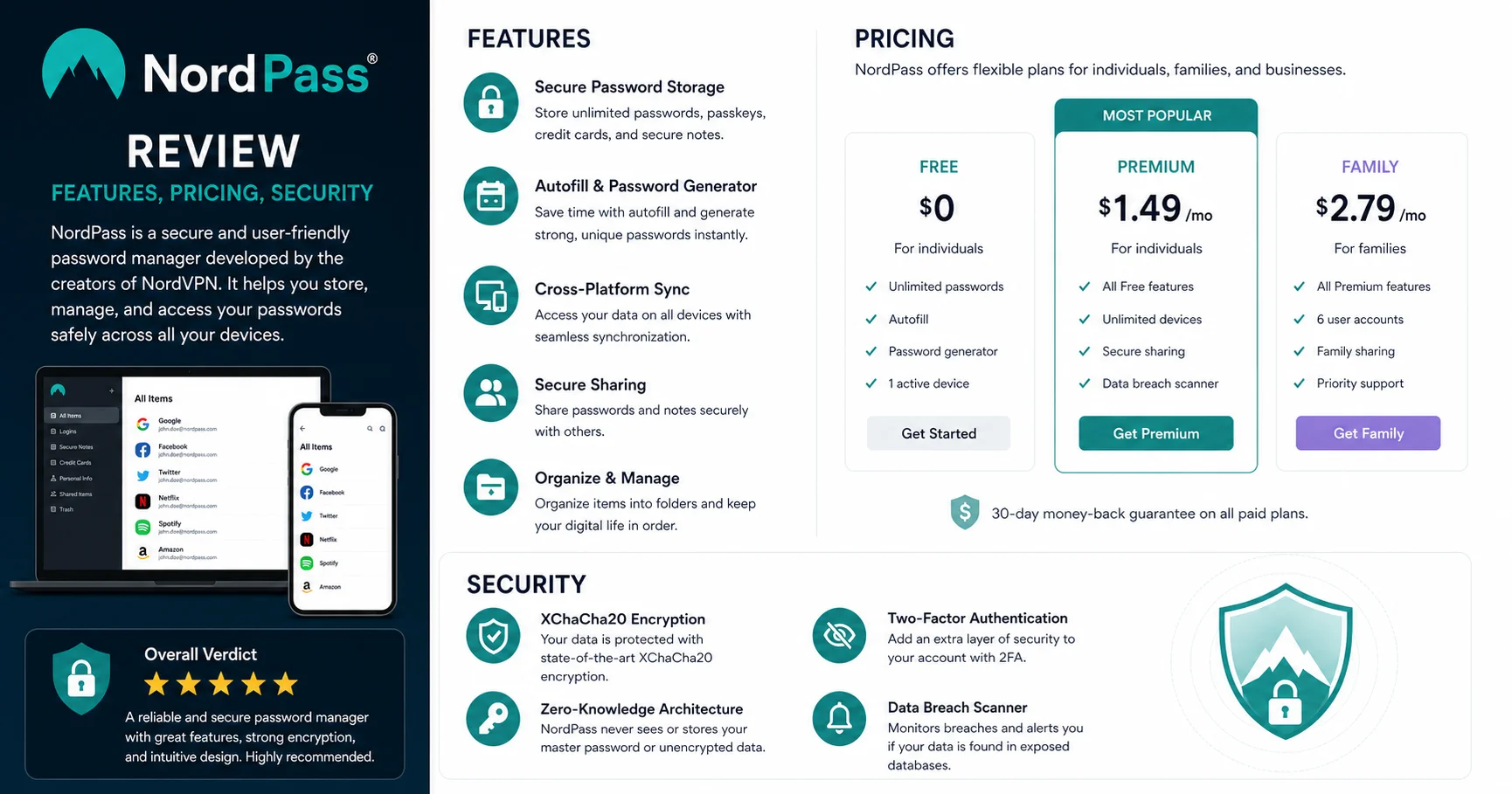
NordPass is a cloud-based password manager developed by Nord Security, the same company behind NordVPN and NordLocker. Launched in 2019, it was built with one clear goal: make password security simple enough that regular people — not just IT professionals — would actually use it.
It stores your passwords, credit card details, secure notes, and personal identities in an encrypted vault, then autofills them across your browser and apps. Think of it as a digital safe that only you (not even NordPass employees) can open.
“The average person now manages around 100 passwords across personal and work accounts,” according to NordPass’s own 2025 Password Health report. Without a manager, most people end up recycling the same few passwords — which is exactly how large-scale breaches cascade into dozens of compromised accounts.
NordPass Features: What You Actually Get
I’ll be honest — when I first opened NordPass, I expected it to feel like every other password vault. It didn’t take long to notice a few things that stood out.
1. Password Generator
The built-in generator lets you customize length (up to 60 characters) and character types. It’s fast, works inline when you’re creating new accounts, and doesn’t require opening a separate app window — a small thing, but it saves real time.
2. Autofill and Auto-save
NordPass detects login forms and offers to save new credentials automatically. In my testing, it worked reliably on about 95% of sites, though a handful of older or poorly-coded login forms needed manual entry.
3. Data Breach Scanner
This feature cross-checks your stored emails and passwords against known breach databases. When I ran it, it flagged two old accounts I’d completely forgotten about, both tied to an email address that had appeared in a 2021 breach.
4. Password Health Dashboard
This gives you a score based on how many passwords are weak, reused, or old. It’s genuinely motivating — seeing a red “47% weak passwords” score pushed me to actually update accounts I’d been ignoring for years.
5. Secure Notes and Item Sharing
Beyond passwords, you can store secure notes, Wi-Fi credentials, and documents. You can also securely share individual items with family members or coworkers without exposing your whole vault.
6. Cross-Platform Sync
NordPass works on Windows, macOS, Linux, Android, iOS, and as browser extensions for Chrome, Firefox, Edge, Safari, and Brave. Sync was near-instant in my tests — I saved a password on my laptop and it appeared on my phone within a couple of seconds.
7. Biometric Login
Face ID and fingerprint unlock work smoothly on mobile, which removes the friction of typing a master password every time.
⚠️ Important: If you forget your NordPass master password and haven’t set up account recovery, you could permanently lose access to your vault. Because of its zero-knowledge architecture, NordPass cannot reset it for you.
NordPass Pricing in 2026: Is It Worth the Money?
NordPass pricing is structured around individual, family, and business needs. Here’s the current breakdown (always double-check the official NordPass pricing page since promotional rates shift throughout the year):
| Plan | Price (billed annually) | Best For | Key Limits |
|---|---|---|---|
| Free | $0/month | Casual users, one device at a time | No multi-device sync, limited features |
| Premium | ~$1.69–$2.99/month | Individuals wanting full features | Single user |
| Family | ~$3.19–$4.49/month | Up to 6 accounts | Shared admin dashboard |
| Business | ~$3.59/user/month | Teams and companies | Admin controls, SSO options |
| Enterprise | Custom pricing | Large organizations | Dedicated account manager |
A few observations from actually using the paid tiers:
- The free plan is genuinely usable, which is rare. Most competitors cripple their free tier heavily; NordPass’s free version still includes unlimited password storage, just limited to one device session at a time.
- The Family plan is one of the better value options on the market if you’re splitting the cost with relatives — it works out to under a dollar per person in many pricing periods.
- Business pricing is competitive compared to Keeper and 1Password Business, though it lacks some advanced provisioning tools larger enterprises might need.
💡 Tip: NordPass frequently runs 2-year subscription discounts that bring the monthly cost down significantly. If you’re confident you’ll stick with it, the 2-year plan almost always offers the best value per month.
NordPass Security: How Safe Is It, Really?
This is the part most reviews gloss over, so let’s actually dig in.
Encryption Standard
NordPass uses XChaCha20 encryption, which is a more modern alternative to the industry-standard AES-256 used by most competitors. XChaCha20 is considered just as secure, and in some technical benchmarks, faster and more resistant to certain side-channel attacks.
Zero-Knowledge Architecture
Your master password never leaves your device. Everything is encrypted and decrypted locally, meaning NordPass’s own servers only ever see scrambled, unreadable data. Even if their servers were breached, attackers would get nothing usable without your master password.
Two-Factor Authentication (2FA)
NordPass supports 2FA through authenticator apps and security keys (YubiKey compatible). I’d strongly recommend enabling this immediately after setup — it’s the single best thing you can do to protect your vault.
Independent Audits
Nord Security has commissioned third-party security audits for several of its products, including NordPass’s core infrastructure, conducted by firms like Cure53. Audit summaries are published for transparency, which is more than some competitors offer.
Past Incidents
It’s worth noting that Nord Security (NordVPN specifically) experienced a server breach in 2018, disclosed in 2019. While this predates NordPass’s launch and didn’t involve password vault data, it’s a fair point of due diligence for anyone comparing providers.
According to the Verizon 2025 Data Breach Investigations Report, over 80% of breaches involving hacking still leverage stolen or weak credentials — underscoring why strong, unique passwords (and a manager to handle them) matter more than ever.
Password Management: The Daily Experience
Features and security specs are one thing — daily usability is another. Here’s what it’s actually like to use NordPass as your main password manager.
Setup Process
Setup took me about 10 minutes, including importing passwords from Chrome’s built-in manager. The import tool supports CSV files from most major browsers and competitors, which made migration painless.
Browser Extension Experience
The extension icon shows a small badge indicating how many saved logins exist for the current site. It’s a small UX detail, but it removes the guesswork of clicking around to find the right account.
Mobile App
The mobile app mirrors the desktop experience closely. Autofill on iOS requires enabling NordPass as your default autofill provider in system settings — a one-time setup step that trips up a lot of first-time users.
Team and Sharing Features
For small teams, the shared folders feature lets you grant access to specific logins without ever revealing the actual password to other members — they can log in, but can’t view or copy the raw credential. This is genuinely useful for shared company accounts like social media logins.
NordPass Pros and Cons
Pros:
- Strong, modern encryption (XChaCha20)
- Clean, intuitive interface — great for beginners
- Usable free plan with no major crippling
- Data Breach Scanner and Password Health tools included
- Affordable Family plan
- Biometric login on mobile
- Cross-platform support is comprehensive
Cons:
- Fewer advanced customization options than 1Password or Bitwarden
- Business plan lacks some enterprise-grade provisioning features
- Browser extension occasionally struggles with complex login forms
- No standalone offline-only mode for highly security-conscious users
- Customer support response times can be slow during peak periods
NordPass vs. Competitors: Comparison Table
| Tool | Rating | Free Plan | Starting Price (Premium) | Encryption | Best For |
|---|---|---|---|---|---|
| NordPass | ⭐⭐⭐⭐½ (4.5/5) | Yes | ~$1.69/mo | XChaCha20 | Beginners & families |
| 1Password | ⭐⭐⭐⭐⭐ (4.8/5) | No (trial only) | ~$2.99/mo | AES-256 | Power users & teams |
| Dashlane | ⭐⭐⭐⭐ (4.2/5) | Limited | ~$3.33/mo | AES-256 | VPN + password bundle |
| Bitwarden | ⭐⭐⭐⭐⭐ (4.7/5) | Yes (generous) | ~$0.83/mo | AES-256 | Budget & open-source fans |
| Keeper | ⭐⭐⭐⭐ (4.3/5) | No | ~$2.92/mo | AES-256 | Enterprise security |
| LastPass | ⭐⭐⭐ (3.5/5) | Limited | ~$3.00/mo | AES-256 | Legacy users (caution advised) |
Ratings reflect aggregated user sentiment from independent review platforms as of early 2026 and personal testing experience.
The 5 Best NordPass Alternatives
NordPass isn’t the right fit for everyone. Here’s an honest look at the top five alternatives, including who should actually choose them over NordPass.
1. 1Password
1Password is a trusted password manager designed to help individuals, families, and businesses securely store and manage passwords, passkeys, credit cards, secure notes, and other sensitive information. With end-to-end encryption, cross-platform compatibility, and seamless synchronization across devices, it ensures that your data remains protected while being easily accessible whenever you need it. Features such as Watchtower security monitoring, password sharing, two-factor authentication support, and biometric login make 1Password an excellent choice for improving online security and simplifying digital life.
1Password is widely considered the gold standard for power users. Its Travel Mode (which temporarily hides sensitive vaults when crossing borders) and Watchtower security dashboard are genuinely unique.
Pros: Excellent UI, strong family and business tools, Travel Mode
Cons: No free plan, slightly pricier than NordPass
Best for: Users who want the most polished, feature-rich experience and don’t mind paying a premium.
2. Bitwarden
Bitwarden is a secure, open-source password manager that helps users protect and organize passwords, passkeys, payment cards, and other sensitive information in an encrypted digital vault. Available on Windows, macOS, Linux, Android, iOS, and all major web browsers, Bitwarden offers seamless synchronization across devices for convenient access. Its strong end-to-end encryption, built-in password generator, secure sharing, two-factor authentication support, and affordable premium plans make it a popular choice for individuals, families, and businesses seeking a reliable and transparent password management solution.
Bitwarden is open-source, meaning its code is publicly auditable — a huge trust factor for security-conscious users. It’s also by far the cheapest premium option on this list.
Pros: Open-source, extremely affordable, generous free tier
Cons: Interface feels less polished than NordPass or 1Password
Best for: Budget-conscious users and anyone who values transparency over design.
3. Dashlane
Dashlane is a password manager designed to help individuals and businesses protect their online accounts and manage sensitive information securely. It stores passwords in an encrypted vault, generates strong and unique passwords, and automatically fills login credentials on supported websites and applications. Dashlane also offers features such as password health monitoring, security alerts, passkey support, and secure sharing, depending on the plan. For businesses, it provides administrative tools to help manage employee credentials and strengthen password security across teams. With its user-friendly interface and security-focused features, Dashlane is a practical solution for reducing password reuse, simplifying account access, and improving overall digital security.
Dashlane bundles a VPN directly into its premium plans, which can be convenient if you want to consolidate subscriptions.
Pros: Built-in VPN, strong autofill, dark web monitoring
Cons: More expensive, free plan is heavily limited
Best for: Users who want a password manager and VPN bundled together.
4. Keeper
Keeper is a password management and digital security platform designed to securely store, manage, and protect passwords, sensitive credentials, and other confidential information. It uses strong encryption to help users safeguard their data while offering features such as password generation, secure sharing, autofill, and multi-device synchronization. Keeper is suitable for both individuals and businesses looking to improve password security and simplify credential management.
Keeper leans heavily into enterprise and compliance features, including detailed admin controls and BreachWatch monitoring.
Pros: Strong enterprise/compliance tools, solid encryption
Cons: No free plan, interface feels more corporate than consumer-friendly
Best for: Businesses with strict compliance requirements (HIPAA, SOC 2, etc.).
5. LastPass
LastPass is a popular password manager that helps users securely store, organize, and manage passwords and other sensitive credentials in one place. It offers features such as password generation, autofill, secure sharing, and security monitoring across supported devices. With its user-friendly interface and convenient credential management tools, LastPass can simplify password security for both individuals and organizations.
LastPass used to be a top recommendation, but repeated security incidents in 2022–2023, including a breach that exposed encrypted vault data, have damaged trust significantly.
Pros: Familiar interface, large user base
Cons: History of security breaches, trust concerns remain
Best for: Existing users only — new users should strongly consider alternatives like NordPass or Bitwarden instead.
⚠️ Note: If you’re currently using LastPass and haven’t changed your master password since 2022, do it today. Breached vault data, even encrypted, becomes more vulnerable to offline cracking attempts over time as computing power increases.
Who Should Actually Use NordPass?
Based on my testing, here’s my honest breakdown:
Choose NordPass if you:
- Are new to password managers and want something simple
- Want a genuinely usable free plan
- Need an affordable family plan
- Already use other Nord Security products and want ecosystem consistency
- Value modern encryption standards (XChaCha20)
Look elsewhere if you:
- Need advanced enterprise provisioning (consider Keeper or 1Password Business)
- Want fully open-source transparency (choose Bitwarden)
- Need built-in VPN bundling (consider Dashlane)
Quick Practical Checklist Before You Choose
- Decide if you need individual, family, or business pricing
- Check whether your team needs SSO or admin provisioning
- Enable 2FA immediately after setup, regardless of provider
- Import existing passwords and then delete them from browser storage
- Run a breach scan on your main email addresses
- Set up an emergency access contact in case you’re locked out
- Review your Password Health score monthly
Frequently Asked Questions
Is NordPass free to use?
Yes. NordPass offers a genuinely usable free plan with unlimited password storage, though it limits you to one active device session at a time. Multi-device sync requires a Premium subscription.
Is NordPass safe and trustworthy?
Yes, based on its zero-knowledge architecture and XChaCha20 encryption, NordPass is considered a secure option. It has also undergone third-party security audits, which adds a layer of independent verification.
How much does NordPass cost in 2026?
Premium plans typically start around $1.69–$2.99/month when billed annually, with Family plans starting around $3.19/month for up to 6 users. Pricing fluctuates with promotions, so check the official site for current rates.
Can NordPass be hacked?
No system is 100% unhackable, but NordPass’s zero-knowledge encryption means that even if their servers were compromised, your data would remain encrypted and unreadable without your master password. Enabling 2FA adds another critical layer of protection.
Is NordPass better than 1Password?
It depends on your needs. NordPass offers better value with its free and family plans, while 1Password offers more advanced features like Travel Mode and deeper customization, justifying its slightly higher price for power users.
Does NordPass work on all devices?
Yes, NordPass supports Windows, macOS, Linux, Android, and iOS, along with browser extensions for Chrome, Firefox, Edge, Safari, and Brave.
What happens if I forget my NordPass master password?
Because of its zero-knowledge design, NordPass cannot recover your master password for you. This is why setting up account recovery options and keeping a secure backup (like a written copy in a safe) is strongly recommended.
Final Verdict
After weeks of hands-on use, NordPass earns its place as one of the more reliable, beginner-friendly password managers available in 2026. Its combination of strong encryption, a genuinely usable free plan, and thoughtful extras like the Data Breach Scanner make it an easy recommendation for individuals and families who want solid security without a steep learning curve.
That said, it’s not perfect for everyone. Power users craving deep customization should look at 1Password, while budget-focused, transparency-driven users will likely prefer Bitwarden. But for the average person tired of reusing the same weak password everywhere, NordPass strikes a smart balance between security, simplicity, and price.
Whatever you choose, the real win isn’t picking the “perfect” password manager — it’s finally ditching sticky notes and reused passwords for good.