Webhook Guide: How Web-hooks Work, Setup, Security, and Use Cases Explained With 5 Platforms Comparison.

Introduction To Webhook
You’ve probably heard the term webhook tossed around in developer Slack channels, integration docs, or that one meeting where someone said “just fire a web-hook” as if it were the simplest thing in the world. If you’re nodding along while secretly Googling it under the table — this guide is for you.
A webhook is essentially an automated message sent from one application to another when a specific event happens. Think of it as a digital notification system: instead of constantly asking “has anything changed?” (which is what traditional APIs do), a webhook simply tells you the moment something does.
In this comprehensive guide, you will learn:
- What a webhook actually is and how it differs from a traditional API
- The technical mechanics behind web-hook delivery, payloads, and HTTP requests
- A step-by-step web-hook setup process you can follow today
- Critical web-hook security practices that most tutorials skip entirely
- Real-world webhook use cases across e-commerce, DevOps, SaaS, and more
- A platform comparison, a practical checklist, and answers to every FAQ you might have
By the end, you won’t need to open another tab. Let’s get into it.
What Is a Webhook? (The Plain-English Definition)
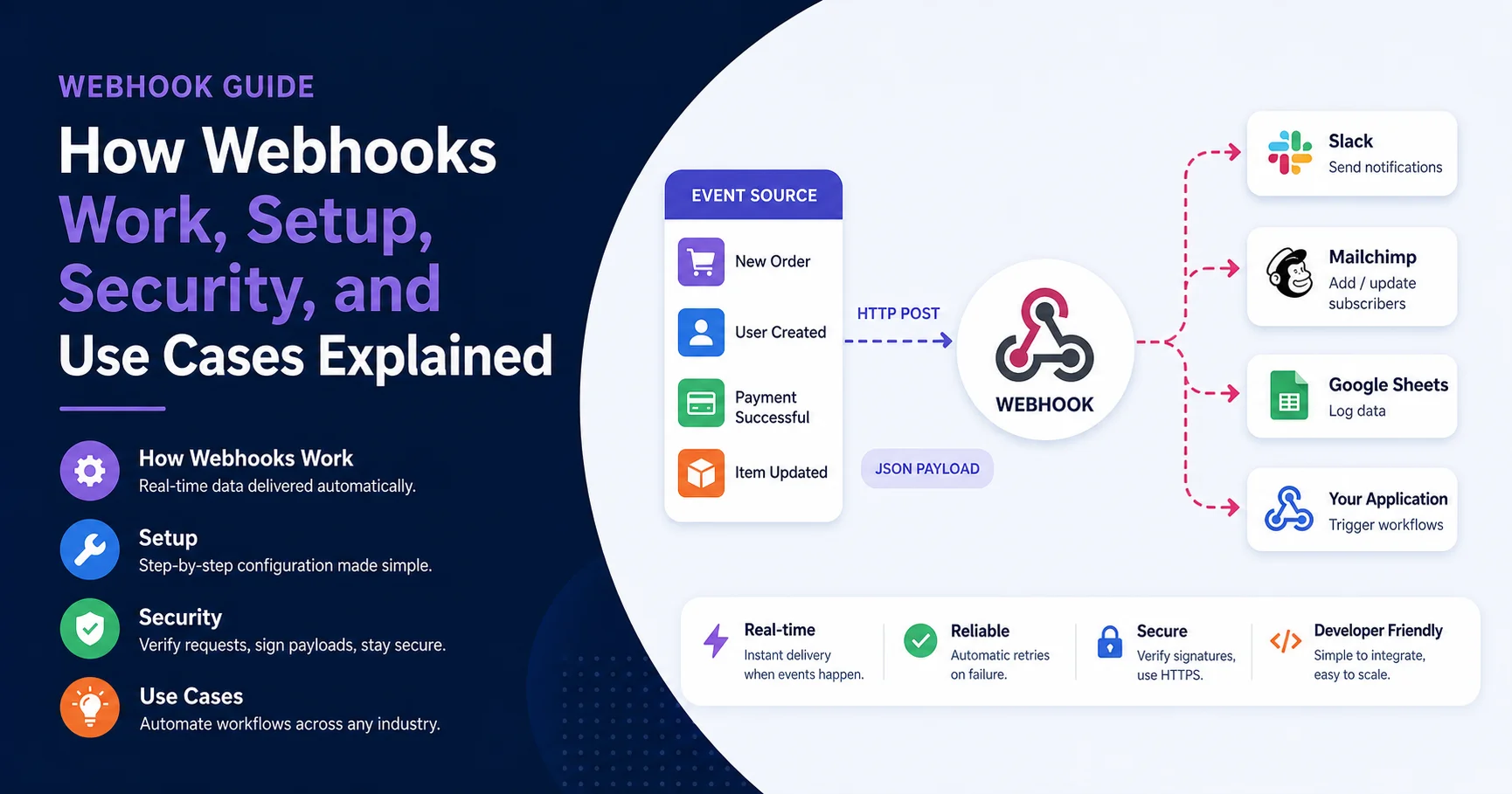
A webhook is an HTTP callback — a lightweight, event-driven mechanism that allows one system to push real-time data to another system the instant a predefined event occurs.
Here’s the analogy I always use when explaining web-hook technology to non-technical colleagues: imagine you’re waiting for a package. The traditional approach (polling) is like walking to your front door every five minutes to check if it’s arrived. A webhook is the doorbell. The delivery driver presses it once, and you know immediately. No wasted trips. No guessing.
Technically speaking, a web-hook consists of three components:
- The Event — Something happens in the source application (a payment is completed, a new user signs up, a GitHub pull request is merged).
- The Payload — A structured data packet (usually JSON or XML) containing details about the event.
- The Endpoint — A URL on the receiving application that listens for and processes the incoming webhook data.
The beauty of the webhook model is its simplicity. There’s no complex handshake, no OAuth dance (in most cases), and no need to maintain a persistent connection. It’s a fire-and-forget HTTP POST request that delivers exactly what you need, exactly when you need it.
💡 From experience: The first time I set up a web-hook to connect Stripe payment events to our internal dashboard, I was stunned at how little code it required compared to the polling solution we’d been maintaining for months. What used to be 200 lines of cron-job logic became a 30-line endpoint.
How Webhooks Work: The Technical Breakdown
Understanding the webhook lifecycle helps you debug issues faster and architect better integrations. Here’s the step-by-step flow:
1. Event Occurs in the Source System
A user completes a purchase on your Shopify store. Shopify registers this as a orders/create event.
2. The Source System Constructs the Payload
Shopify packages the order details — customer name, items purchased, total amount, shipping address — into a JSON object.
3. The Webhook Sends an HTTP POST Request
Shopify sends this JSON payload via an HTTP POST request to the web-hook endpoint URL you configured (e.g., https://yourapp.com/webhooks/shopify-orders).
4. Your Server Receives and Processes the Data
Your server accepts the request, validates it (more on security below), parses the JSON, and triggers whatever action you’ve defined — updating a database, sending a confirmation email, or notifying a Slack channel.
5. Your Server Responds with a Status Code
Your endpoint should return a 200 OK status to acknowledge receipt of the web-hook. If it returns a 4xx or 5xx error, most webhook providers will automatically retry the delivery according to their retry policy. Providers such as Stripe, GitHub, and Shopify typically use exponential backoff and may attempt delivery several times over a period of 24–72 hours. If your endpoint continues to fail, the provider may eventually disable the web-hook. To avoid this, always return a 200 OK response as quickly as possible and process the webhook payload asynchronously in the background.
Webhook vs API: Key Differences You Must Understand
This is the question I get asked most often, and the confusion is completely understandable. Both webhook technology and APIs move data between systems, but they operate on fundamentally different models.
| Feature | Webhook | Traditional API (REST) |
|---|---|---|
| Communication model | Push (event-driven) | Pull (request-driven) |
| Who initiates? | Source system, automatically | Your application, on demand |
| Real-time? | Yes, near-instant | Only if you poll frequently |
| Server load | Low (data arrives only when needed) | Higher (constant polling requests) |
| Setup complexity | Low to moderate | Moderate to high |
| Data freshness | Real-time | Depends on polling interval |
| Retry mechanism | Built-in by provider | You must build your own |
| Best for | Event notifications, alerts | Data retrieval, CRUD operations |
The bottom line: Use a webhook when you need to react to events. Use an API when you need to request data. In most modern architectures, you’ll use both together — the web-hook tells you something happened, and the API lets you fetch the full details.
How to Set Up a Webhook: Step-by-Step Guide
Setting up your first webhook doesn’t require a computer science degree. Here’s the practical process I follow every time, regardless of the platform.
Step 1 — Identify the Event You Want to Track
Start with the business outcome, not the technology. What do you actually need to know about? Examples:
- New Stripe payment received
- GitHub repository push
- Shopify order created
- Typeform submission completed
Step 2 — Create Your Webhook Endpoint URL
You need a publicly accessible URL that can receive HTTP POST requests. Options include:
- Your own server — A route in your Node.js, Python, or PHP application
- Serverless functions — AWS Lambda, Vercel Functions, or Cloudflare Workers
- No-code tools — Zapier, Make (Integromat), or n8n
For local development and testing, I highly recommend using Webhook.site or ngrok to expose your localhost to the internet temporarily.
Step 3 — Register the Webhook in the Source Platform
Navigate to the settings or developer section of the source application. For example, in Stripe: Developers → Webhooks → Add endpoint. Paste your URL and select the events you want to subscribe to.
Step 4 — Handle the Incoming Payload
Write code to receive and parse the JSON data. Here’s a minimal Node.js example:
JavaScriptapp.post('/webhook/stripe', express.raw({type: 'application/json'}), (req, res) => {
  const event = JSON.parse(req.body);
  console.log('Webhook received:', event.type);
  // Process the event
  res.status(200).send('OK');
});
Step 5 — Test Your Webhook Thoroughly
Trigger the event manually or use the platform’s “Send test web-hook” feature. Verify that your endpoint receives the payload, parses it correctly, and returns a 200 status.
Step 6 — Monitor and Maintain
A webhook is not a “set it and forget it” solution. Monitor your endpoint’s uptime, review logs for failed deliveries, and update your endpoint URL if your infrastructure changes.
Webhook Security Best Practices (Don’t Skip This)
I learned this the hard way. Early in my career, I left a web-hook endpoint completely open — no validation, no authentication. Within a week, someone had sent spoofed payment events to our system. Nobody wants that 3 AM Slack message.
Here are the webhook security practices you must implement:
1. Verify the Webhook Signature
Most reputable providers sign their webhook payloads using a secret key. Stripe uses Stripe-Signature, GitHub uses X-Hub-Signature-256, and Shopify uses X-Shopify-Hmac-SHA256. Always verify this signature against your stored secret before processing any data.
2. Use HTTPS Exclusively
Never configure a webhook endpoint on HTTP. HTTPS encrypts the payload in transit, preventing man-in-the-middle attacks. Most providers will outright reject non-HTTPS URLs.
3. Validate the Payload Structure
Don’t blindly trust incoming data. Validate that the JSON structure matches what you expect. A malformed or unexpected payload could be an attack vector.
4. Implement Idempotency
Webhook providers may deliver the same event more than once (due to retries or network issues). Use the event ID to ensure you process each event exactly once. Store processed event IDs in your database and skip duplicates.
5. Respond Quickly, Process Asynchronously
Return your 200 OK response within 5 seconds. If your processing takes longer, acknowledge the webhook immediately and queue the payload for background processing. This prevents timeouts and unnecessary retries.
6. Restrict by IP Address (When Possible)
Some providers publish their webhook IP ranges. If yours does, whitelist those IPs at the firewall level for an additional layer of security.
💡 Pro tip: If you’re managing multiple web-hook integrations and security feels overwhelming, consider a dedicated webhook management platform like Hookdeck or Svix. They handle signature verification, retries, and logging out of the box.
Real-World Webhook Use Cases Across Industries
The versatility of webhook technology is what makes it indispensable. Here are the most impactful use cases I’ve personally implemented or seen in production:
E-Commerce
- Order notifications: Trigger fulfillment workflows the instant a customer places an order
- Inventory alerts: Notify your warehouse system when stock drops below a threshold
- Abandoned cart recovery: Fire a webhook when a cart is abandoned to trigger an email sequence
SaaS & Subscription Management
- Payment events: React to successful charges, failed payments, and subscription cancellations via Stripe or Paddle web-hook notifications
- User lifecycle: Automatically provision or deprovision accounts when users upgrade or downgrade plans
DevOps & CI/CD
- Code deployments: Trigger automated testing pipelines when a pull request is merged via GitHub webhook
- Incident alerts: Forward PagerDuty or Datadog alerts to Slack channels in real time
Marketing & CRM
- Lead capture: Push new form submissions from Typeform or HubSpot directly into your CRM
- Email engagement: React to email opens and clicks to trigger follow-up sequences
FinTech
- Transaction monitoring: Receive real-time notifications for bank transfers, refunds, and chargebacks
- KYC verification: Get notified when identity verification is completed by a third-party provider
Webhook Platform Comparison (2026)
📊 Note: Ratings are compiled from G2, Capterra, and developer community reviews as of early 2026. They reflect general user satisfaction, not sponsored endorsements.
| Platform | User Rating | Ease of Setup | Security Features | Retry Logic | Pricing | Best For |
|---|---|---|---|---|---|---|
| Hookdeck | ⭐⭐⭐⭐⭐ (4.7/5) | ✅ Easy | Signature verification, IP filtering | Advanced (configurable) | Free tier + paid | Webhook infrastructure & reliability |
| Svix | ⭐⭐⭐⭐½ (4.6/5) | ✅ Easy | HMAC signing, encryption | Built-in with dashboard | Free tier + paid | SaaS webhook delivery as a service |
| Zapier | ⭐⭐⭐⭐½ (4.5/5) | ✅ Very Easy | Basic | Limited | Free–$69/mo | No-code web-hook automation |
| Pipedream | ⭐⭐⭐⭐ (4.3/5) | Moderate | Good | Configurable | Free–$30/mo | Developer-friendly webhook workflows |
| Webhook.site | ⭐⭐⭐⭐ (4.0/5) | ✅ Very Easy | Minimal | None | Free | Testing & debugging webhook payloads |

Hookdeck is a webhook infrastructure platform that helps developers reliably receive, manage, monitor, and deliver webhooks between applications. It provides features such as event routing, automatic retries, request inspection, filtering, and traffic control to help handle failed deliveries, duplicate events, and sudden traffic spikes. Hookdeck also helps developers debug web-hook integrations and improve reliability without building all the underlying infrastructure from scratch. It is particularly useful for applications that rely on real-time event-driven workflows, including payment processing, e-commerce, SaaS integrations, and data synchronization. By centralizing web-hook delivery and observability, Hookdeck helps development teams build more resilient integrations and troubleshoot issues more efficiently.
Svix is a webhook infrastructure platform that enables companies to send web-hooks to their customers and partner applications reliably and securely. It provides webhook delivery management, automatic retries, message tracking, event logs, and monitoring tools to help developers troubleshoot failed deliveries and maintain reliable integrations. Svix also supports web-hook security through signature verification and helps manage high-volume event delivery without requiring teams to build and maintain the entire infrastructure themselves. Its APIs and SDKs make integration easier for developers building SaaS products, payment systems, and event-driven applications. Svix is particularly useful for businesses that need scalable, observable, and dependable webhook delivery as part of their product infrastructure.


Zapier is a popular automation platform that connects thousands of apps and services to help users automate repetitive tasks and streamline their workflows without requiring advanced coding skills. It allows users to create automated workflows, known as Zaps, that trigger actions between different applications based on specific events. For example, Zapier can automatically send notifications, update spreadsheets, create tasks, manage leads, or synchronize data across multiple platforms. Designed for businesses, marketers, entrepreneurs, and teams, Zapier helps save time, reduce manual work, and improve productivity by connecting the tools people use every day.
Pipedream is an integration and workflow automation platform that helps developers connect APIs, applications, and services with minimal infrastructure management. It supports event-driven workflows, webhooks, scheduled tasks, and custom code in languages such as JavaScript and Python. Pipedream provides prebuilt integrations, authentication management, and tools for processing incoming events, transforming data, and triggering automated actions across connected applications. Developers can use it to build web-hook endpoints, automate repetitive tasks, and integrate services such as Slack, Stripe, GitHub, and Google Sheets. With its combination of low-code workflows and custom programming capabilities, Pipedream is useful for building flexible integrations and reliable automation pipelines.


Webhook.site is an online tool that helps developers test, inspect, and debug web-hooks and HTTP requests without building a custom server. It instantly generates a unique URL that captures incoming requests, allowing users to examine headers, payloads, query parameters, and other request details in real time. Web-hook.site supports testing integrations, troubleshooting API communication, and verifying event deliveries from services such as payment gateways, e-commerce platforms, and automation tools. It is especially useful during development because it makes it easy to identify malformed payloads, missing headers, and unexpected request behavior. With its simple interface and quick setup, Webhook.site is a practical solution for developers who need to validate web-hook integrations and diagnose delivery issues efficiently.
Common Webhook Mistakes and How to Fix Them
After years of building and debugging web-hook integrations, here are the most frequent mistakes I see — and how to avoid them:
1. Not handling retries properly
Your endpoint will receive duplicate events. Without idempotency checks, you’ll process the same payment twice. Always deduplicate using the event ID.
2. Processing synchronously and timing out
If your webhook handler takes 30 seconds to process, the provider will time out and retry — creating a cascade of duplicates. Acknowledge first, process later.
3. Ignoring web-hook versioning
Providers like Stripe periodically update their webhook API versions. If you don’t pin your API version, a silent update could break your payload parsing overnight.
4. Hardcoding web-hook secrets
Never commit your web-hook signing secret to version control. Use environment variables or a secrets manager like AWS Secrets Manager or HashiCorp Vault.
5. Not monitoring webhook health
A web-hook endpoint that silently fails is worse than one that never existed. Set up alerts for failed deliveries, high latency, and unexpected payload formats.
Quick-Reference Webhook Setup Checklist
Use this checklist every time you configure a new web-hook integration:
- Identify the specific event(s) you need to track
- Create a publicly accessible HTTPS endpoint URL
- Register the web-hook in the source platform’s dashboard
- Implement signature verification using the provider’s secret key
- Parse and validate the incoming JSON payload structure
- Add idempotency logic using unique event IDs
- Return a
200 OKresponse within 5 seconds - Queue heavy processing for asynchronous background workers
- Test with the provider’s test web-hook feature
- Set up monitoring and alerting for failed deliveries
- Document the webhook integration for your team
- Schedule quarterly reviews of web-hook health and API versions
Frequently Asked Questions About Web-hooks
What is a web-hook used for?
A webhook is used to deliver real-time notifications between applications when specific events occur. Common uses include payment confirmations, order updates, code deployment triggers, and lead capture notifications. It eliminates the need for constant polling by pushing data automatically.
Are webhooks secure?
A web-hook can be highly secure when properly configured. Essential security measures include HTTPS encryption, signature verification (HMAC), IP whitelisting, payload validation, and idempotency checks. An unsecured web-hook endpoint, however, is vulnerable to spoofing and replay attacks.
What is the difference between a webhook and an API?
The core difference is the communication model. A web-hook pushes data to your server automatically when an event occurs (push model). An API requires your application to actively request data (pull model). Web-hook technology is ideal for real-time event notifications, while APIs are better suited for on-demand data retrieval.
How do I test a webhook locally?
Use a tunneling tool like ngrok to expose your localhost to the internet. Alternatively, use Web-hook.site to inspect incoming payloads without writing any code. Most providers also offer a “Send test web-hook” button in their dashboard.
Can webhooks fail? What happens then?
Yes, web-hook deliveries can fail due to server downtime, network issues, or endpoint errors. Most providers implement automatic retry mechanisms with exponential backoff — typically 3 to 5 retries over 24–72 hours. If all retries fail, the web-hook may be disabled, and you’ll need to manually re-enable it.
Do webhooks cost money?
The web-hook mechanism itself is free — it’s simply an HTTP request. However, dedicated web-hook management platforms like Hookdeck or Svix charge for advanced features like retry orchestration, logging, and transformation. Most SaaS providers (Stripe, GitHub, Shopify) include web-hook functionality at no extra cost.
How many webhooks can I create?
This depends on the provider. Stripe allows up to 16 web-hook endpoints per account. GitHub allows 20 per repository. Shopify allows 20 per topic per app. For most use cases, these limits are more than sufficient. If you need more, a web-hook management platform can multiplex a single endpoint into multiple internal routes.
Conclusion: Web-hooks Are the Connective Tissue of Modern Software
If you’ve read this far, you now understand more about webhook technology than the vast majority of developers and marketers working in the industry today. Let’s bring it all together.
A web-hook is not just a technical feature buried in a settings menu — it’s the connective tissue that allows your software ecosystem to communicate in real time, react to events instantly, and automate workflows that would otherwise require constant human intervention or resource-heavy polling.
From processing Stripe payments the millisecond they succeed, to triggering CI/CD pipelines on every code push, to syncing Shopify orders with your fulfillment warehouse — the web-hook is the silent engine powering the integrations your business depends on.
Your next steps are straightforward:
- Pick one integration you’ve been manually managing and replace it with a web-hook
- Follow the setup checklist above to configure it securely
- Implement signature verification and idempotency from day one
- Monitor your webhook health weekly for the first month
- Scale to additional integrations as your confidence grows
The era of batch processing and cron-job polling is fading. In 2026, the businesses that move fastest are the ones whose systems talk to each other in real time. Web-hook technology makes that possible — affordably, reliably, and with surprisingly little code.
Stop polling. Start listening. Your webhook is ringing.
Sources referenced: Stripe Webhook Documentation (2025), GitHub Developer Docs (2025), Shopify API Reference (2025), G2 & Capterra user reviews (2025–2026), Hookdeck and Svix official documentation.