PMO Guide 2026: Roles, Responsibilities, Benefits, and Best Practices Explained

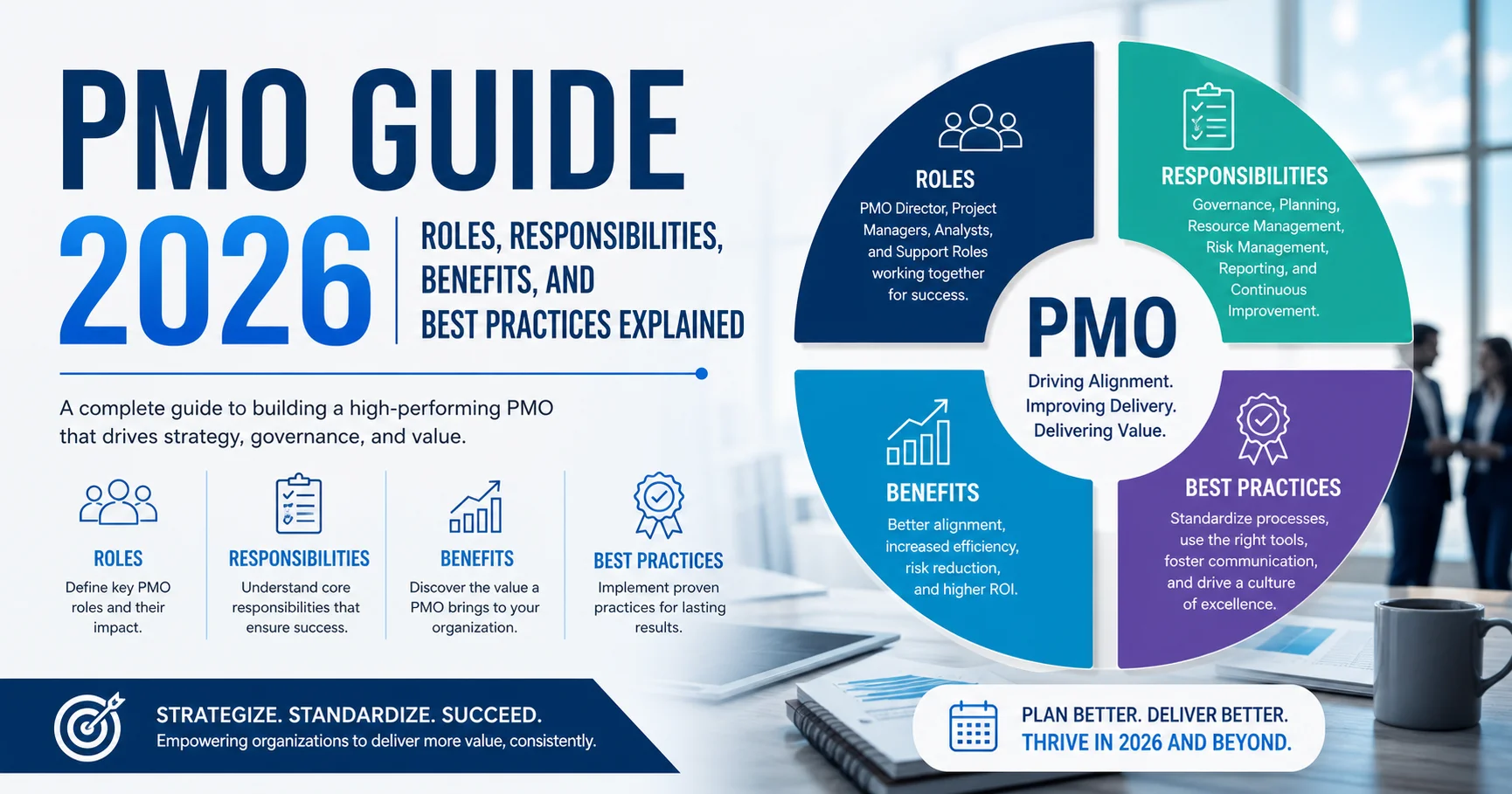
Introduction To PMO – Project Management Office
If your company runs more than two or three projects at once and nobody can tell you which ones are actually on track, you don’t have a project problem — you have a PMO problem. I’ve worked inside and alongside project management offices for years, and the difference between organizations with a well-run Project Management Office and those without one is night and day.
Quick answer: A PMO (Project Management Office) is a centralized team or department that standardizes project governance, tracks performance across projects, and ensures initiatives align with business strategy. The right Project Management Office reduces project failure rates, improves resource allocation, and gives leadership real visibility into what’s actually happening across the organization.
In this guide, you’ll find:
- A clear definition of what a Project Management Office is (and isn’t)
- The three main types of PMO and which one fits your organization
- A full breakdown of Project Management Office roles and responsibilities
- Proven benefits backed by industry data
- A comparison of the best Project Management Office software tools in 2026
- Step-by-step best practices for building an effective Project Management Office
- Common challenges and how to avoid them
- A practical checklist and FAQ section
By the end, you won’t need to open another tab to understand how a PMO works or how to build one that actually delivers value.
What Is a PMO?
A PMO, or Project Management Office, is a centralized function within an organization responsible for standardizing project management practices, maintaining project documentation, and ensuring that projects stay aligned with broader business goals. Think of it as the control tower for every project flying through your organization.
Unlike a single project manager who focuses on one project at a time, a PMO oversees the entire project portfolio. It sets the rules of engagement — templates, reporting formats, approval processes — so that every team speaks the same project management language.
According to the Project Management Institute’s Pulse of the Profession report, organizations with mature PMOs report significantly higher project success rates and better alignment between projects and business strategy compared to those without formal Project Management Office structures.
A PMO isn’t just paperwork and spreadsheets, though. In practice, it’s the function that catches a project quietly drifting off budget three months before it would have become a crisis.
Why Do Organizations Need a Project Management Office?
I’ve seen companies try to scale project delivery without any central oversight, and it almost always ends the same way: duplicated work, conflicting priorities, and executives finding out about project delays in a meeting rather than a dashboard.
A PMO solves this by providing:
- Centralized visibility across all active projects
- Consistent methodology so every project manager isn’t reinventing the wheel
- Resource coordination to prevent teams from being overbooked or underutilized
- Risk management at a portfolio level, not just project-by-project
- Strategic alignment ensuring every project ties back to business objectives
💡 Tip: If you’re constantly answering “what’s the status of Project X?” in ad-hoc emails or meetings, that’s usually the clearest sign your organization needs a Project Management Office.
Types of PMO: Which One Fits Your Organization?
Not every Project Management Office looks the same. The structure you choose depends on how much control your organization wants to exert over individual projects. There are three widely recognized types of PMO.
1. Supportive Project Management Office
A supportive PMO acts as a consultative resource. It provides templates, best practices, training, and access to project information from other projects, but doesn’t enforce control over how individual project managers run their work.
Best for: Organizations with experienced project managers who need light-touch support rather than strict oversight.
2. Controlling Project Management Office
A controlling Project Management Office requires compliance with specific frameworks, templates, and governance structures. Project managers have more autonomy than under a directive PMO, but they must follow established processes and reporting standards.
Best for: Mid-sized organizations balancing flexibility with the need for consistency across departments.
3. Directive PMO
A directive Project Management Office takes full control, directly managing projects and assigning project managers from within the PMO itself. This is the highest level of control and consistency, but it requires significant investment and organizational buy-in.
Best for: Large enterprises running complex, high-stakes projects where standardization is non-negotiable.
| PMO Type | Level of Control | Best For | Flexibility |
|---|---|---|---|
| Supportive | Low | Experienced PM teams | High |
| Controlling | Medium | Mid-sized organizations | Moderate |
| Directive | High | Large enterprises | Low |
Important: There’s no universally “best” type of PMO. The right choice depends on your organization’s size, project complexity, and existing project management maturity.
PMO Roles and Responsibilities Explained
This is where a lot of confusion happens. People often assume a Project Management Office is just one job title, but in reality, it’s a team with several distinct roles, each carrying specific responsibilities.
Core PMO Responsibilities
- Establishing and maintaining project management methodology and standards
- Tracking project performance through KPIs and status reporting
- Managing the project portfolio and prioritizing initiatives based on strategic value
- Facilitating resource allocation across competing projects
- Identifying and escalating risks at a portfolio level
- Providing training and mentorship to project managers
- Maintaining a centralized repository of project documentation and lessons learned
- Supporting change management and stakeholder communication
Key PMO Roles
| Role | Primary Responsibility | Typical Seniority |
|---|---|---|
| Project Management Office Director | Sets PMO strategy, reports to executive leadership | Senior |
| Project Management Office Manager | Oversees daily PMO operations and team | Mid-senior |
| Project Portfolio Manager | Prioritizes and balances the project portfolio | Mid-senior |
| Project Management Office Analyst | Tracks data, builds reports, monitors KPIs | Mid-level |
| Project Management Office Coordinator | Handles scheduling, documentation, admin support | Entry-mid level |
| Project Managers | Execute individual projects under Project Management OfficeO governance | Varies |
In my experience, the PMO Analyst role is often underestimated. These are the people pulling together the dashboards executives actually look at — if the data is wrong or outdated, the entire Project Management Office loses credibility fast.
⚠️ Common Mistake: Many organizations create a Project Management Office but staff it entirely with administrative coordinators and no strategic decision-makers. Without someone senior enough to influence priorities, the PMO becomes a reporting function rather than a value-driving one.
Benefits of a Project Management Office: What Does It Actually Deliver?
A well-run PMO isn’t overhead — it’s a performance multiplier. Here are the benefits I’ve consistently seen play out in practice, supported by industry research.
1. Higher Project Success Rates
Organizations with established PMOs report considerably fewer project failures than those managing projects without centralized oversight, according to PMI’s industry surveys. Standardized processes reduce the guesswork that often leads to scope creep and missed deadlines.
2. Better Resource Utilization
A Project Management Office has visibility across the entire portfolio, which means it can spot when one team is overloaded while another sits idle. This cross-project view is something individual project managers simply don’t have.
3. Improved Strategic Alignment
Projects that don’t tie back to business goals are a common source of wasted budget. A PMO acts as a filter, ensuring that only initiatives with genuine strategic value receive funding and resources.
4. Reduced Project Costs
By standardizing templates, processes, and reporting, a Project Management Office cuts down on duplicated effort and rework. I’ve seen organizations reduce reporting time alone by several hours per week per project manager simply by introducing standardized status templates.
5. Stronger Risk Management
Because a PMO monitors multiple projects simultaneously, it can identify patterns — like a vendor consistently causing delays across several projects — that would be invisible at the individual project level.
6. Better Decision-Making Data
Executives making go/no-go decisions on new initiatives rely heavily on Project Management Office-generated data. Clean, consistent reporting means faster, more confident decision-making at the leadership level.
“Organizations that align their Project Management OfficeO closely with strategic objectives report significantly higher rates of project success than those treating the PMO as a purely administrative function.” — Project Management Institute
Project Management Office Best Practices for 2026
Building a PMO is one thing; making it actually effective is another. Here are the best practices I’d recommend to anyone setting one up or trying to fix an underperforming one.
1. Start With Clear Objectives
Before building any processes, define exactly what success looks like for your Project Management Office. Is it reducing project delays? Improving budget accuracy? Increasing strategic alignment? Vague goals lead to vague PMOs.
2. Choose the Right PMO Type for Your Maturity Level
Don’t jump straight to a directive Project Management OfficeO if your organization has never had centralized project governance before. Start supportive or controlling, then evolve as the organization adapts.
3. Invest in the Right Tools
Manual tracking in spreadsheets works for a handful of projects. Beyond that, you need dedicated PMO software (more on this below) to maintain visibility without drowning your team in administrative work.
4. Keep Reporting Simple and Consistent
Executives don’t need 15-page status reports. A single-page dashboard showing budget, timeline, risk status, and key milestones is far more effective and far more likely to actually get read.
5. Build Relationships, Not Just Processes
A PMO that’s seen purely as a compliance enforcer will face resistance. The most successful PMOs I’ve seen position themselves as a support function that helps project managers succeed, not a bureaucratic checkpoint.
6. Measure Project Management Office Performance, Not Just Project Performance
Track metrics like PMO-driven cost savings, process adoption rates, and stakeholder satisfaction — not just whether individual projects hit their deadlines.
7. Review and Adapt the PMO Model Regularly
What works for a 50-person company won’t work at 500. Revisit your Project Management Office structure and processes at least annually to make sure they still match organizational needs.
💡 Practical Tip: When introducing a new PMO, run it alongside existing processes for one full project cycle before fully replacing old methods. This reduces resistance and gives you real data to refine your approach.
Best PMO Software Tools in 2026
A PMO is only as effective as the tools supporting it. Based on hands-on use and team feedback across different implementations, here’s how the leading Project Management Office software options compare.
| Tool | Rating | Best For | Starting Price | Ease of Use |
|---|---|---|---|---|
| Monday.com | ⭐⭐⭐⭐½ (4.5/5) | Visual project tracking | ~$9/user/month | Very Easy |
| Smartsheet | ⭐⭐⭐⭐ (4.3/5) | Spreadsheet-style portfolio management | ~$7/user/month | Moderate |
| Microsoft Project | ⭐⭐⭐⭐ (4.1/5) | Enterprise-level scheduling | ~$10/user/month | Moderate-Hard |
| Wrike | ⭐⭐⭐⭐ (4.2/5) | Cross-team collaboration | ~$9.80/user/month | Easy |
| Asana | ⭐⭐⭐⭐½ (4.4/5) | Task and workflow management | ~$10.99/user/month | Very Easy |
Ratings based on aggregated user feedback from independent review platforms and direct testing experience as of early 2026.
A quick note from experience: Smartsheet works great for PMOs that came from an Excel-heavy culture since the learning curve is shorter. Monday.com and Asana tend to win over teams that prioritize visual clarity and faster onboarding for new project managers.

Monday.com is a cloud-based work operating system (Work OS) that enables teams to manage projects, workflows, and daily operations from a single platform. It offers customizable boards, task tracking, automation, collaboration tools, and real-time reporting to help teams stay organized and productive. Used by businesses across various industries, Monday.com simplifies project planning, improves team collaboration, and provides greater visibility into work progress through its flexible and user-friendly interface.
Smartsheet is a cloud-based work management and project management platform that helps teams plan projects, automate workflows, and track progress using a familiar spreadsheet-style interface. It combines task management, Gantt charts, dashboards, reporting, and collaboration tools to help organizations manage projects and coordinate team activities efficiently. Users can assign tasks, set deadlines, monitor budgets, share updates, and visualize project timelines in real time. Smartsheet also offers workflow automation, resource management, and integrations with popular business applications, making it suitable for complex projects and cross-functional teams. Its flexible structure supports a wide range of use cases, including marketing campaigns, operations, construction, and enterprise project management. Smartsheet is particularly useful for businesses seeking greater visibility, improved collaboration, and streamlined project workflows.

Microsoft Project and Microsoft Planner are project and task management solutions from Microsoft designed to help individuals and teams organize work, manage tasks, and track project progress. Microsoft Planner offers a simple and intuitive experience for creating tasks, assigning responsibilities, setting deadlines, and visualizing work through boards, making it suitable for everyday team collaboration. Microsoft Project, on the other hand, provides more advanced project management capabilities, including detailed scheduling, Gantt charts, resource management, dependencies, and project planning. Together, they provide flexible solutions for managing everything from simple team tasks to complex, large-scale projects.
Wrike is a cloud-based project management and work collaboration platform that helps teams plan projects, manage tasks, track progress, and improve productivity. It offers features such as customizable workflows, Gantt charts, Kanban boards, time tracking, resource management, and real-time reporting. Wrike also supports team collaboration through shared dashboards, task discussions, file management, and integrations with popular business applications. Its automation and AI-powered features can help reduce repetitive work and provide better visibility into project performance. Suitable for marketing teams, IT departments, and large organizations, Wrike enables businesses to coordinate complex projects, manage workloads, and keep teams aligned with deadlines and strategic goals.

Asana is a leading work management and team collaboration platform that helps organizations plan, track, and manage projects efficiently. It enables users to create tasks, assign responsibilities, set deadlines, monitor progress, and automate workflows within a centralized workspace. Widely adopted by businesses and remote teams, Asana improves productivity, enhances communication, and ensures projects stay on schedule through its intuitive and flexible project management tools.
Project Management Office vs. Project Manager: What’s the Difference?
This is one of the most common points of confusion, so let’s clear it up directly.
A project manager is responsible for the day-to-day execution of a single project — managing the team, timeline, budget, and deliverables for that specific initiative.
A PMO operates at a higher level, overseeing multiple projects simultaneously, setting standards that project managers follow, and ensuring the overall portfolio aligns with business strategy.
| Aspect | Project Manager | Project Management Office |
|---|---|---|
| Scope | Single project | Entire project portfolio |
| Focus | Execution and delivery | Governance and strategy |
| Reporting | Reports project status | Aggregates and analyzes multiple reports |
| Decision Authority | Project-level decisions | Portfolio-level prioritization |
Put simply: project managers drive individual projects forward, while a PMO makes sure all those projects are heading in the same strategic direction.
Challenges of Running a Project Management Office (And How to Avoid Them)
No Project Management Office guide would be complete without being honest about the difficulties. Here are the real challenges I’ve seen organizations face.
1. Perceived as Bureaucratic Overhead
If a Project Management Office only adds extra reporting without providing tangible support, teams will resist it. Solution: Position the PMO as a resource that removes administrative burden from project managers, not one that adds to it.
2. Lack of Executive Sponsorship
A PMO without strong backing from leadership struggles to enforce standards or secure resources. Solution: Ensure the Project Management Office director reports directly to senior leadership and has a seat in strategic planning discussions.
3. Inconsistent Tool Adoption
Teams reverting to spreadsheets or personal tracking methods undermines centralized visibility. Solution: Choose user-friendly PMO software and invest in proper onboarding and training.
4. Measuring the Wrong Metrics
Tracking only whether projects finish on time ignores broader value like cost savings or strategic alignment. Solution: Build a balanced scorecard that includes financial, strategic, and operational metrics.
5. Scaling Too Quickly
Jumping straight into a directive Project Management Office model without organizational readiness often causes pushback. Solution: Scale PMO authority gradually as trust and process maturity build.
⚠️ Warning: A PMO that fails to show measurable value within its first 12-18 months is at high risk of being downsized or dissolved. Early wins and visible ROI are critical for long-term survival.
How to Set Up a PMO: Step-by-Step
If you’re building a PMO from scratch, here’s a practical roadmap based on real implementations.
- Define the PMO’s purpose and scope — Are you solving reporting chaos, resource conflicts, or strategic misalignment?
- Secure executive sponsorship before building anything else
- Choose the appropriate Project Management OfficeO type (supportive, controlling, or directive)
- Select and implement Project Management Office software suited to your team’s size and complexity
- Develop standardized templates for status reports, risk logs, and project charters
- Hire or assign key Project Management Office roles based on the responsibilities outlined earlier
- Pilot the PMO with a small set of projects before rolling it out organization-wide
- Establish KPIs to measure Project Management Office effectiveness, not just project outcomes
- Communicate value regularly to stakeholders through concise, consistent reporting
- Review and refine the Project Management Office model at least once a year
Practical Project Management Office Checklist
Use this checklist before launching or auditing your PMO:
- Project Management Office objectives are clearly defined and documented
- Executive sponsor is identified and actively engaged
- Appropriate Project Management Office type (supportive/controlling/directive) selected
- Project Management Office software tool chosen and team trained
- Standardized templates created for reporting and documentation
- Key Project Management Office roles staffed with appropriate seniority
- KPIs established to measure both project and Project Management Office performance
- Pilot program completed before full organizational rollout
- Communication plan in place for stakeholder updates
- Annual review scheduled to reassess PMO structure
Frequently Asked Questions
What does Project Management Office stand for?
PMO stands for Project Management Office. It’s a centralized team or department responsible for standardizing project management practices and overseeing a portfolio of projects across an organization.
What is the main role of a Project Management Office?
The main role of a PMO is to provide governance, standardization, and visibility across multiple projects, ensuring they align with the organization’s strategic goals while improving efficiency and reducing risk.
What are the three types of PMO?
The three main types of Project Management Office are Supportive (advisory role), Controlling (requires process compliance), and Directive (directly manages projects). The right choice depends on your organization’s size and project management maturity.
Is a PMO the same as a project manager?
No. A project manager oversees a single project’s execution, while a Project Management Office oversees an entire portfolio of projects, setting standards and ensuring strategic alignment across all of them.
What skills are needed to work in a Project Management Office?
Common skills include project management methodology knowledge (such as Agile or PRINCE2), data analysis, stakeholder communication, risk management, and proficiency with PMO software tools like Monday.com or Microsoft Project.
How long does it take to set up an effective PMO?
Most organizations need 6-12 months to establish a functioning Project Management Office and another 12-18 months to demonstrate measurable ROI. Rushing this timeline often leads to poor adoption and weak results.
Do small businesses need a PMO?
Not always. Small businesses managing one or two projects at a time may not need a formal PMO. However, once an organization is juggling multiple concurrent projects with shared resources, a lightweight supportive Project Management Office often becomes valuable.
Final Thoughts
A well-designed PMO isn’t about adding bureaucracy — it’s about giving your organization the visibility and consistency it needs to stop projects from quietly failing in isolation. Whether you choose a supportive, controlling, or directive model, the fundamentals remain the same: clear objectives, strong executive backing, the right tools, and a genuine commitment to supporting project managers rather than policing them.
The organizations that get the most value from their Project Management Office treat it as a strategic partner, not an administrative checkbox. If you’re building one from scratch or fixing one that isn’t delivering results, start small, measure relentlessly, and let the data prove the PMO’s value over time.
Done right, a PMO becomes the one function in your organization that can answer, with confidence, exactly what’s happening across every project — and that kind of clarity is worth far more than any dashboard or template could ever capture on its own.