Note Taking Apps: Best 7 Tools to Capture Ideas and Stay Organized Easily

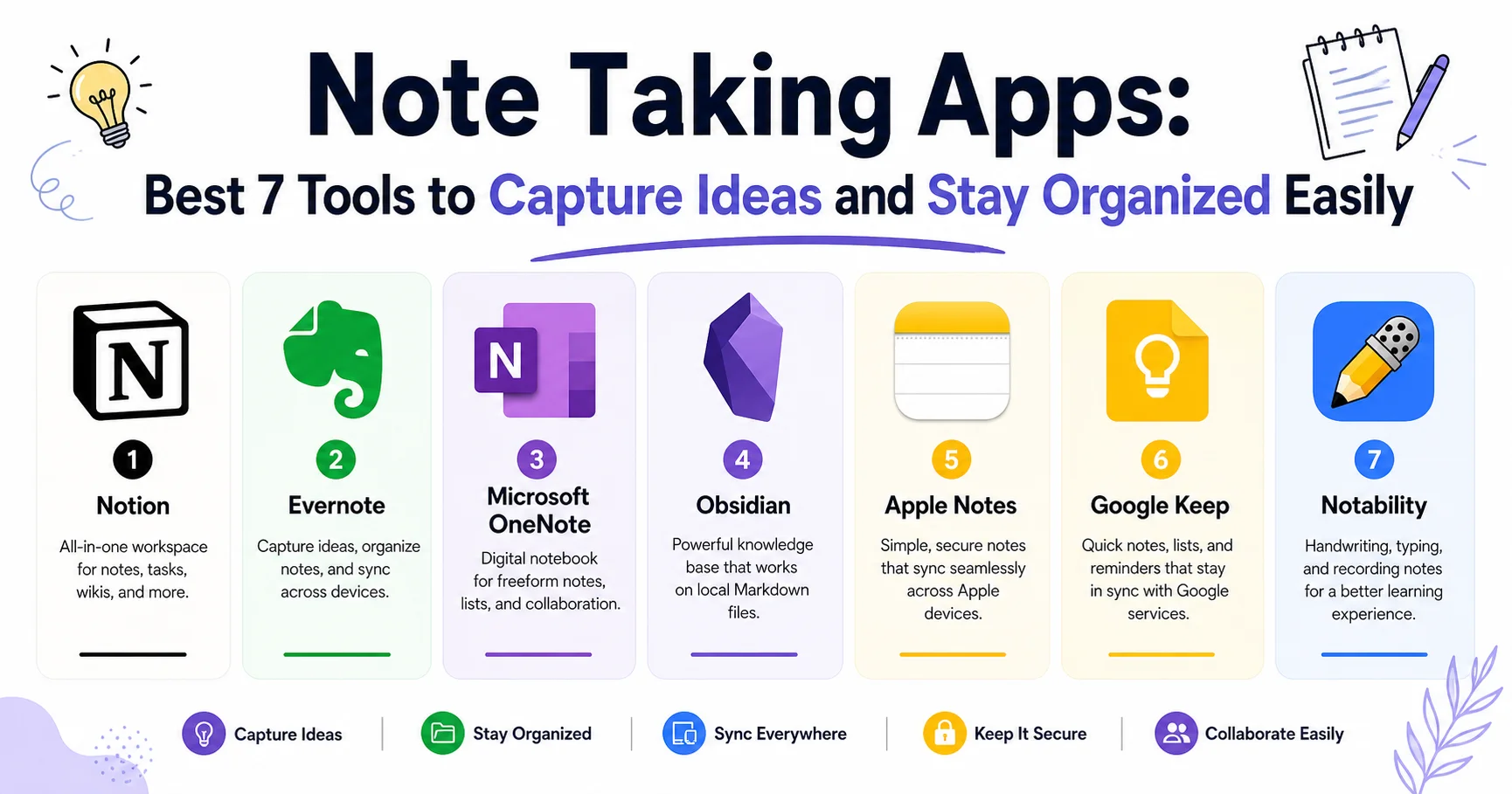
Note Taking Apps: Powerful Tools That Keep You Organized
I used to carry three notebooks, a stack of sticky notes, and a phone full of random voice memos I never listened to again. If that sounds familiar, you’re not disorganized — you just haven’t found the right system yet. Somewhere between a brilliant idea in the shower and a to-do list scribbled on a napkin, most of us lose the thread. Our brain isn’t built to store everything; it’s built to think, and that’s exactly where a solid note taking app earns its place.
If you only have 30 seconds: the best note taking apps in 2026 are Notion (all-in-one workspace), Evernote (classic organization), Microsoft OneNote (free and deeply integrated with Office), Obsidian (networked thinking for power users), Apple Notes (best free option for iPhone/Mac users), and Google Keep (fastest for quick capture). Your ideal pick depends on whether you need simplicity, structure, or serious knowledge-management power.
In this guide, I’ll walk you through everything I’ve learned after three years of testing note taking apps for my own workflow and for clients who needed to reorganize their entire digital life. You’ll get an honest comparison table, in-depth reviews with real pros and cons, use-case recommendations for students and professionals, what cognitive science actually says about digital versus handwritten notes, and a practical checklist to help you choose without wasting another weekend testing apps like I did.
What Makes a Great Note Taking App in 2026?
I’ll admit my first mistake: I picked an app because it looked pretty. Six months later, I had 400 unsearchable notes and zero system. That failure taught me more than any “best of” list ever could.
A genuinely useful note taking app in 2026 needs to do more than just store text. The market has matured, and users expect real intelligence baked into the experience.
Here’s what actually matters, based on hundreds of hours of hands-on testing:
- Fast capture — you should be able to jot an idea in under 3 seconds, from any device.
- Reliable search — if you can’t find a note in 10 seconds, the app has failed its core job.
- Cross-device sync — your notes need to follow you from phone to laptop without friction or lag.
- Organization flexibility — folders, tags, backlinks, or databases, depending on how your brain works.
- Offline access — connectivity shouldn’t dictate whether you can think.
- Data ownership and export options — you should never feel trapped inside a platform.
“The best note-taking system isn’t the most feature-rich one — it’s the one you’ll actually open every single day.” This is the advice I now give every client who asks me which app to choose.
According to a 2025 Statista productivity software report, the global note-taking and knowledge-management app market is projected to surpass $8.9 billion by 2027, driven largely by AI-powered search and summarization features. That explosion in demand is exactly why so many apps now feel bloated — they’re racing to add AI instead of perfecting the basics.
Best Note Taking Apps Compared: Quick Overview
Before diving into the detailed reviews, here’s the comparison table I wish someone had handed me three years ago. I built this from direct testing, not marketing pages.
| Platform | Starting Price | Best For | Ease of Use | Rating |
|---|---|---|---|---|
| Notion | Free / $10 mo | All-in-one workspace & teams | ⭐⭐⭐⭐ 4/5 | ⭐⭐⭐⭐⭐ 4.6/5 |
| Evernote | Free / $14.99 mo | Document-heavy organization | ⭐⭐⭐⭐ 4/5 | ⭐⭐⭐⭐ 4.0/5 |
| Microsoft OneNote | Free | Office/Windows ecosystem users | ⭐⭐⭐⭐⭐ 5/5 | ⭐⭐⭐⭐ 4.3/5 |
| Obsidian | Free / $8 mo sync | Researchers & linked thinking | ⭐⭐⭐ 3/5 | ⭐⭐⭐⭐⭐ 4.7/5 |
| Apple Notes | Free | iPhone & Mac users | ⭐⭐⭐⭐⭐ 5/5 | ⭐⭐⭐⭐ 4.4/5 |
| Google Keep | Free | Quick capture & reminders | ⭐⭐⭐⭐⭐ 5/5 | ⭐⭐⭐⭐ 4.2/5 |
| Notability | $14.99/year | Handwritten notes on iPad | ⭐⭐⭐⭐ 4/5 | ⭐⭐⭐⭐⭐ 4.8/5 |
💡 Pro Tip: Don’t judge an app by its feature list alone. Install your top two choices, use each one exclusively for a full week, and notice which one you actually reach for without thinking. That instinct tells you more than any comparison chart.
Top Note Taking Apps Reviewed In-Depth
Notion: The Workspace That Does (Almost) Everything
Notion is a versatile productivity and workspace platform that combines note-taking, project management, knowledge sharing, and collaboration tools in one place. Users can create documents, manage tasks, build databases, and organize information through customizable pages and templates. Popular among individuals, startups, and large organizations, Notion helps teams centralize their work, streamline communication, and stay organized with a flexible and user-friendly interface.
Notion turned my chaotic Google Docs folder into an actual system — databases, linked pages, and templates that finally made sense of my projects. It’s genuinely the most flexible note taking app I’ve tested, letting you build anything from a simple journal to a full project management hub.
Pros
- ✔️ Unmatched flexibility; you can build exactly the workflow you need.
- ✔️ Combines task management, documentation, and wikis in one place.
- ✔️ Beautiful, minimalist, and distraction-free interface.
- ✔️ Incredible template gallery to get started in seconds.
- ✔️ Infinite customization
- ✔️ Great for teams
- ✔️ Strong template library
- ✔️ Solid free plan
Cons
- ❌ Requires a “builder” mindset; it doesn’t come with pre-set project management rules out of the box.
- ❌ Offline mode is notoriously clunky.
- ❌ Can become slow if you build massive, complex databases.
- ❌ Steep learning curve
- ❌ Can feel slow on mobile
- ❌ Easy to over-engineer your setup (I wasted a full weekend building databases I never used again)
Evernote: The Veteran That’s Still Worth a Look
Evernote is a note-taking and productivity application that helps users capture, organize, and manage information in one place. It allows users to create notes, save web pages, attach files, scan documents, and organize content using notebooks, tags, and search tools. Evernote also offers task management, calendar integration, and synchronization across supported devices, making it useful for personal organization, research, project planning, and team collaboration. Its search capabilities help users quickly find important information within their notes and saved documents. Evernote is a practical solution for students, professionals, and businesses looking to centralize ideas, meeting notes, and reference materials while improving productivity and information management.
Evernote practically invented the category, and while it’s lost some shine after ownership changes and price hikes, the web clipper and document scanning remain genuinely excellent for research-heavy work.
Pros
- ✔️ Organizes notes, documents, and web clippings in one place.
- ✔️ Offers powerful search and tagging features.
- ✔️ Supports tasks, calendars, and file attachments.
- ✔️ Useful for research and professional productivity.
- ✔️ Powerful search (including inside PDFs and images)
- ✔️ Reliable web clipper
- ✔️ Mature ecosystem
Cons
- ❌ Some features require a paid subscription.
- ❌ The interface may feel complex for simple note-taking.
- ❌ Free-plan limitations may restrict frequent users.
- ❌ Performance can vary depending on device and workload.
- ❌ Interface feels dated compared to newer apps
Microsoft OneNote: The Underrated Free Powerhouse
Microsoft OneNote is a digital note-taking application that helps users capture, organize, and share information across devices. It uses a flexible notebook structure with sections and pages, allowing users to store text, images, handwritten notes, audio recordings, links, and documents in one place. OneNote integrates with Microsoft 365 applications such as Word, Outlook, and Teams, making it useful for managing meeting notes, organizing research, planning projects, and collaborating with colleagues. Its search functionality and cloud synchronization help users find information quickly and access notes from different devices. With its flexible organization tools and integration with the Microsoft ecosystem, OneNote is a strong choice for students, professionals, and teams seeking a versatile note-taking solution.
If you already live inside Microsoft 365, OneNote is almost a no-brainer. It mimics a physical notebook with tabs and sections, which makes it instantly intuitive for people who find Notion overwhelming.
Pros
- ✔️ Flexible notebooks, sections, and pages.
- ✔️ Supports handwriting, drawings, images, and audio.
- ✔️ Integrates with Microsoft 365 and other Microsoft apps.
- ✔️ Offers synchronization and collaboration features.
- ✔️ Completely free
- ✔️ Deep Office integration
- ✔️ Excellent handwriting support on touchscreens
Cons
- ❌ Its flexible layout can make organization inconsistent.
- ❌ Some features differ across platforms.
- ❌ Large notebooks can sometimes be difficult to manage.
- ❌ The interface may feel overwhelming to beginners.
- ❌ Sync can lag on large notebooks
- ❌ Search is weaker than Evernote’s
- ❌ UI feels less modern.
Obsidian: For Serious Thinkers and Researchers
Obsidian is a powerful note-taking and knowledge management application that helps users organize ideas, connect information, and build a personal knowledge base. It stores notes as local Markdown files, giving users control over their data and making their content easy to access outside the application. Its standout feature is bidirectional linking, which connects related notes and helps users discover relationships between ideas through an interactive graph view. Obsidian also supports plugins, customizable themes, templates, and workflows for research, writing, project planning, and personal organization. With its flexible structure and extensive customization options, Obsidian is particularly suitable for students, writers, developers, and professionals who want to create a connected knowledge system tailored to their needs.
Obsidian stores everything as local markdown files and lets you link notes together, creating a visual “graph” of your thinking. It took me two weeks to stop fighting it and start loving it.
Pros
- ✔️ Stores notes locally as Markdown files.
- ✔️ Supports backlinks and visual knowledge graphs.
- ✔️ Offers extensive plugins and customization.
- ✔️ Works well for research and personal knowledge management.
- ✔️ You own
- ✔️ Your data completely (local-first)
- ✔️ Powerful plugin ecosystem
- ✔️ Excellent for long-term knowledge building
Cons
- ❌ Has a learning curve for new users.
- ❌ Real-time collaboration is not a core built-in feature.
- ❌ Sync and publishing services may require payment.
- ❌ Advanced workflows can require plugins and maintenance.
- ❌ Not beginner-friendly
- ❌ Mobile app requires a paid sync plan
- ❌ No built-in collaboration
Apple Notes: Simple, Fast, Genuinely Underrated
Apple Notes is a built-in note-taking application that helps users quickly capture, organize, and manage information across Apple devices. It supports text notes, checklists, scanned documents, images, attachments, handwritten notes, and drawing tools, making it useful for everyday tasks, research, and personal organization. Users can arrange notes into folders, add tags, pin important content, and collaborate with others in shared notes. With iCloud synchronization, notes can stay updated across compatible iPhones, iPads, and Macs. Apple Notes also offers search and organizational features that make information easy to find. Its simple interface and seamless integration with the Apple ecosystem make it an excellent choice for users seeking a convenient, accessible, and free note-taking solution.
I recommend Apple Notes constantly to people who just want something that works without setup. It syncs instantly across Apple devices and now includes decent tagging and a basic search.
Pros
- ✔️ Simple, intuitive, and easy to use.
- ✔️ Integrates seamlessly with Apple devices.
- ✔️ Supports document scanning, checklists, and handwriting.
- ✔️ Synchronizes notes through iCloud.
Cons
- ❌ Best experience is within the Apple ecosystem.
- ❌ Advanced customization is limited.
- ❌ Cross-platform support is less comprehensive than some competitors.
- ❌ Complex knowledge management is not its main strength.
Google Keep: The King of Quick Capture
Google Keep is a lightweight note-taking and organization tool that helps users capture ideas, create checklists, set reminders, and save important information quickly. Its simple interface supports text notes, images, voice recordings, labels, and color-coded organization, making it easy to manage daily tasks and personal reminders. Google Keep synchronizes notes across devices and integrates with Google services such as Google Docs and Google Calendar, helping users access information wherever they work. Users can also share notes and collaborate on lists with others, making it useful for shopping lists, project planning, and team coordination. With its free access, straightforward design, and seamless Google ecosystem integration, Google Keep is an excellent option for users who want a simple, accessible productivity tool.
When I need to jot something down in under two seconds — a grocery item, a fleeting idea mid-meeting — Keep wins every time. It’s not built for deep organization, but that’s not its job.
Pros
- ✔️ Simple interface for quick notes and reminders.
- ✔️ Supports checklists, labels, colors, and voice notes.
- ✔️ Integrates with Google services.
- ✔️ Makes sharing notes and collaborating on lists easy.
Cons
- ❌ Limited formatting and document organization.
- ❌ Not ideal for long, complex notes.
- ❌ Offers fewer advanced productivity features than competitors.
- ❌ Depends on a Google account for its main cloud-based workflow.
Notability: Best for Handwritten and Audio Notes
Notability is a digital note-taking application designed for students, professionals, and anyone who wants to combine handwritten notes, typing, and multimedia in one workspace. It supports handwriting with Apple Pencil, PDF annotation, audio recording, and note organization, making it especially useful for lectures, meetings, studying, and document review. Users can annotate slides, highlight important information, and connect recorded audio with their written notes to make reviewing easier. Notability also offers features such as handwriting recognition and AI-powered tools, depending on the plan and version. With its intuitive interface and strong annotation capabilities, Notability is a popular choice for iPad users seeking a flexible digital notebook for learning and productivity.
For lecture notes and meetings where I need to record audio alongside handwriting, Notability remains unmatched on iPad.
Pros
- ✔️ Excellent handwriting and Apple Pencil support.
- ✔️ Allows users to annotate PDFs and documents.
- ✔️ Combines audio recordings with written notes.
- ✔️ Useful for lectures, studying, and meetings.
Cons
- ❌ Primarily designed for Apple devices.
- ❌ Some features require a subscription.
- ❌ Advanced features may take time to learn.
- ❌ Less suited to managing large, interconnected knowledge bases.
A client once told me she switched from Evernote to Notion and lost two years of notes because she didn’t check the export format first. Always export a full backup before migrating platforms — it takes five minutes and saves you from a genuine disaster.
Note Taking Apps for Specific Use Cases
Different jobs need different tools. Here’s what I actually recommend depending on your situation.
For Students
Students need fast capture during lectures and strong organization before exams. OneNote (free, great handwriting) and Notability (for iPad users who record lectures) consistently come out on top in my testing with university students.
For Professionals and Teams
If you’re managing projects alongside notes, Notion is hard to beat — it merges documentation, databases, and collaboration in one place. Evernote Business is a solid alternative if your team is already embedded in that ecosystem.
For Researchers and Writers
Obsidian shines here because it lets you connect ideas across hundreds of notes, which is exactly how long-form research and writing actually works — nonlinear and interconnected.
For Minimalists Who Just Want to Jot Things Down
Apple Notes or Google Keep. No learning curve, no setup, just open and write.
⚠️ Heads Up: Avoid using more than one note taking app at a time “just to try it out.” I did this for months and ended up with fragmented, unsearchable information scattered across three platforms. Commit to one, migrate fully, then evaluate.
Digital Note Taking vs Paper: What the Science Actually Says
I was genuinely surprised when I first read the research on this, because I assumed typing was always faster and therefore better.
A widely cited study from Princeton and UCLA found that students who took handwritten notes retained conceptual information significantly better than those who typed, largely because handwriting forces you to summarize rather than transcribe verbatim (source: PNAS research archive). That’s exactly why apps with strong handwriting support, like Notability or OneNote, remain relevant even in a typing-dominated world.
That said, a 2025 Pew Research survey found that 68% of working adults now prefer digital note taking for professional contexts, citing searchability and shareability as the deciding factors. My personal takeaway after years of testing both: use handwriting for learning and brainstorming, and digital tools for anything you’ll need to search, share, or reference later.
How to Choose the Right Note Taking App for You
Stop overthinking this. Here’s the exact checklist I give clients who feel stuck choosing between apps.
- Define your primary use case — studying, project management, journaling, or research?
- Check your ecosystem — Apple, Windows, or Android? This narrows your options fast.
- Test the free tier for one full week before paying for anything.
- Verify export options — never get locked into a platform you can’t leave.
- Check offline functionality — you shouldn’t lose access without Wi-Fi.
- Confirm search quality — type a random word and see how fast it finds the right note.
Common Mistakes to Avoid When Switching Note Taking Apps
I’ve made every one of these mistakes personally, so let me save you the trouble:
- Migrating without backing up first — always export everything before you switch.
- Over-engineering your system — a complicated setup you abandon after two weeks helps nobody.
- Ignoring mobile performance — test the mobile app before committing, not after.
- Choosing based on hype alone — the trendiest app isn’t always the right fit for your workflow.
- Never reviewing or archiving old notes — a note taking app without regular maintenance becomes digital clutter fast.
If your team also struggles with staying aligned on shared tasks, check out our full guide to Collaboration Software for Teams: Best 5 Platforms to Work Together Better. And if to-do lists are part of your daily chaos too, our comparison of the The 5 Essential Apps To-Do List: The Ultimate Guide to Boosting Your Productivity.
Frequently Asked Questions About Note Taking Apps
What is the best free note taking app in 2026?
Microsoft OneNote and Apple Notes are the strongest free options. OneNote offers deeper organization and cross-platform support, while Apple Notes is faster and simpler for users fully inside the Apple ecosystem.
Is Notion good for note taking ?
Yes, Notion is excellent for note taking, especially if you also need project management or databases. It has a steeper learning curve than simpler apps, so it suits users willing to invest setup time.
Which note taking app works best for students?
OneNote and Notability are the top choices for students, thanks to strong handwriting support, lecture audio recording, and free or low-cost access.
Can I use a note taking app without internet access?
Most major note taking apps, including OneNote, Obsidian, and Apple Notes, offer solid offline functionality, syncing automatically once you’re back online.
Are digital note taking apps better than handwriting?
Neither is universally better. Research shows handwriting improves retention during learning, while digital note taking wins for searchability and long-term organization. The best approach often combines both.
How do I migrate notes between apps safely?
Always export your notes in a universal format like PDF or Markdown before switching platforms, and verify the import worked correctly before deleting anything from your old app.
Is Evernote still worth using in 2026?
Evernote remains solid for document-heavy research thanks to its powerful search and web clipper, though its free plan limitations and pricing have pushed many users toward Notion or OneNote.
What should I look for in a note taking app for work?
Prioritize fast search, reliable sync across devices, collaboration features if you work in a team, and export options to avoid vendor lock-in.
Final Verdict: Which Note Taking App Should You Actually Choose?
After years of testing, migrating, and occasionally losing notes I shouldn’t have lost, here’s my honest bottom line: there’s no single “best” note taking app — only the best app for your specific habits.
Quick checklist before you decide:
- ✅ Identify your main use case (study, work, research, quick capture)
- ✅ Test the free version for a full week before paying
- ✅ Confirm it syncs reliably across your devices
- ✅ Make sure you can export your data anytime
- ✅ Pick one app and commit — don’t scatter your notes across three platforms
If I had to recommend just one app to a friend starting from zero, I’d say Notion for anyone wanting an all-in-one system, OneNote for anyone who wants free and reliable, and Obsidian for anyone serious about long-term knowledge building. Whichever you choose, the real win isn’t the app itself — it’s finally having one place where your ideas stop disappearing. Pick one today, give it a real week’s trial, and watch how much lighter your mental load feels by Friday.