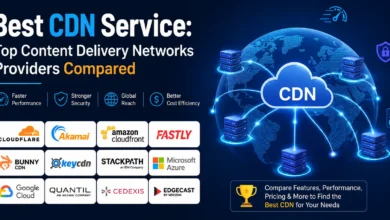
What Is a CDN? The Complete 2026 Guide to Content Delivery Networks

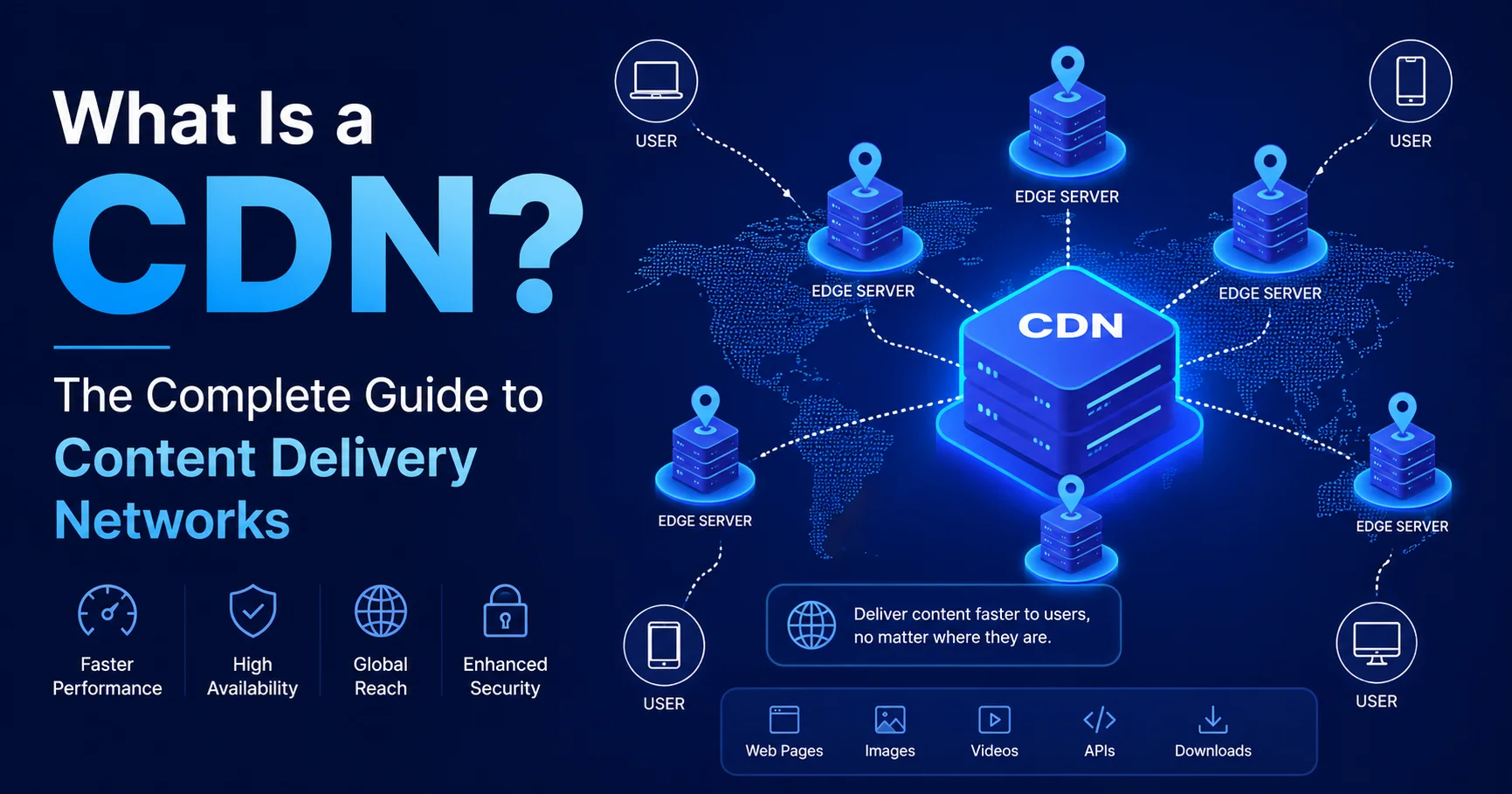
Introduction: CDN – The Invisible Engine Behind Fast Websites
Have you ever wondered why some websites load almost instantly — even when you’re accessing them from thousands of miles away from where they’re hosted? The answer, almost always, involves a Content Delivery Network.
A CDN (Content Delivery Network) is a globally distributed network of servers that work together to deliver web content to users faster, more reliably, and more securely — by serving that content from a location geographically close to the user, rather than from a single, distant origin server.
In plain terms: instead of everyone in Tokyo waiting for a server in New York to respond, a CDN serves that content from a server in Tokyo. The result? Faster load times, happier users, and better search rankings.
In this complete guide, you’ll discover:
- ✅ What a CDN is and how it actually works
- ✅ The core components that make a Content Delivery Network function
- ✅ Real, measurable benefits of using a Content Delivery Network
- ✅ Honest limitations you need to know
- ✅ The top CDN providers in 2026 — compared with user ratings
- ✅ Who needs a Content Delivery Network and who doesn’t
- ✅ A step-by-step checklist for getting started
- ✅ Answers to the most common Content Delivery Network questions
By the end of this guide, you’ll have a complete, accurate picture of Content Delivery Network technology — no further research needed.
What Is a CDN? A Clear, Honest Definition
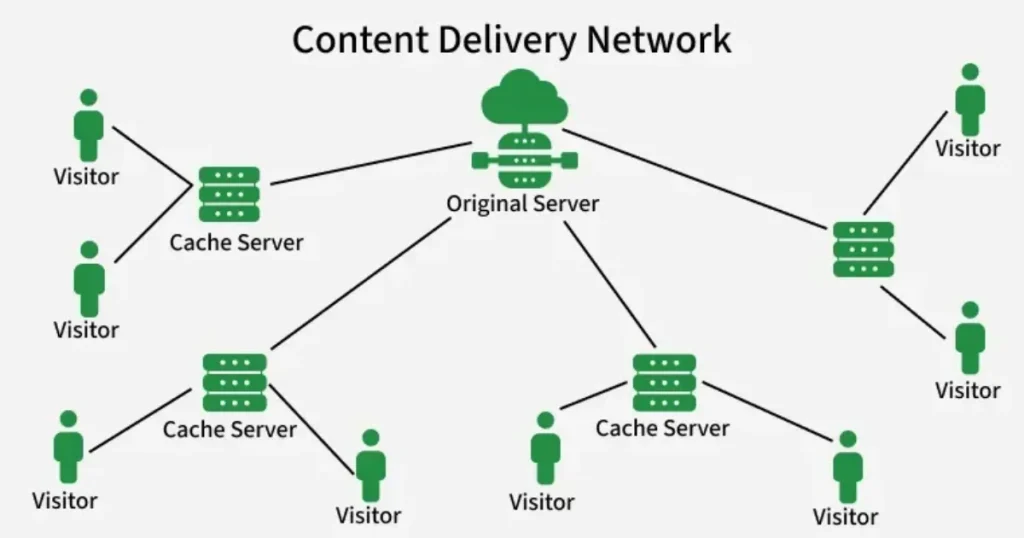
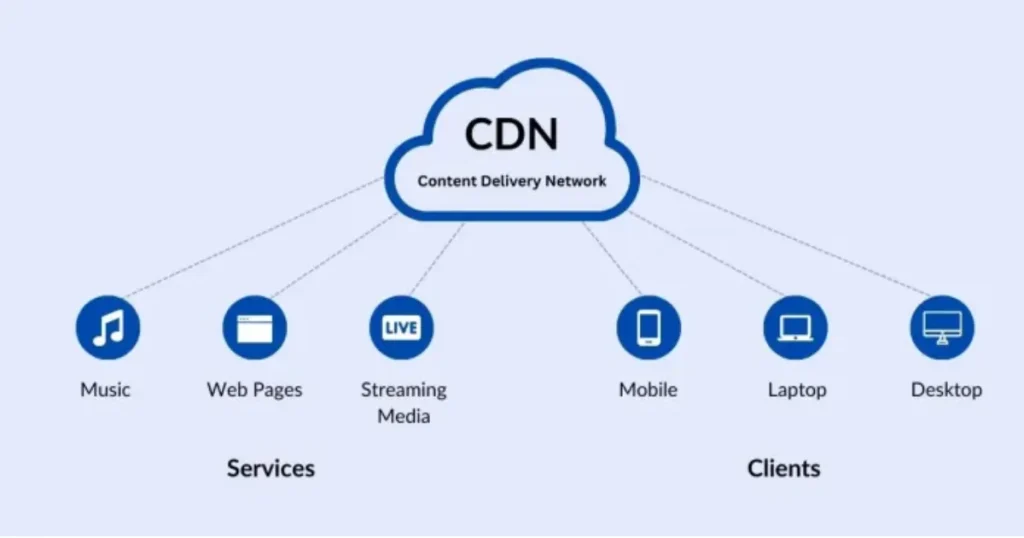
A CDN (Content Delivery Network) is a distributed network of servers located in different geographic regions around the world. Its main purpose is to deliver website content—such as web pages, images, videos, JavaScript files, CSS, and downloads—to users as quickly as possible. Instead of every visitor connecting directly to the website’s main server, a CDN stores cached copies of frequently requested content on edge servers located closer to users. When someone visits a website, the CDN can deliver the requested content from the nearest available server, reducing latency and improving loading speed. CDNs can also help websites handle traffic spikes, improve availability, and provide additional security features such as DDoS protection and traffic filtering.
CDN stands for Content Delivery Network (sometimes also called a Content Distribution Network). It is a geographically distributed network of proxy servers and their data centers, strategically positioned around the world to reduce the physical distance between a website’s content and its users.
Here’s the core problem a Content Delivery Network solves: every time someone visits your website, their browser sends a request to your origin server — the single physical machine (or cloud server) where your website actually lives. If that server is in London and your visitor is in Sydney, that request travels roughly 17,000 kilometers round-trip. Even at the speed of light, that distance introduces measurable latency — the delay between requesting and receiving content.
A CDN eliminates most of that latency by caching copies of your content across dozens or hundreds of Points of Presence (PoPs) worldwide. When a user in Sydney visits your site, the Content Delivery Network serves them cached content from a nearby server — perhaps in Sydney, Melbourne, or Singapore — rather than routing the request all the way to London.
💡 Key Fact: According to Cloudflare’s research, CDN technology now serves the majority of global internet traffic. By 2026, an estimated 72% of all internet traffic passes through Content Delivery Network infrastructure at some point during delivery.
What a Content Delivery Network Delivers
A CDN can serve virtually any type of web content:
- Static assets: Images, CSS files, JavaScript files, fonts
- Dynamic content: Personalized pages, API responses (with edge computing)
- Video and audio streaming: Netflix, YouTube, Spotify all rely on CDNs
- Software downloads: Operating system updates, app installers
- Live streaming: Sports events, concerts, breaking news
- Web application content: Full pages, forms, interactive elements
How a CDN Works — Step by Step
Understanding how a CDN works is simpler than most technical articles make it sound. Here’s a grounded, clear walkthrough.
Step 1: You Set Up Your Origin Server
Your website lives on an origin server. This is your hosting server — whether it’s a VPS, dedicated server, or cloud instance like AWS EC2 or Google Cloud. This is where your original, authoritative content lives.
Step 2: You Connect to a CDN Provider
You sign up with a Content Delivery Network provider (Cloudflare, AWS CloudFront, Fastly, etc.) and configure your domain to route traffic through their network. This typically involves changing your DNS settings to point to the CDN’s nameservers or creating a CNAME record.
Step 3: The Content Delivery Network Caches Your Content
The first time a user requests a piece of content (say, your logo image), the CDN’s edge server nearest to that user doesn’t have it yet. So it makes one request to your origin server, retrieves the file, delivers it to the user, and stores a cached copy on that edge server for future requests.
Step 4: Subsequent Requests Are Served from Cache
Every subsequent user in that region who requests the same file gets it directly from the CDN edge server — your origin server isn’t contacted at all. This is called a cache hit, and it’s where the performance magic happens.
Step 5: Cache Expiration and Refresh
Cached content doesn’t stay forever. You (or the Content Delivery Network) set TTL (Time to Live) values that determine how long content stays cached before the edge server checks for a fresher version from your origin. For static assets like logos or CSS files, TTL might be 30 days. For dynamic pages, it might be seconds or minutes.
The CDN Request Flow — Visualized
User in Tokyo
    ↓ sends request
CDN Edge Server in Tokyo
    ↓ cache HIT → serves immediately ⚡
    ↓ cache MISS → requests from Origin Server → caches → serves 📦
Origin Server in New York
DNS-Based vs. Anycast Routing
Most modern CDNs use Anycast routing — a networking method where multiple servers share the same IP address, and network routers automatically direct requests to the geographically nearest one. Cloudflare, for example, uses Anycast across all its data centers, meaning DNS resolution itself is optimized for speed.
The Core Components of a CDN
A CDN isn’t just “servers in different countries.” It’s a sophisticated technical system with several distinct components.
1. Edge Servers (PoPs — Points of Presence)
These are the distributed servers located in data centers around the world. Each PoP serves users in its region. A major CDN provider might have 200–300+ PoPs globally. The more PoPs a Content Delivery Network has, the better coverage and the lower latency for end users.
2. Origin Server
Your original web server. The CDN pulls content from here when no cached copy exists. A well-configured Content Delivery Network dramatically reduces the load on your origin server.
3. Cache
The storage layer within each edge server where copies of your content are kept. Cache configuration — including TTL settings, cache-control headers, and purging rules — is one of the most important aspects of Content Delivery Network management.
4. Load Balancers
CDNs use intelligent load balancing to distribute traffic across multiple edge servers within a PoP, preventing any single server from becoming overwhelmed during traffic spikes.
5. SSL/TLS Termination
Most CDNs handle HTTPS encryption at the edge, meaning SSL handshakes happen at the nearest server rather than at your origin. This speeds up secure connections significantly.
6. Security Layer (WAF, DDoS Protection)
Modern CDNs include a Web Application Firewall (WAF) and DDoS mitigation capabilities, filtering malicious traffic before it ever reaches your origin server.
Real Benefits of Using a CDN in 2026
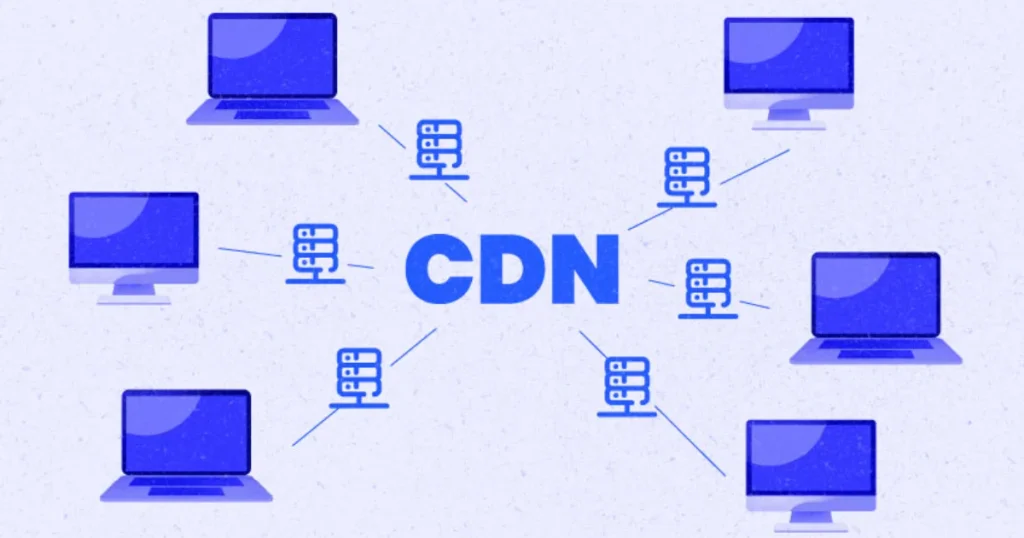
Using a CDN (Content Delivery Network) can significantly improve a website’s speed, reliability, and overall performance. By distributing cached content across servers located in different regions, a CDN allows users to receive files from a server closer to their location, which can reduce latency and improve page loading times. It also helps websites handle high volumes of traffic by distributing requests across multiple edge servers, reducing the load on the origin server. Another important benefit is better availability, since content can often remain accessible even when the origin server experiences heavy traffic or temporary issues.
Let’s go beyond the marketing claims and talk about what a CDN actually delivers in practice.
⚡ 1. Dramatically Faster Load Times
This is the primary reason most people use a CDN. Reducing the physical distance between servers and users directly reduces latency. Studies consistently show that:
- A 1-second delay in page load time can reduce conversions by 7% (Akamai)
- 53% of mobile users abandon a page that takes more than 3 seconds to load (Google/SOASTA Research)
- CDN implementation typically reduces page load times by 40–70% for geographically distributed audiences
📈 2. Better SEO Rankings
Google has explicitly confirmed that page speed is a ranking factor — both for desktop and mobile search. Core Web Vitals, which measure loading performance, interactivity, and visual stability, directly influence search rankings. A CDN improves:
- LCP (Largest Contentful Paint) — by serving large images and assets faster
- TTFB (Time to First Byte) — by reducing server response time
- CLS (Cumulative Layout Shift) — by ensuring fonts and images load quickly and reliably
🛡️ 3. Enhanced Security
This is where modern CDNs have evolved dramatically. Today’s Content Delivery Network services offer:
- DDoS Protection: Absorbing and filtering volumetric attacks (some CDNs handle attacks measured in Tbps)
- Web Application Firewall (WAF): Blocking SQLi, XSS, and other OWASP Top 10 attacks
- Bot Management: Identifying and blocking malicious bots
- SSL/TLS Management: Automated certificate provisioning and renewal
- Rate Limiting: Preventing abuse and credential stuffing
🔄 4. Reduced Origin Server Load
When your CDN handles 80–95% of requests from cache, your origin server handles only a fraction of the traffic it would otherwise. This means:
- Lower hosting costs
- Less risk of server crashes during traffic spikes
- Easier scaling for viral content or marketing campaigns
🌐 5. Higher Availability and Reliability
If your origin server goes down temporarily, many Content Delivery Networks can continue serving cached content to users — a feature called origin shield or stale-while-revalidate. This resilience is why CDNs are critical infrastructure for high-traffic platforms.
💰 6. Reduced Bandwidth Costs
Because cached content is served from Content Delivery Network infrastructure rather than your origin server, you transfer less data from your hosting environment. For sites with heavy traffic or large media files, this can translate to significant cost savings.
Honest Limitations of CDN Technology
Although a CDN (Content Delivery Network) offers major performance, reliability, and security advantages, it is not a perfect solution for every website. One limitation is that dynamic content—such as personalized pages, real-time dashboards, and database-driven requests—may not benefit as much from caching as static files. A CDN can also add configuration complexity, especially when setting up caching rules, DNS, SSL/TLS, and cache invalidation. Costs can increase as a website receives more traffic or transfers large amounts of data, depending on the provider and pricing model. Incorrect caching configurations may also cause users to receive outdated content.
No technology is perfect. Here’s what Content Delivery Networkproviders won’t always tell you upfront.
⚠️ CDN Limitations You Should Know
❌ Dynamic content is harder to cache: CDNs excel with static assets. Highly personalized or frequently changing content requires careful cache configuration or edge computing — which adds complexity.
❌ Cost can scale unexpectedly: Most Content Delivery Network providers charge based on bandwidth consumption. During traffic spikes or viral events, bills can spike dramatically if you’re not on a flat-rate plan.
❌ Cache invalidation is tricky: If you update content on your origin but forget to purge the CDN cache, users may see outdated content for hours or days. Getting cache-control headers right takes experience.
❌ Debugging becomes more complex: With a Content Delivery Network in front of your server, troubleshooting issues — like incorrect caching behavior or blocked requests — requires understanding an additional layer of infrastructure.
❌ Vendor lock-in: Some Content Delivery Network -specific features (edge functions, custom rules) aren’t portable between providers. Switching CDNs later can require significant reconfiguration.
Top Content Delivery Network Providers in 2026 — Compared with User Ratings
The CDN market is competitive and mature. Here’s an honest comparison of the leading providers based on features, pricing, performance, and real user feedback.
| CDN Provider | User Rating | Free Tier | PoPs | Best For | Pricing Model | Ease of Use |
|---|---|---|---|---|---|---|
| Cloudflare | ⭐⭐⭐⭐⭐ (4.8/5) | ✅ Yes (generous) | 300+ | All website types | Free + paid plans | Very Easy |
| AWS CloudFront | ⭐⭐⭐⭐ (4.2/5) | ✅ Limited | 600+ | AWS-hosted apps | Pay-per-use | Moderate |
| Fastly | ⭐⭐⭐⭐ (4.3/5) | ❌ No | 90+ | Enterprise, streaming | Pay-per-use | Advanced |
| Akamai | ⭐⭐⭐⭐ (4.1/5) | ❌ No | 4,000+ | Large enterprise | Custom pricing | Complex |
| BunnyCDN | ⭐⭐⭐⭐½ (4.6/5) | ❌ No ($1 min) | 120+ | Budget-conscious sites | Very affordable | Easy |
| KeyCDN | ⭐⭐⭐⭐ (4.0/5) | ❌ No | 50+ | Small to mid sites | Pay-per-use | Easy |
| Cloudinary | ⭐⭐⭐⭐ (4.2/5) | ✅ Yes | Global | Image/video delivery | Freemium | Moderate |
Quick Provider Breakdown
🥇 Cloudflare — The best all-around CDN for most websites. The free plan is genuinely useful (not just a trial), includes DDoS protection, SSL, and basic firewall rules. The setup takes minutes. For 90% of websites, Cloudflare is the obvious starting point.
🥈 AWS CloudFront — Ideal if you’re already in the AWS ecosystem. Integrates natively with S3, EC2, and Lambda@Edge for advanced edge computing. More complex to configure than Cloudflare but extremely powerful.
🥉 BunnyCDN — The best value Content Delivery Network for developers and small businesses who want excellent performance without enterprise pricing. Pricing starts at $0.01/GB, and the interface is refreshingly simple.
🏢 Akamai — The oldest and largest Content Delivery Network network by PoP count. Used by governments, banks, and major media companies. Not relevant for small websites — pricing is custom and enterprise-focused.
⚡ Fastly — Favored by tech-forward companies and developers who need real-time cache purging, instant configuration changes, and advanced edge computing (Compute@Edge). GitHub, Stripe, and The New York Times use Fastly.
💬 From experience: I’ve used Cloudflare on everything from personal blogs to high-traffic e-commerce sites. The setup is genuinely five minutes for basic configuration, and the performance improvement — especially for users outside the origin server’s region — is immediately visible in tools like Google PageSpeed Insights.
Do You Actually Need a CDN? Honest Assessment
Not every website needs a Content Delivery Network . Let’s be realistic about when it makes sense and when it doesn’t.
✅ You Need a CDN If:
- Your website serves users in multiple countries or regions
- You run an e-commerce site where page speed directly impacts conversion rates
- You host large media files — images, videos, PDFs, downloadable files
- You run a news site, blog, or media platform with unpredictable traffic spikes
- You’re concerned about DDoS attacks or security
- Your Core Web Vitals scores are poor and you’re looking for performance gains
- You operate SaaS applications with global users
❌ A CDN Is Less Critical If:
- Your website is a simple local business site serving a single city or region
- All your users are geographically close to your origin server
- You have very low traffic and security isn’t a concern
- You’re running an internal tool or intranet
💡 Practical Rule of Thumb: If your website is visible to the public internet and you care about performance, security, or SEO — even a free CDN like Cloudflare will almost certainly improve your situation. The cost of not using one is measurable in speed, rankings, and user experience. The cost of starting with Cloudflare’s free plan is literally zero.
CDN and SEO — How Content Delivery Networks Directly Impact Search Rankings
This section is particularly important for website owners and marketers who may not immediately see the SEO connection.
Core Web Vitals and CDN
Google’s Core Web Vitals — the ranking signals introduced in 2021 and now fully integrated into the algorithm — measure three key experiences:
- LCP (Largest Contentful Paint): How long until the main content loads
- INP (Interaction to Next Paint): How responsive the page is to user interaction
- CLS (Cumulative Layout Shift): How much content shifts during loading
A CDN directly improves LCP by serving large images and assets from nearby servers. It also improves CLS by ensuring fonts, stylesheets, and images load faster and in the correct order.
TTFB Improvement
Time to First Byte (TTFB) — the time between a browser request and the first byte of response received — is a strong indicator of server responsiveness. Google recommends TTFB under 800ms. Without a Content Delivery Network, users far from your origin may experience TTFB of 800–2000ms. With a CDN, TTFB commonly drops to 50–200ms globally.
Crawl Budget
For large websites, Google allocates a crawl budget — a limit on how many pages it crawls per session. Faster server response times (improved by CDN) help Google crawl more of your content efficiently, which is particularly important for large e-commerce sites or news platforms with thousands of pages.
CDN for Different Types of Websites — Practical Use Cases
E-commerce Websites
CDN is near-essential for online stores. Product images — often hundreds per page — are prime candidates for Content Delivery Network caching. A Content Delivery Network also ensures checkout pages remain available during Black Friday traffic spikes, and the WAF protection adds a security layer around payment flows.
WordPress Websites
WordPress sites benefit enormously from CDN integration. Most major Content Delivery Network providers have specific WordPress integrations, and plugins like W3 Total Cache or WP Rocket make connecting to a CDN straightforward. Cloudflare, in particular, has a dedicated WordPress plugin that handles configuration automatically.
Video Streaming Platforms
Video streaming is bandwidth-intensive and latency-sensitive. Platforms like Netflix, Disney+, and YouTube use Content Delivery Network infrastructure extensively — in Netflix’s case, a proprietary Content Delivery Network called Open Connect. Even smaller streaming applications benefit from CDN caching of video segments.
SaaS Applications
Global SaaS applications need consistent, low-latency performance for users in every region. CDNs with edge computing capabilities (like Cloudflare Workers or Fastly Compute@Edge) allow running application logic at the edge — processing user requests at the nearest server rather than routing everything to a central application server.
News and Media Sites
Traffic on news sites is highly unpredictable — a breaking story can drive 10x normal traffic in minutes. Content Delivery Network caching ensures the origin server isn’t overwhelmed, and most major news organizations (BBC, The Guardian, Reuters) use CDNs as critical infrastructure.
How to Set Up a CDN — Getting Started Guide
Setting up a CDN is significantly easier than most developers expect. Here’s a practical overview using Cloudflare as the example — since it’s free, widely used, and beginner-friendly.
Setting Up Cloudflare Content Delivery Network — Step by Step
Step 1: Create a Cloudflare Account
Visit cloudflare.com and sign up for a free account.
Step 2: Add Your Website
Enter your domain name. Cloudflare will scan your existing DNS records automatically.
Step 3: Review DNS Records
Verify that Cloudflare correctly imported your DNS records (A records, CNAME records, MX records for email).
Step 4: Update Your Nameservers
Cloudflare will provide two nameservers. Log in to your domain registrar (GoDaddy, Namecheap, etc.) and replace your current nameservers with Cloudflare’s.
Step 5: Wait for DNS Propagation
DNS changes typically propagate within 24 hours, though usually much faster (often under 30 minutes).
Step 6: Configure Your CDN Settings
In the Cloudflare dashboard, configure:
- SSL/TLS: Set to “Full (Strict)” if you have a valid certificate on your origin
- Caching Level: Set to “Standard” to start
- Browser Cache TTL: Set to 4–8 hours minimum for static assets
- Always Use HTTPS: Enable this
- Auto Minify: Enable for HTML, CSS, and JavaScript
Step 7: Test Your Setup
Use GTmetrix or Google PageSpeed Insights to verify performance improvements. Check the response headers for CF-Cache-Status: HIT to confirm content is being served from cache.
CDN Setup Checklist — 12 Steps to Production-Ready Configuration
Use this checklist when deploying a CDN for your website:
🔧 Initial Setup
- CDN account created and domain added
- DNS records verified and nameservers updated
- DNS propagation confirmed
- HTTPS/SSL configured correctly
⚙️ Performance Configuration
- Cache-Control headers set on origin server
- TTL values configured appropriately (static assets: long; dynamic: short)
- Image optimization enabled (compression, WebP conversion)
- Minification enabled for HTML, CSS, JavaScript
- HTTP/2 or HTTP/3 enabled
🔒 Security Configuration
- WAF rules activated (at least basic ruleset)
- DDoS protection confirmed active
- Bot management configured
- Rate limiting set for login pages and forms
- Security headers configured (HSTS, X-Frame-Options, CSP)
📊 Monitoring
- Analytics connected to monitor cache hit ratio
- Alerts configured for unusual traffic patterns
- Origin server health monitoring active
- Performance baseline established (before/after comparison)
Frequently Asked Questions About CDN
Q1: Is a CDN the same as web hosting?
No — they serve completely different purposes. Web hosting stores your website files and makes them accessible on the internet. A CDN distributes copies of those files to servers worldwide for faster delivery. You need web hosting regardless; a Content Delivery Network is an additional layer that improves performance and security. They work together, not as alternatives.
Q2: Does a CDN work for small websites?
Yes, and the benefit is often underestimated. Even a small blog with a global readership will load faster for international visitors with a Content Delivery Network. Cloudflare’s free plan makes this accessible for any website, regardless of size or traffic volume. There’s genuinely no reason not to use one.
Q3: Can a CDN hurt my website?
Only if configured incorrectly. The most common issues are: caching content that shouldn’t be cached (like logged-in user pages), cache not being purged after content updates, or misconfigured SSL causing browser warnings. These are all solvable with proper configuration. A well-configured CDN has essentially no downside.
Q4: How does a CDN protect against DDoS attacks?
CDNs absorb attack traffic across their distributed infrastructure. When an attacker sends millions of requests to overwhelm your server, a Content Delivery Network distributes those requests across hundreds of edge servers — each handling a fraction of the attack load. Additionally, CDN providers use traffic analysis to identify attack patterns and block malicious requests before they reach your origin. Major Content Delivery Network providers can absorb attacks in the hundreds of Tbps range.
Q5: What is a CDN cache hit ratio and why does it matter?
The cache hit ratio is the percentage of requests served from CDN cache rather than your origin server. A high cache hit ratio (80–95%+) means your Content Delivery Network is working efficiently — most traffic never reaches your origin. A low ratio means most requests are going to your origin, which negates most Content Delivery Network benefits. Improving cache hit ratio is done by setting appropriate TTL values, caching static assets aggressively, and properly configuring cache-control headers.
Q6: Is Cloudflare really free? What’s the catch?
Yes, Cloudflare’s free plan is genuinely useful — not a crippled trial. It includes CDN, DDoS protection, SSL, basic WAF rules, and analytics. The catch is that advanced features (custom WAF rules, advanced bot management, image optimization, real-time analytics) require paid plans starting at $20/month. For most websites, the free plan provides substantial, real value. Cloudflare’s business model is based on converting high-traffic and enterprise customers to paid plans, not charging individuals.
Q7: What’s the difference between a CDN and a reverse proxy?
A Content Delivery Network is a type of reverse proxy, but not all reverse proxies are CDNs. A reverse proxy sits between the user and your origin server, intercepting and forwarding requests. A Content Delivery Network does this but adds geographic distribution, caching across global PoPs, and performance optimization. Nginx or HAProxy can act as a simple reverse proxy; Cloudflare or AWS CloudFront are full CDN solutions.
Q8: How do I know if a CDN is actually working?
Check the HTTP response headers. When a Content Delivery Network is active and serving cached content, you’ll see CDN-specific headers in the response. For Cloudflare, look for CF-Cache-Status: HIT. For AWS CloudFront, look for X-Cache: Hit from cloudfront. You can inspect these headers using browser developer tools (Network tab) or tools like curl. Also compare PageSpeed Insights scores before and after enabling your Content Delivery Network.
Q9: Does a CDN store my data?
Content Delivery Network edge servers store cached copies of your public-facing content — images, CSS, HTML pages. They don’t store private user data, database contents, or server-side logic unless you explicitly configure edge storage. Your sensitive data remains on your origin server. CDN providers do log request metadata (IP addresses, timestamps, URLs) for analytics and security purposes — review your provider’s privacy policy for details.
Q10: What is edge computing and how does it relate to CDN?
Edge computing is the evolution of Content Delivery Network. Traditional CDNs cache static content at edge servers. Edge computing goes further by allowing you to run application code at those edge servers. Cloudflare Workers, Fastly Compute@Edge, and AWS Lambda@Edge let you process requests, personalize content, authenticate users, and run full application logic — all at the edge, milliseconds from the user. This blurs the line between Content Delivery Network and application server, enabling new architectures that were previously impossible.
The Future of CDN Technology — What’s Coming in 2026 and Beyond
The CDN industry isn’t standing still. Several developments are reshaping what Content Delivery Network means.
Edge Computing at Scale
The shift from “cache it at the edge” to “compute it at the edge” is accelerating. By 2026, major CDN providers offer edge computing as a standard feature, not a premium add-on. This means applications can be architecturally designed to run entirely at the edge — reducing reliance on centralized servers.
AI-Powered Traffic Optimization
CDN providers are increasingly using machine learning to:
- Predict traffic patterns and pre-position content
- Automatically identify and block sophisticated bot attacks
- Optimize routing decisions in real time
- Personalize content delivery based on user context
HTTP/3 and QUIC Protocol Adoption
QUIC (the underlying protocol for HTTP/3) eliminates one of the remaining latency sources in HTTP/2: the connection establishment handshake. Content Delivery Network providers are rolling out HTTP/3 support broadly, with further improvements in 2026, particularly improving performance on mobile networks with packet loss.
WebAssembly at the Edge
WebAssembly (Wasm) allows running code written in any language at CDN edge nodes with near-native performance. This opens the door to running complex business logic — written in Rust, Go, or Python — at edge nodes worldwide.
Conclusion: CDN Is No Longer Optional — It’s Infrastructure
After everything we’ve covered in this guide, the conclusion is clear: a Content Delivery Network is no longer a luxury feature for large platforms. In 2026, it’s as fundamental to your web infrastructure as hosting itself.
The performance benefits are real and measurable. The security improvements are significant. The SEO impact is direct. And with providers like Cloudflare offering a genuinely capable free plan, the barrier to entry is essentially zero.
Here’s what you should take away from this complete CDN guide:
- A Content Delivery Network reduces latency by serving content from geographically distributed edge servers
- It improves Core Web Vitals, which directly affects Google search rankings
- Modern CDNs provide security — DDoS protection, WAF, bot management — not just speed
- Cloudflare is the best starting point for most websites; enterprise users should evaluate Akamai, Fastly, or AWS CloudFront
- Cache configuration is the most important factor in Content Delivery Network effectiveness
- Edge computing is the next evolution — CDNs are becoming distributed application platforms
Whether you run a personal blog, an e-commerce store, or a global SaaS platform, there is a CDN setup that fits your needs and your budget. The question in 2026 isn’t whether to use a Content Delivery Network — it’s which one and how to configure it correctly.
Your next step: if your website isn’t behind a CDN today, set up a free Cloudflare account this afternoon. It’s one of the highest-impact, lowest-effort improvements you can make to any website. The performance difference — and the peace of mind on security — is worth every minute of setup time.
📌 CDN Quick Reference Summary
* CDN = Content Delivery Network — globally distributed servers that cache and deliver web content faster
* Reduces latency by serving content from servers near the user
* Improves Core Web Vitals (LCP, INP, CLS) and SEO rankings
* Provides DDoS protection, WAF, and SSL management
* Top providers in 2026: Cloudflare, AWS CloudFront, Fastly, BunnyCDN, Akamai
* Cloudflare free plan is the best starting point for most websites
* Cache hit ratio and TTL configuration are key to Content Delivery Network effectiveness
* Edge computing is the next frontier — compute logic runs at Content Delivery Network edge nodes
* Not just for large sites — any public website benefits from CDN protection and speed