OpenAI API Guide: Pricing, Models, Features, Integration Examples and 3 Competitives Comparaison.

Introduction to the OpenAI API
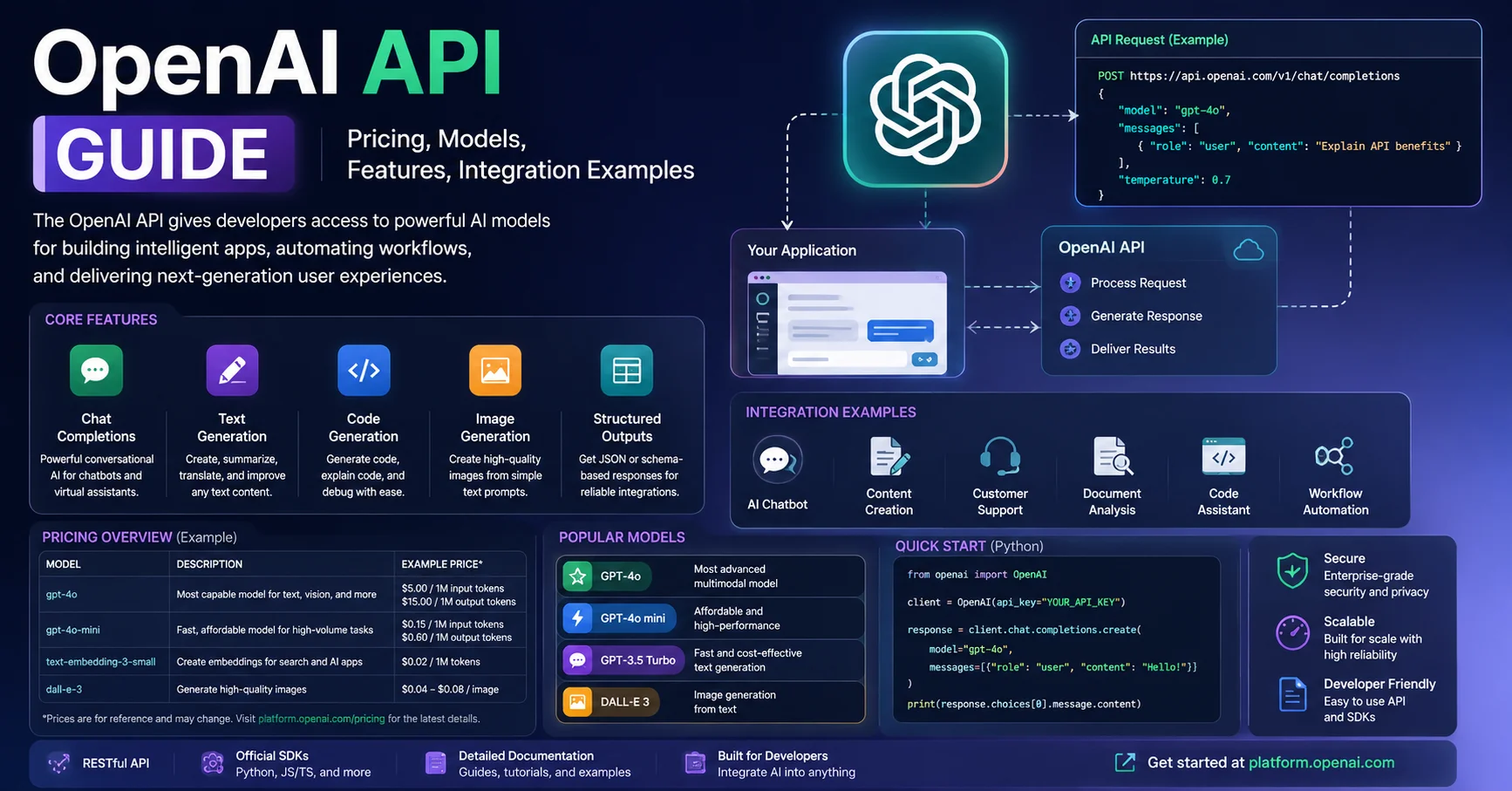
The OpenAI API is a developer platform that enables applications to integrate artificial intelligence capabilities directly into websites, software, mobile apps, and automated workflows. Instead of building an AI model from scratch, developers can use OpenAI’s APIs to add features such as text generation, reasoning, structured outputs, image generation, and other AI-powered capabilities to their applications.
The API works through requests sent from an application to OpenAI’s platform. Developers provide instructions and relevant input, select an appropriate model, and receive a response that their application can process and display. This makes the OpenAI API useful for building chatbots, content-generation tools, customer-support assistants, document-processing systems, coding tools, and AI automation workflows.
Authentication is handled through API credentials, while applications communicate with the platform using standard API requests. Developers can also use official SDKs to simplify integration with programming languages such as Python and JavaScript/TypeScript.
One of the major advantages of the OpenAI API is its flexibility. Developers can integrate AI into existing business processes rather than forcing users to work in a separate AI application. For example, a company could automatically analyze incoming customer messages, generate a response, extract structured information from documents, or connect AI capabilities to an existing CRM.
The OpenAI API therefore serves as a foundation for building AI-powered applications and automated workflows, giving developers access to advanced models through programmable interfaces. The official OpenAI Platform provides the tools and documentation needed to start building and testing API-based applications.
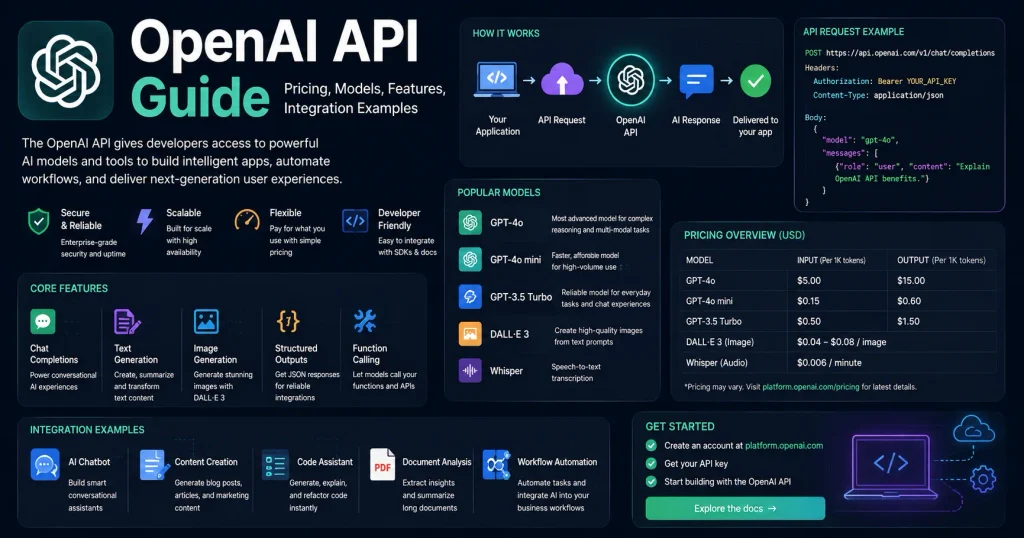
Quick Answer: The OpenAI API gives developers programmatic access to OpenAI’s most powerful AI models — including GPT-4o, o3, and GPT-4o mini — to build applications that can generate text, analyze images, transcribe audio, generate embeddings, and much more. It works on a pay-per-token pricing model, integrates with any programming language via HTTP, and has official SDKs for Python and Node.js. Whether you’re building a customer support chatbot or a complex AI research tool, this guide covers everything you need to get started and scale confidently.
The first time I made a successful call to the OpenAI API and watched a fully coherent, context-aware response appear in my terminal, I genuinely paused. Not because it was magic — but because I realized how much of what I’d been building manually could now be handled intelligently in milliseconds. That moment changes how you think about software development entirely.
But the learning curve is real. Model selection alone can paralyze new users, pricing surprises catch developers off guard, and without proper prompt engineering or error handling, early integrations tend to be fragile. This guide eliminates all of that confusion.
Here’s exactly what you’ll find in this guide:
- A clear breakdown of every major OpenAI API model in 2026 and when to use each
- Transparent, up-to-date pricing breakdown with real cost estimates
- Step-by-step integration examples in Python and JavaScript
- Advanced features: function calling, vision, assistants, embeddings, fine-tuning
- OpenAI API vs. competing AI APIs (honest comparison table)
- Cost control strategies and best practices
- FAQs answered from real developer experience
Let’s get building.
What Is the OpenAI API and How Does It Work?
OpenAI is an AI company that develops advanced models and tools for tasks such as text generation, analysis, coding, image creation, and workflow automation. Its technologies can be integrated into automated workflows to handle repetitive tasks, process information, generate content, and support business operations.
The OpenAI API is a REST-based interface that allows developers to send requests to OpenAI’s AI models and receive intelligent responses. Instead of using ChatGPT through a browser, you interact with the same underlying models programmatically — meaning you can embed AI capabilities directly into your own applications, workflows, and products.
Under the hood, the process is straightforward:
- You send an HTTP request containing your input (called a prompt or messages array)
- OpenAI’s servers process your input through the selected model
- The model returns a response — text, JSON, image, audio, or embeddings — depending on the endpoint you used
- You’re billed based on the number of tokens processed (input + output)
A token is roughly 4 characters or ¾ of a word in English. “Hello, how are you?” is approximately 6 tokens. This token-based billing model is important to understand before you start building, because it directly determines your costs.
📊 Scale Fact: As of 2025, OpenAI’s API processes hundreds of billions of tokens daily across millions of developer accounts worldwide. The platform powers applications across healthcare, legal, education, e-commerce, and software development. (Source: OpenAI)
OpenAI API Models in 2026: Which One Should You Use?
Choosing the right model is the single most impactful decision you’ll make when building with the OpenAI API. Using a model that’s more powerful than your use case requires is the fastest way to burn through your budget. Using one that’s underpowered produces poor results that frustrate users.
Here’s a clear breakdown of the major models available through the OpenAI API in 2026:
GPT-4o — The Workhorse
GPT-4o (“o” stands for “omni”) is OpenAI’s flagship multimodal model. It handles text, images, audio input, and code within a single model — no need to chain separate models for different modalities.
Best for:
- Complex reasoning and multi-step tasks
- Code generation and debugging
- Document analysis with images
- Customer-facing applications where quality matters
Context window: 128,000 tokens (roughly 96,000 words — an entire novel)
GPT-4o mini — The Smart Budget Option
GPT-4o mini is a smaller, faster, cheaper version of GPT-4o that still outperforms GPT-3.5 Turbo on most benchmarks. It’s the model I reach for first when building prototypes or high-volume applications where cost efficiency matters.
Best for:
- High-volume text classification
- Summarization at scale
- Chatbots with straightforward conversation flows
- Rapid prototyping
Context window: 128,000 tokens
o3 and o3-mini — The Reasoning Models
The o3 series represents OpenAI’s dedicated reasoning models. Instead of responding immediately, these models “think” through problems using chain-of-thought reasoning before producing an answer. They’re dramatically better at mathematics, scientific reasoning, logic puzzles, and complex coding challenges.
Best for:
- Advanced mathematical problems
- Code generation for complex algorithms
- Scientific analysis
- Multi-step logical reasoning
Important caveat: o3 models are significantly more expensive than GPT-4o and noticeably slower. Use them only when GPT-4o fails to solve your problem reliably. I’ve seen teams waste significant budget using o3 for tasks that GPT-4o mini handles perfectly.
GPT-4o Realtime — For Live Audio Applications
The Realtime API enables low-latency, streaming audio input and output — enabling voice-to-voice AI conversations with sub-second response times. This is the model powering voice-first AI assistants built on OpenAI infrastructure.
Best for: Voice assistants, live customer support bots, real-time tutoring applications
OpenAI API Pricing 2026: The Full Breakdown
Pricing is where most developers get surprised — and where informed planning pays off immediately. All OpenAI API pricing is pay-per-use with no monthly subscription for API access (separate from ChatGPT Plus). You pay only for what you use.
Token Pricing by Model
| Model | Input (per 1M tokens) | Output (per 1M tokens) | Context Window | User Rating |
|---|---|---|---|---|
| GPT-4o | $2.50 | $10.00 | 128K tokens | ⭐⭐⭐⭐⭐ (4.8/5) |
| GPT-4o mini | $0.15 | $0.60 | 128K tokens | ⭐⭐⭐⭐⭐ (4.7/5) |
| o3 | $10.00 | $40.00 | 200K tokens | ⭐⭐⭐⭐ (4.5/5) |
| o3-mini | $1.10 | $4.40 | 200K tokens | ⭐⭐⭐⭐ (4.4/5) |
| GPT-4o Realtime | $5.00 (audio) | $20.00 (audio) | 128K tokens | ⭐⭐⭐⭐ (4.3/5) |
| text-embedding-3-small | $0.02 | N/A | 8K tokens | ⭐⭐⭐⭐⭐ (4.6/5) |
| Whisper (audio transcription) | $0.006/minute | N/A | N/A | ⭐⭐⭐⭐ (4.4/5) |
| DALL·E 3 (image generation) | $0.040/image (1024×1024) | N/A | N/A | ⭐⭐⭐⭐ (4.2/5) |
Prices are approximate and subject to change. Always verify current pricing on the official OpenAI pricing page.
Real-World Cost Estimates
To make this concrete, here are monthly cost estimates for common use cases:
Customer support chatbot (500 conversations/day, ~500 tokens each):
- Using GPT-4o mini:
$1.35/day → **$40/month** - Using GPT-4o:
$18.75/day → **$560/month**
Document summarization tool (1,000 documents/day, ~2,000 tokens each):
- Using GPT-4o mini:
$0.90/day → **$27/month** - Using GPT-4o:
$12.50/day → **$375/month**
The cost difference between GPT-4o and GPT-4o mini for the same workload is typically 16–20x. Before defaulting to GPT-4o, test whether GPT-4o mini meets your quality bar. In my experience, it does for roughly 70% of common business use cases.
⚠️ Budget Warning: Set Spending Limits Before You Launch
OpenAI allows you to set monthly spending limits in your account dashboard. Set one before going to production. A misconfigured loop in your code — sending thousands of unintended API calls — can rack up significant charges in minutes. I learned this the hard way early on. Go to your OpenAI billing settings and set a hard monthly cap immediately after creating your account.
Getting Started: Your First OpenAI API Integration
Step 1: Create an Account and Get Your API Key
- Go to platform.openai.com
- Sign up or log in with your Google or Microsoft account
- Navigate to API Keys → Create new secret key
- Copy and store your key immediately — OpenAI shows it only once
⚠️ Security Critical: Never hardcode your API key in source code. Never commit it to a Git repository. Store it as an environment variable and use a secrets manager in production. A leaked API key means someone else runs up your bill.
Step 2: Install the SDK
Python:
pip install openaiNode.js:
npm install openaiStep 3: Your First API Call
Python — Basic Chat Completion:
from openai import OpenAI
import os

client = OpenAI(api_key=os.environ.get("OPENAI_API_KEY"))

response = client.chat.completions.create(
    model="gpt-4o-mini",
    messages=[
        {
            "role": "system",
            "content": "You are a helpful customer support assistant for a software company. Be concise and professional."
        },
        {
            "role": "user",
            "content": "How do I reset my password?"
        }
    ],
    max_tokens=300,
    temperature=0.7
)

print(response.choices[0].message.content)
print(f"\nTokens used: {response.usage.total_tokens}")
JavaScript/Node.js — Same Call:
import OpenAI from 'openai';

const client = new OpenAI({
  apiKey: process.env.OPENAI_API_KEY,
});

async function chat() {
  const response = await client.chat.completions.create({
    model: 'gpt-4o-mini',
    messages: [
      {
        role: 'system',
        content: 'You are a helpful customer support assistant. Be concise and professional.'
      },
      {
        role: 'user',
        content: 'How do I reset my password?'
      }
    ],
    max_tokens: 300,
    temperature: 0.7,
  });

  console.log(response.choices[0].message.content);
  console.log(`Tokens used: ${response.usage.total_tokens}`);
}

chat();
Understanding the key parameters:
model— which OpenAI model to usemessages— the conversation history as an array (system + user + assistant turns)max_tokens— caps the response length (and therefore cost)temperature— controls randomness (0 = deterministic, 1 = creative, 2 = chaotic)
Advanced OpenAI API Features You Should Know
Function Calling (Tool Use) — The Game Changer
Function calling allows the model to decide when to call a specific function you’ve defined, and return structured JSON that your code can execute. This is how you build AI systems that take real-world actions — looking up databases, calling external APIs, or updating records.
tools = [
    {
        "type": "function",
        "function": {
            "name": "get_weather",
            "description": "Get current weather for a specific city",
            "parameters": {
                "type": "object",
                "properties": {
                    "city": {
                        "type": "string",
                        "description": "City name, e.g. 'London'"
                    },
                    "unit": {
                        "type": "string",
                        "enum": ["celsius", "fahrenheit"]
                    }
                },
                "required": ["city"]
            }
        }
    }
]

response = client.chat.completions.create(
    model="gpt-4o",
    messages=[{"role": "user", "content": "What's the weather in Paris?"}],
    tools=tools,
    tool_choice="auto"
)

# The model decides to call get_weather with {"city": "Paris"}
# Your code then executes the actual weather API call
tool_call = response.choices[0].message.tool_calls[0]
print(tool_call.function.name)       # get_weather
print(tool_call.function.arguments)  # {"city": "Paris"}
Function calling transforms the OpenAI API from a text generator into an AI reasoning engine that orchestrates real actions. This is the foundation of most serious AI agent architectures in 2026.
Vision — Analyzing Images with GPT-4o
The OpenAI API with GPT-4o can analyze images — diagrams, screenshots, photos, documents — alongside text in a single request:
response = client.chat.completions.create(
    model="gpt-4o",
    messages=[
        {
            "role": "user",
            "content": [
                {
                    "type": "text",
                    "text": "What's shown in this screenshot? Identify any errors."
                },
                {
                    "type": "image_url",
                    "image_url": {
                        "url": "https://yoursite.com/screenshot.png",
                        "detail": "high"  # or "low" for faster/cheaper analysis
                    }
                }
            ]
        }
    ],
    max_tokens=500
)
Use cases I’ve personally built with vision: automated invoice data extraction, UI bug detection from screenshots, product image categorization, and accessibility audit tools.
Embeddings — Semantic Search and RAG Applications
Embeddings convert text into numerical vectors that capture semantic meaning. Two texts with similar meaning produce vectors that are mathematically close together — regardless of whether they share the same words.
response = client.embeddings.create(
    model="text-embedding-3-small",
    input="How do I cancel my subscription?"
)

embedding_vector = response.data[0].embedding
# Returns a list of 1,536 floating-point numbers
# Store in a vector database (Pinecone, Weaviate, pgvector)
# Then retrieve semantically similar content for RAG pipelines
Embeddings are the backbone of Retrieval-Augmented Generation (RAG) — the most effective technique for making GPT models answer questions based on your own private documents without hallucinating.
Streaming — Faster Perceived Response Times
Instead of waiting for the entire response to generate, stream tokens as they arrive:
stream = client.chat.completions.create(
    model="gpt-4o",
    messages=[{"role": "user", "content": "Write a product description for wireless headphones."}],
    stream=True
)

for chunk in stream:
    if chunk.choices[0].delta.content is not None:
        print(chunk.choices[0].delta.content, end="", flush=True)
Streaming dramatically improves user experience in chat interfaces — the user sees words appearing immediately rather than staring at a loading spinner for 3–8 seconds. Always use streaming for user-facing applications.
The Assistants API — Stateful AI Agents
The Assistants API lets you create persistent AI agents with memory (threads), built-in tools (code interpreter, file search), and the ability to reference uploaded files. Unlike the basic chat endpoint, Assistants maintain conversation history automatically without you managing it.
When to use Assistants API:
- Multi-turn conversations where history matters
- Document Q&A systems (upload PDFs, ask questions)
- AI agents that execute code
- Applications that need persistent user contexts
When NOT to use Assistants API:
- Simple one-shot requests (adds unnecessary overhead and cost)
- Applications where you need complete control over conversation state
OpenAI API vs. Competing AI APIs: Honest Comparison
| Feature | OpenAI API | Anthropic Claude API | Google Gemini API | Mistral API |
|---|---|---|---|---|
| Top Model | GPT-4o / o3 | Claude 3.7 Sonnet | Gemini 2.0 Flash | Mistral Large |
| Strongest At | Balanced all-rounder | Long documents, safety | Multimodal, Google integration | European data compliance |
| Context Window | 128K–200K tokens | 200K tokens | 1M tokens (Flash) | 128K tokens |
| Vision Support | ✅ GPT-4o | ✅ Claude 3+ | ✅ Gemini Flash | ✅ Pixtral |
| Function Calling | ✅ Excellent | ✅ Good | ✅ Good | ✅ Good |
| Free Tier | $5 credit (new accounts) | Limited beta access | Generous free tier | Limited |
| Pricing (best model) | $2.50/1M input tokens | ~$3.00/1M input tokens | ~$0.075/1M input tokens | ~$2.00/1M input tokens |
| Documentation Quality | ⭐⭐⭐⭐⭐ (4.8/5) | ⭐⭐⭐⭐ (4.5/5) | ⭐⭐⭐⭐ (4.3/5) | ⭐⭐⭐ (3.8/5) |
| SDK Quality | ⭐⭐⭐⭐⭐ (4.9/5) | ⭐⭐⭐⭐ (4.6/5) | ⭐⭐⭐⭐ (4.4/5) | ⭐⭐⭐ (3.7/5) |
| Ecosystem & Community | ⭐⭐⭐⭐⭐ (5/5) | ⭐⭐⭐⭐ (4.2/5) | ⭐⭐⭐⭐ (4.0/5) | ⭐⭐⭐ (3.5/5) |
My honest take:
The OpenAI API wins on documentation quality, SDK polish, ecosystem size, and the breadth of available models. For most developers starting out, it’s the right first choice because the learning resources are unmatched.
Claude (Anthropic) genuinely outperforms GPT-4o on tasks involving extremely long documents and nuanced writing with specific style guidelines. If your use case is document-heavy, benchmark both before committing.
Anthropic (Claude) is an AI platform known for its Claude language models, which can assist with writing, analysis, coding, research, and document processing. Claude can also be integrated into automated workflows to analyze information, generate responses, classify data, and handle repetitive business tasks with minimal human intervention.

Gemini Flash is worth serious attention for cost-sensitive, high-volume applications — the price-per-token is dramatically lower, and quality has improved substantially.
Gemini is an advanced artificial intelligence model developed by Google, designed to assist users with writing, coding, research, document analysis, and content creation. With its multimodal capabilities, it can understand and process text, images, code, and other types of data. Integrated with Google’s ecosystem, Gemini provides a seamless experience for improving productivity across personal, academic, and professional tasks.
Mistral is the strong choice for EU-based applications with strict GDPR data residency requirements.
OpenAI API Best Practices and Cost Control
1. Always Log Token Usage in Development
print(f"Input tokens: {response.usage.prompt_tokens}")
print(f"Output tokens: {response.usage.completion_tokens}")
print(f"Total cost estimate: ${response.usage.total_tokens * 0.00000015:.6f}")
Logging token usage in every response during development gives you a real baseline before you hit production scale. I’ve caught 10x cost overruns this way before they became real problems.
2. Use System Prompts Wisely
Your system prompt is sent with every request. Keep it concise. A bloated system prompt of 500 tokens adds up fast across thousands of requests:
- 500 extra tokens × 10,000 requests/day = 5M extra tokens/day
- At GPT-4o pricing: $12.50/day in wasted input tokens alone
3. Implement Exponential Backoff for Rate Limits
The OpenAI API enforces rate limits (requests per minute and tokens per minute). Handle them gracefully:
import time
import random

def api_call_with_retry(client, **kwargs, max_retries=5):
    for attempt in range(max_retries):
        try:
            return client.chat.completions.create(**kwargs)
        except openai.RateLimitError:
            if attempt == max_retries - 1:
                raise
            wait_time = (2 ** attempt) + random.uniform(0, 1)
            print(f"Rate limited. Waiting {wait_time:.2f}s...")
            time.sleep(wait_time)
4. Cache Responses for Repeated Inputs
If users ask the same questions repeatedly (FAQ-style), cache responses at the application layer. You pay for every API call regardless of whether it’s a duplicate query. A simple Redis cache on common queries can cut costs by 30–50% in high-traffic applications.
5. Use max_tokens Defensively
Always set max_tokens to a reasonable upper bound. Without it, the model will generate as many tokens as it wants — and you’ll pay for all of them. For most chat applications, 500–1,000 tokens is sufficient for a complete, useful response.
OpenAI API Integration Checklist
✅ OpenAI API Production Readiness Checklist
Security:
- API key stored as environment variable (never in source code)
- API key NOT committed to any Git repository
- Monthly spending limit set in OpenAI dashboard
- API key rotated and old key revoked if ever exposed
Performance:
- Streaming enabled for all user-facing chat interfaces
- Response caching implemented for repeated queries
max_tokensset on every request- Exponential backoff implemented for rate limit errors
Cost Management:
- Token usage logged in development and staging
- GPT-4o mini tested before defaulting to GPT-4o
- System prompt length minimized and reviewed
- Billing alerts configured in OpenAI dashboard
Reliability:
- Error handling covers rate limits, network timeouts, and invalid responses
- Fallback behavior defined if API is unavailable
- Input validation prevents prompt injection attacks
- Response validation ensures output format matches expectations
Compliance:
- OpenAI usage policies reviewed for your use case
- User data handling aligned with OpenAI’s data policy
- Sensitive user data not sent to the API without proper consent
Common OpenAI API Mistakes to Avoid
Mistake 1: Sending entire documents in every message
If you’re building a Q&A system over documents, don’t paste the whole document in every request. Use embeddings + vector search (RAG) to retrieve only the relevant passages. This reduces context length — and cost — by 80–90%.
Mistake 2: Using temperature=0 for everything
Temperature 0 makes the model deterministic but doesn’t make it more accurate. For creative tasks, a temperature of 0 produces noticeably flat, repetitive output. Match temperature to the task: 0 for extraction, 0.3–0.5 for structured output, 0.7–1.0 for creative writing.
Mistake 3: Not validating JSON output
When asking the model to return JSON, it sometimes produces malformed output — especially with complex schemas. Use response_format: { type: "json_object" } (available in newer models) to enforce valid JSON output, and always wrap parsing in a try-catch block.
Mistake 4: Ignoring content moderation
If your application allows user input, users will inevitably try to manipulate your prompts (prompt injection). Implement input sanitization, set clear behavioral boundaries in your system prompt, and consider using OpenAI’s Moderation API to screen user inputs before sending them to your main model.
Mistake 5: Building without usage monitoring
In production, you need to know which users, features, or workflows are consuming the most tokens. Build usage tracking from day one. By the time cost becomes a concern, it’s much harder to retrofit monitoring into an existing system.
FAQs: OpenAI API
❓ Do I need a ChatGPT Plus subscription to use the OpenAI API?
No. The OpenAI API and ChatGPT are completely separate products with separate billing. You can have an API account without any ChatGPT subscription, and vice versa. API access is pay-per-use with no monthly subscription fee.
❓ What’s the difference between GPT-4o and GPT-4o mini?
GPT-4o is OpenAI’s most capable general-purpose model, better at complex reasoning, nuanced writing, and difficult coding tasks. GPT-4o mini is a smaller, faster, and significantly cheaper model that performs well on most common tasks. In testing, GPT-4o mini handles routine tasks (summarization, classification, simple Q&A) as well as GPT-4o at roughly 1/16th the cost. Start with mini and upgrade only where quality falls short.
❓ How do I control costs on the OpenAI API?
The most effective cost controls are: (1) use GPT-4o mini instead of GPT-4o where quality allows, (2) set max_tokens on every request, (3) cache responses for repeated queries, (4) minimize system prompt length, (5) set monthly spending limits in your OpenAI dashboard, and (6) implement RAG instead of stuffing entire documents into context.
❓ Is the OpenAI API GDPR compliant?
OpenAI offers a Data Processing Agreement (DPA) for enterprise customers and API users. By default, OpenAI does not use API inputs to train models (unlike the consumer ChatGPT product). However, for strict GDPR compliance — especially in healthcare or finance — review OpenAI’s data retention policies carefully and consider whether data residency requirements can be met.
❓ What’s the OpenAI API rate limit?
Rate limits vary by account tier and model. New accounts start on Tier 1 (restrictive limits) and automatically advance as cumulative spend increases. Tier 1 typically allows around 500 requests per minute for GPT-4o mini. You can view your exact rate limits in the OpenAI platform limits page. Rate limits increase as your account accumulates spend history.
❓ Can I fine-tune OpenAI models?
Yes. GPT-4o mini and GPT-4o support fine-tuning via the OpenAI API. Fine-tuning involves training the model on your own dataset to specialize its behavior for specific tasks. It’s useful for enforcing very specific output formats, matching a brand voice consistently, or improving accuracy on domain-specific tasks. Fine-tuning has setup costs plus higher per-token inference costs — evaluate carefully against few-shot prompting before committing.
❓ How do I get a higher rate limit on the OpenAI API?
Rate limits increase automatically as your account spends more over time (tiered system). You can also request a manual rate limit increase through the OpenAI platform for legitimate high-volume use cases. Building on OpenAI’s enterprise tier provides custom rate limits and dedicated capacity.
Conclusion: The OpenAI API Is a Development Superpower — Use It Responsibly
After integrating the OpenAI API into production systems across multiple industries, one truth stands out clearly: the technical integration is actually the easy part. The hard part — and where the real value lies — is designing prompts that behave reliably, managing costs at scale, and building the right guardrails so your AI-powered feature doesn’t surprise your users in unwanted ways.
The OpenAI API in 2026 is more capable, more affordable (especially with GPT-4o mini), and better documented than it has ever been. The models are genuinely impressive. The function calling capabilities have matured into something you can build real agentic systems with. The Assistants API, while still evolving, is ready for production use in the right scenarios.
But it’s not without real tradeoffs. Costs can escalate quickly without monitoring. Models can and do hallucinate — especially on factual queries — and your application architecture needs to account for that. The rate limits on new accounts require careful planning if you’re expecting high launch-day traffic.
Here’s my honest recommendation based on experience:
- Start with GPT-4o mini. Most use cases don’t need the full power of GPT-4o, and the cost savings are substantial.
- Set spending limits before writing a single line of production code. You’ll thank yourself later.
- Learn function calling early. It unlocks the real potential of AI in your applications.
- Build RAG, not context stuffing. Embeddings + vector search is the architecture that scales.
- Monitor everything. Token usage, response quality, latency, and error rates should all be visible before you go live.
The OpenAI API is genuinely one of the most powerful tools available to developers today. Used thoughtfully, it lets small teams build things that would have required entire AI research departments five years ago. That’s not hyperbole — that’s the reality of where we are in 2026.
Sources: OpenAI Official Documentation | OpenAI API Pricing | OpenAI Research