Firebase Hosting Guide: Deploy Secure Websites with Fast Global Performance – With 4 Competitives Comparaison


Introduction To Firebase Hosting
Firebase Hosting is a modern web hosting service developed by Google as part of the Firebase platform. It is designed to make website and web application deployment fast, simple, and reliable, particularly for developers working with static websites, single-page applications (SPAs), and progressive web applications (PWAs). Firebase Hosting uses a global content delivery network (CDN) to serve content efficiently to users around the world, while HTTPS is provided by default to help protect websites and user connections.
One of the main advantages of Firebase Hosting is its straightforward deployment process. Developers can connect their projects to Firebase, configure their hosting environment, and deploy their websites using the Firebase CLI. The platform supports features such as custom domains, automatic SSL certificates, deployment previews, and version management. These tools make it easier for developers to test changes before publishing them and quickly roll back to a previous version when necessary.
Firebase Hosting also works well with modern development technologies and frameworks. It can be used with applications built using technologies such as HTML, CSS, JavaScript, React, Angular, and other popular frameworks. For dynamic applications, Firebase Hosting can also work alongside services such as Cloud Functions and Cloud Run, allowing developers to combine fast static content delivery with server-side functionality. Its integration with other Firebase services can also simplify the development of applications that require authentication, databases, storage, analytics, or other backend capabilities.
Overall, Firebase Hosting is a practical solution for developers who want to publish and manage modern websites without dealing with complex server infrastructure. Its combination of global CDN delivery, HTTPS, simple deployment tools, custom domains, and integration with the broader Firebase ecosystem makes it suitable for projects ranging from small personal websites and landing pages to production web applications. For developers already using Firebase, Hosting provides a convenient way to keep deployment and application services within the same development ecosystem.
Quick Answer: Firebase Hosting is Google’s production-grade web hosting platform that delivers your static and dynamic content through a global CDN, with automatic HTTPS, one-command deployment, and zero-configuration SSL. Whether you’re launching a personal portfolio or a high-traffic web app, Firebase Hosting gets your site live — fast, secure, and globally distributed — in under 10 minutes.
If you’ve ever spent hours fighting hosting dashboards, misconfigured SSL certificates, or slow load times from a single-region server, you already know the pain this guide is about to solve. Firebase Hosting removes that friction almost entirely, and in this comprehensive walkthrough, I’ll show you exactly how it works — from your very first firebase deploy command to advanced configurations most tutorials skip.
Here’s what this guide covers:
- What Firebase Hosting is and how it works under the hood
- Step-by-step setup and deployment (beginner-friendly)
- Custom domains, SSL, and CDN configuration
- Firebase Hosting vs competing platforms (with a comparison table)
- Real-world tips, common pitfalls, and performance optimization
- Pricing breakdown for 2026
- FAQs from real developers
Let’s get into it.
What Is Firebase Hosting? A Clear, Honest Overview
Firebase Hosting is a fast, secure, and reliable web hosting service provided by Google as part of the Firebase platform. It allows developers to deploy and host static websites, single-page applications (SPAs), and modern web applications with minimal configuration. Firebase Hosting delivers website content through a global content delivery network (CDN), helping improve loading speeds for users in different locations. It also provides HTTPS by default, custom domain support, automatic SSL certificates, and simple deployment through the Firebase CLI. In addition, Firebase Hosting can integrate with other Firebase services, Cloud Functions, and Cloud Run, making it a flexible option for developers who need both reliable hosting and scalable backend functionality.
Firebase Hosting is a fully managed static and dynamic web hosting service built by Google and part of the Firebase platform. It was designed from the ground up for modern web development workflows — think single-page applications (SPAs), Progressive Web Apps (PWAs), and Jamstack architectures.
But here’s what makes it genuinely interesting: Firebase Hosting isn’t just about serving HTML files. It integrates natively with Cloud Functions, Cloud Run, and Firebase Authentication, which means you can serve dynamic content, run serverless backend logic, and protect routes — all from the same platform.
How Firebase Hosting Works Under the Hood
When you deploy to Firebase Hosting, your files are pushed to Google’s global Content Delivery Network (CDN), which currently spans over 100+ Points of Presence (PoPs) worldwide. Every asset gets cached at the edge node closest to your visitor, dramatically reducing Time to First Byte (TTFB).
Here’s the technical flow in plain English:
- You run
firebase deployfrom your local machine or CI/CD pipeline - The Firebase CLI packages your build output and uploads it to Google’s infrastructure
- Google’s CDN propagates your content to edge nodes globally (usually within 60–90 seconds)
- Visitors receive content from the nearest edge node, with full HTTP/2 support and automatic Brotli/GZIP compression
- SSL/TLS is provisioned and renewed automatically — zero manual steps
💡 Pro Insight: Unlike traditional shared hosting, Firebase Hosting serves files from memory at the edge, not from a spinning disk on a single server. This alone can cut your page load time by 40–70% compared to budget hosting providers.
Firebase Hosting Key Features in 2026
Before jumping into setup, let’s be clear about what you’re actually getting. I’ve personally deployed production sites on Firebase Hosting and these features are the ones that make a real difference day-to-day:
✅ Automatic SSL/HTTPS (Free)
Every domain — including custom domains — gets a free SSL certificate provisioned via Let’s Encrypt, automatically renewed. You never touch a .pem file.
✅ Global CDN by Google
Your content is served from Google’s own infrastructure — the same network that powers Google Search, YouTube, and Gmail. Edge nodes in North America, Europe, Asia-Pacific, South America, and Africa.
✅ One-Command Deployment
firebase deployThat’s it. One command pushes your entire site live.
✅ Instant Rollbacks
Every deployment is versioned. You can roll back to any previous version from the Firebase console in two clicks — no re-deploying, no restoring backups.
✅ Preview Channels
Create temporary live URLs for staging, PR reviews, or client approvals — without touching your production environment.
✅ Framework-Aware Deployment (2024–2026)
Firebase now has built-in support for Next.js, Angular, Astro, Nuxt, and SvelteKit via the webframeworks experimental feature, with server-side rendering (SSR) handled through Cloud Run automatically.
✅ Native Firebase Integration
Connect your site to Firestore, Firebase Auth, Cloud Functions, and Analytics without managing credentials or CORS headaches.
Step-by-Step: How to Deploy Your First Site on Firebase Hosting
Deploying your first website on Firebase Hosting is a straightforward process that can be completed with a few simple steps. First, create a project in the Firebase Console and install the Firebase CLI on your computer. After signing in with your Google account, open your website’s project folder in the terminal and run the Firebase initialization command to connect the folder to your Firebase project. Select Hosting during the setup, choose the directory containing your website files, and configure the project according to your needs.
Once the configuration is complete, use the Firebase deployment command to publish your website. Firebase will then upload your files and provide a hosting URL where you can access your site online. You can also connect a custom domain and use Firebase’s automatic HTTPS protection to make your website more secure.

This section is intentionally detailed. I remember the first time I set up Firebase Hosting — I stumbled on the initialization step because I hadn’t linked a project first. I’ll make sure you don’t hit that wall.
Step 1: Create a Firebase Project
- Go to the Firebase Console
- Click “Add project”
- Name your project (e.g.,
my-portfolio-2026) - Choose whether to enable Google Analytics (optional for hosting)
- Click “Create project”
Step 2: Install the Firebase CLI
You need Node.js installed. Then run:
npm install -g firebase-toolsVerify the installation:
firebase --version
# Should return 13.x or higher in 2026
Step 3: Log In to Firebase
firebase loginThis opens a browser window for Google OAuth authentication. After login, you’ll see a success confirmation in your terminal.
Step 4: Initialize Firebase Hosting in Your Project
Navigate to your project folder, then run:
firebase init hostingThe CLI will walk you through an interactive setup:
- Select your Firebase project (the one you created in Step 1)
- Public directory: Enter the folder containing your build output (e.g.,
build,dist, orout) - Single-page app: Type
yif you’re deploying a React/Vue/Angular SPA - Automatic builds with GitHub? Optional — say
yesif you want CI/CD
This generates two files:
firebase.json— your hosting configuration.firebaserc— your project aliases
Step 5: Build Your Project
For a React app:
npm run buildFor a Next.js app (static export):
npm run build && npm run exportStep 6: Deploy
firebase deploy --only hostingWithin 60–90 seconds, your site is live at:https://your-project-id.web.app
Configuring firebase.json: The File That Controls Everything
Most guides skip this part. Don’t. Your firebase.json file is where you unlock Firebase Hosting’s real power.
Here’s a production-ready example:
{
  "hosting": {
    "public": "build",
    "ignore": [
      "firebase.json",
      "**/.*",
      "**/node_modules/**"
    ],
    "rewrites": [
      {
        "source": "**",
        "destination": "/index.html"
      }
    ],
    "headers": [
      {
        "source": "**/*.@(js|css)",
        "headers": [
          {
            "key": "Cache-Control",
            "value": "public, max-age=31536000, immutable"
          }
        ]
      },
      {
        "source": "**",
        "headers": [
          {
            "key": "X-Frame-Options",
            "value": "DENY"
          },
          {
            "key": "X-Content-Type-Options",
            "value": "nosniff"
          },
          {
            "key": "Referrer-Policy",
            "value": "strict-origin-when-cross-origin"
          }
        ]
      }
    ],
    "redirects": [
      {
        "source": "/old-page",
        "destination": "/new-page",
        "type": 301
      }
    ]
  }
}
What this does:
- Caches JS/CSS files for 1 year (with
immutableflag — critical for performance) - Adds security headers to every response
- Handles SPA routing with the
**rewrite toindex.html - Sets up a 301 redirect for an old URL
⚠️ Important: Always set
Cache-Control: immutableon versioned assets. If you don’t, returning visitors may receive stale JavaScript files after a new deployment. This is one of the most common Firebase Hosting mistakes I’ve seen in production codebases.
Setting Up a Custom Domain on Firebase Hosting
Using your own domain (www.yoursite.com) instead of the default .web.app URL is straightforward:
- In the Firebase Console, go to Hosting → Add custom domain
- Enter your domain (e.g.,
www.yoursite.com) - Firebase gives you two DNS records to add to your domain registrar (usually A records or CNAME)
- Add those records in your registrar (GoDaddy, Namecheap, Cloudflare, etc.)
- DNS propagation takes 24–48 hours
- Firebase automatically provisions your SSL certificate once DNS resolves
Apex domain vs. www subdomain:
Firebase Hosting supports both example.com and www.example.com. For apex domains, you’ll need to add A records. For subdomains, add a CNAME.
💡 Tip: If you’re using Cloudflare as your DNS provider, set the record to DNS-only (gray cloud) initially. Once your SSL certificate is provisioned by Firebase, you can enable Cloudflare’s proxy if needed — but in most cases, Firebase’s CDN + SSL is sufficient and adding Cloudflare’s proxy on top can cause SSL handshake conflicts.
Firebase Hosting Pricing 2026: What You Actually Pay
Firebase Hosting operates on the Spark (free) and Blaze (pay-as-you-go) plans.
| Feature | Spark Plan (Free) | Blaze Plan (Pay-as-you-go) |
|---|---|---|
| Storage | 10 GB | $0.026/GB |
| Data transfer (monthly) | 360 MB/day | $0.15/GB after 10 GB free |
| Custom domains | ✅ Included | ✅ Included |
| SSL certificates | ✅ Free | ✅ Free |
| Multiple sites per project | Up to 36 | Up to 36 |
| Preview channels | ✅ Included | ✅ Included |
| Cloud Functions integration | ❌ | ✅ |
| SLAs & support | Community | Paid support available |
Real-world cost estimate: A typical marketing website with 50,000 monthly visitors and ~2 MB page size would consume roughly 100 GB of data transfer/month. That’s approximately $13.50/month on the Blaze plan — extremely competitive.
⚠️ Budget Alert: If you’re integrating Cloud Functions with Firebase Hosting (for SSR or API routes), set up billing alerts in the Google Cloud Console. Cloud Functions usage is billed separately and can spike unexpectedly under high traffic.
Firebase Hosting vs. The Competition: Honest Comparison
| Platform | Firebase Hosting | Netlify | Vercel | GitHub Pages | Cloudflare Pages |
|---|---|---|---|---|---|
| Global CDN | ✅ Google (100+ PoPs) | ✅ (100+ PoPs) | ✅ (100+ PoPs) | ❌ Limited | ✅ (270+ PoPs) |
| Free SSL | ✅ | ✅ | ✅ | ✅ | ✅ |
| Free Plan Storage | 10 GB | 100 GB | 100 GB | 1 GB | Unlimited |
| CI/CD Integration | ✅ | ✅ | ✅ | ✅ | ✅ |
| SSR Support | ✅ (Cloud Run) | ✅ | ✅ (Native) | ❌ | ✅ (Workers) |
| Rollbacks | ✅ Instant | ✅ | ✅ | Manual | ✅ |
| Preview URLs | ✅ | ✅ | ✅ | ❌ | ✅ |
| Backend Integration | ✅ Native Firebase | ⚠️ Third-party | ⚠️ Third-party | ❌ | ⚠️ Workers only |
| User Rating | ⭐⭐⭐⭐ (4.2/5) | ⭐⭐⭐⭐⭐ (4.5/5) | ⭐⭐⭐⭐⭐ (4.7/5) | ⭐⭐⭐ (3.1/5) | ⭐⭐⭐⭐ (4.3/5) |
| Best For | Firebase ecosystem | General static sites | Next.js / React | Open source docs | Edge computing |
My honest take: If you’re already using Firebase services (Firestore, Auth, Functions), Firebase Hosting is the obvious choice — the integration is seamless and you won’t find anything that matches its native compatibility. If you’re building Next.js apps without Firebase dependencies, Vercel is arguably superior. For pure static sites on a free tier, Cloudflare Pages wins on sheer bandwidth generosity.
Performance Optimization Checklist for Firebase Hosting
Here’s a practical checklist I use before every production deployment:
✅ Firebase Hosting Pre-Deployment Performance Checklist
- Enable Brotli compression (handled automatically by Firebase CDN)
- Set
Cache-Control: immutableon hashed JS/CSS assets infirebase.json - Use a content hash in your asset filenames (Webpack/Vite do this by default)
- Configure security headers (
X-Frame-Options,X-Content-Type-Options, CSP) - Run Lighthouse audit before deploying (
npx lighthouse https://yoursite.web.app) - Use Preview Channels to test before pushing to production
- Enable HTTP/2 Push for critical assets (via Cloud Functions if needed)
- Set up Firebase Performance Monitoring for real user metrics
- Configure custom
404.htmlfor better error UX - Verify SSL is active on custom domain before announcing launch
CI/CD with GitHub Actions: Automate Your Firebase Hosting Deployments
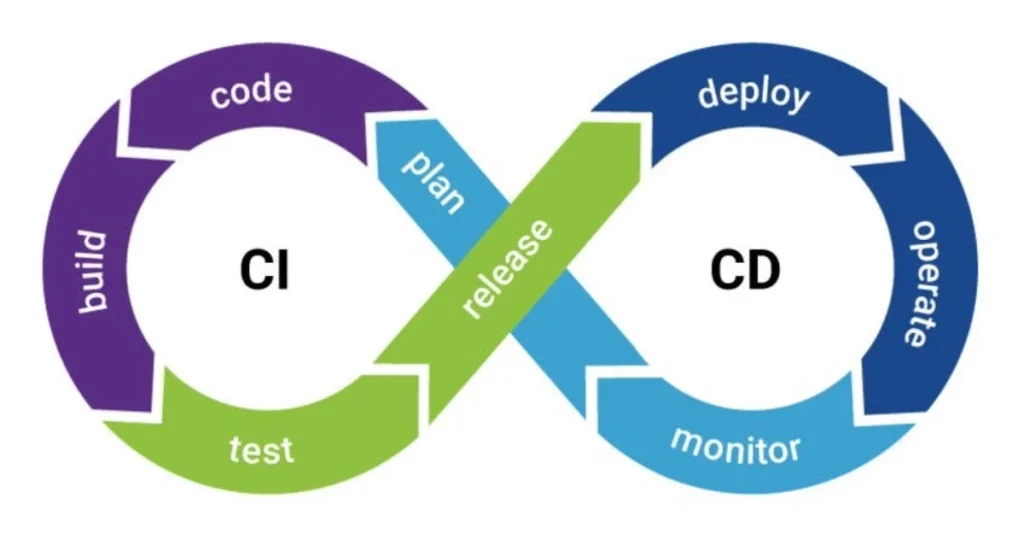
Manual deploys are fine for solo projects. For teams, automate everything.
Here’s a minimal GitHub Actions workflow for Firebase Hosting:
name: Deploy to Firebase Hosting

on:
  push:
    branches:
      - main

jobs:
  build_and_deploy:
    runs-on: ubuntu-latest
    steps:
      - uses: actions/checkout@v4

      - name: Setup Node.js
        uses: actions/setup-node@v4
        with:
          node-version: '20'

      - name: Install dependencies
        run: npm ci

      - name: Build
        run: npm run build

      - name: Deploy to Firebase Hosting
        uses: FirebaseExtended/action-hosting-deploy@v0
        with:
          repoToken: '${{ secrets.GITHUB_TOKEN }}'
          firebaseServiceAccount: '${{ secrets.FIREBASE_SERVICE_ACCOUNT }}'
          channelId: live
          projectId: your-project-id
For pull request previews, change channelId: live to nothing (omit it), and Firebase will automatically create a unique preview URL for each PR. Your team can review changes on a live URL before merging — this alone has saved me several embarrassing production incidents.
Common Firebase Hosting Issues and How to Fix Them
After deploying dozens of sites on Firebase Hosting, here are the errors I see most frequently:
Problem 1: 404 on Page Refresh (SPA Routing)
Cause: Firebase serves /about as a separate file, which doesn’t exist.
Fix: Add this rewrite in firebase.json:
"rewrites": [{ "source": "**", "destination": "/index.html" }]Problem 2: Custom Domain Stuck on “Pending”
Cause: DNS hasn’t propagated yet, or records were entered incorrectly.
Fix: Use dnschecker.org to verify propagation. Double-check that you added A records (not CNAME) for apex domains.
Problem 3: Old Content Showing After Deploy
Cause: Browser cache or CDN edge cache serving stale content.
Fix: Ensure asset filenames include a content hash. For immediate cache busting, use Firebase’s versioning — every deploy creates a new, immutable version URL.
Problem 4: CORS Errors When Calling Cloud Functions
Cause: Cloud Functions default CORS policy blocks cross-origin requests from your domain.
Fix: Add CORS headers in your Cloud Function response, or use Firebase Hosting rewrites to proxy function calls:
"rewrites": [{
  "source": "/api/**",
  "function": "api"
}]
This proxies /api/ calls through your Firebase domain, eliminating CORS entirely.
Real-World Use Cases Where Firebase Hosting Excels
Firebase Hosting isn’t the right tool for everything — but it’s the perfect tool for these scenarios:
- Portfolio websites and landing pages — Deploy in minutes, zero maintenance
- Progressive Web Apps (PWAs) — Excellent HTTP/2 + caching support
- Marketing sites with Firestore as a headless CMS — Real-time content updates without rebuilds
- Internal tools and dashboards — Secure with Firebase Auth, deploy fast
- Jamstack blogs (with Hugo, Eleventy, Astro) — Static output deploys beautifully
- E-commerce storefronts using Firebase as the backend
- A/B testing environments — Preview Channels make this surprisingly easy
Quick Reference Summary
| Task | Command / Location |
|---|---|
| Install Firebase CLI | npm install -g firebase-tools |
| Login | firebase login |
| Initialize project | firebase init hosting |
| Deploy | firebase deploy --only hosting |
| Deploy preview channel | firebase hosting:channel:deploy staging |
| Rollback | Firebase Console → Hosting → Release History |
| Add custom domain | Firebase Console → Hosting → Add custom domain |
| View active deployments | firebase hosting:sites:list |
FAQs: Firebase Hosting
❓ Is Firebase Hosting free?
Yes, Firebase Hosting has a generous free tier (Spark plan) that includes 10 GB storage, 360 MB/day bandwidth, free SSL, and custom domains. For most personal projects and small business sites, the free tier is entirely sufficient.
❓ Does Firebase Hosting support server-side rendering (SSR)?
Yes. Since 2023, Firebase Hosting has introduced framework-aware deployment that automatically handles SSR for Next.js, Nuxt, and Angular Universal using Cloud Run under the hood. This requires the Blaze (pay-as-you-go) plan.
❓ How long does Firebase Hosting deployment take?
Typically 30–90 seconds for a full deployment. The CLI uploads your files, triggers CDN propagation, and your site is live globally within about a minute.
❓ Can I host multiple websites on one Firebase project?
Yes. Firebase Hosting supports up to 36 sites per project, each with its own custom domain and independent deploy history. This is useful for managing staging, production, and regional variants from a single Firebase project.
❓ Is Firebase Hosting good for SEO?
Absolutely. Firebase Hosting delivers content via a global CDN with HTTP/2, fast TTFB, automatic HTTPS, and strong Core Web Vitals scores out of the box — all of which are positive ranking signals. You can also add proper meta tags, sitemaps, and structured data to your static files.
❓ What’s the difference between .web.app and .firebaseapp.com?
Both are default Firebase Hosting domains assigned to your project, and both work identically. Firebase provides both for historical reasons. Use either, or point both to the same hosting content. Your custom domain should always be preferred for production.
❓ Can Firebase Hosting serve a WordPress site?
No. WordPress is a PHP application and requires a server-side runtime. Firebase Hosting is designed for static files and serverless functions. For WordPress, use a traditional host. You can, however, export a WordPress site to a static format (via plugins like Simply Static) and host the static output on Firebase.
Conclusion: Is Firebase Hosting Worth It in 2026?
After deploying real projects on Firebase Hosting — from a 5-page portfolio to a SaaS dashboard serving thousands of daily users — my honest conclusion is this: Firebase Hosting is one of the best-value hosting platforms available today, particularly if you’re already in the Firebase ecosystem.
The combination of Google’s global CDN, automatic SSL, instant rollbacks, preview channels, and a genuinely usable free tier is hard to beat. The developer experience is clean, the CLI is reliable, and the integration with other Firebase services makes it feel like a cohesive platform rather than a collection of bolted-together tools.
Where it falls short: If you need WordPress, PHP, or complex server-side workloads, look elsewhere. And if you’re building heavily Next.js-centric applications without any Firebase dependencies, Vercel’s native Next.js support may be a better fit.
But for the vast majority of modern web projects — SPAs, PWAs, static sites, Jamstack blogs, marketing pages, and Firebase-backed web apps — Firebase Hosting is fast, secure, cost-effective, and genuinely delightful to use.
Start with the free plan, follow this guide step by step, and your site will be live on Google’s global network in under 10 minutes. That’s a promise I can back with experience.
Sources: Firebase Hosting Official Documentation | Google Cloud Pricing | web.dev Performance Guidelines