Alternatives to Android Studio: Top 7 Powerful IDEs & Tools for Developers

Alternatives to Android Studio: Top 7 IDEs & Tools for Devs
Let’s be completely honest for a second. Every single mobile developer knows the feeling. You open your laptop, fire up your Integrated Development Environment, and suddenly your computer’s fans sound like a jet engine preparing for liftoff. Your RAM usage spikes, your system slows to a crawl, and you are left staring at a Gradle build progress bar that seems to be moving in slow motion. We are talking about Android Studio, of course.
While it is the official, Google-backed IDE for native Android development, a massive number of developers are actively searching for Alternatives to Android Studio. Why? Because hardware is expensive, patience is thin, and modern app development often requires cross-platform flexibility that a strictly native environment just doesn’t provide.
If you are currently exploring Alternatives to Android Studio, you have landed in the exact right place. The landscape of mobile development has evolved dramatically, and you no longer have to suffer through a resource-heavy IDE if it doesn’t fit your workflow. In this comprehensive guide, we are going to tear down the top Alternatives to Android Studio available today. We will look at lightweight editors, cross-platform powerhouses, and hardcore terminal setups. Whether you are building native Kotlin apps, cross-platform Flutter projects, or JavaScript-based React Native applications, finding the right Alternatives to Android Studio will completely transform your daily productivity. Grab a coffee, and let’s dive into the best Alternatives to Android Studio for modern developers.
Why Developers Are Searching for Alternatives to Android Studio
Before we jump into the list, it is crucial to understand why so many professionals are abandoning the default tool in favor of Alternatives to Android Studio. It is not just about hating change; it is about optimizing your workflow.
The Resource Heavyweight Problem
Android Studio is built on the IntelliJ platform, which is incredibly powerful but notoriously hungry for system resources. If you are developing on a machine with less than 16GB of RAM, the official IDE can bring your entire system to a grinding halt. Many developers seek out Alternatives to Android Studio simply to reclaim their CPU cycles and keep their laptops from overheating during long coding sessions.
The Need for Cross-Platform Flexibility
The modern mobile market rarely relies on a single platform. Most businesses want both an iOS and an Android app. Relying solely on a native environment forces you to context-switch between Xcode and Android Studio. By choosing cross-platform Alternatives to Android Studio, developers can write a single codebase and deploy it to multiple platforms, saving hundreds of hours of duplicated effort.
Customization and UI Clutter
Some developers simply find the default interface of the official IDE overwhelming. With dozens of panels, tool windows, and menus, it can feel cluttered. Lightweight Alternatives to Android Studio often offer a minimalist, distraction-free environment that lets you focus purely on writing clean code.
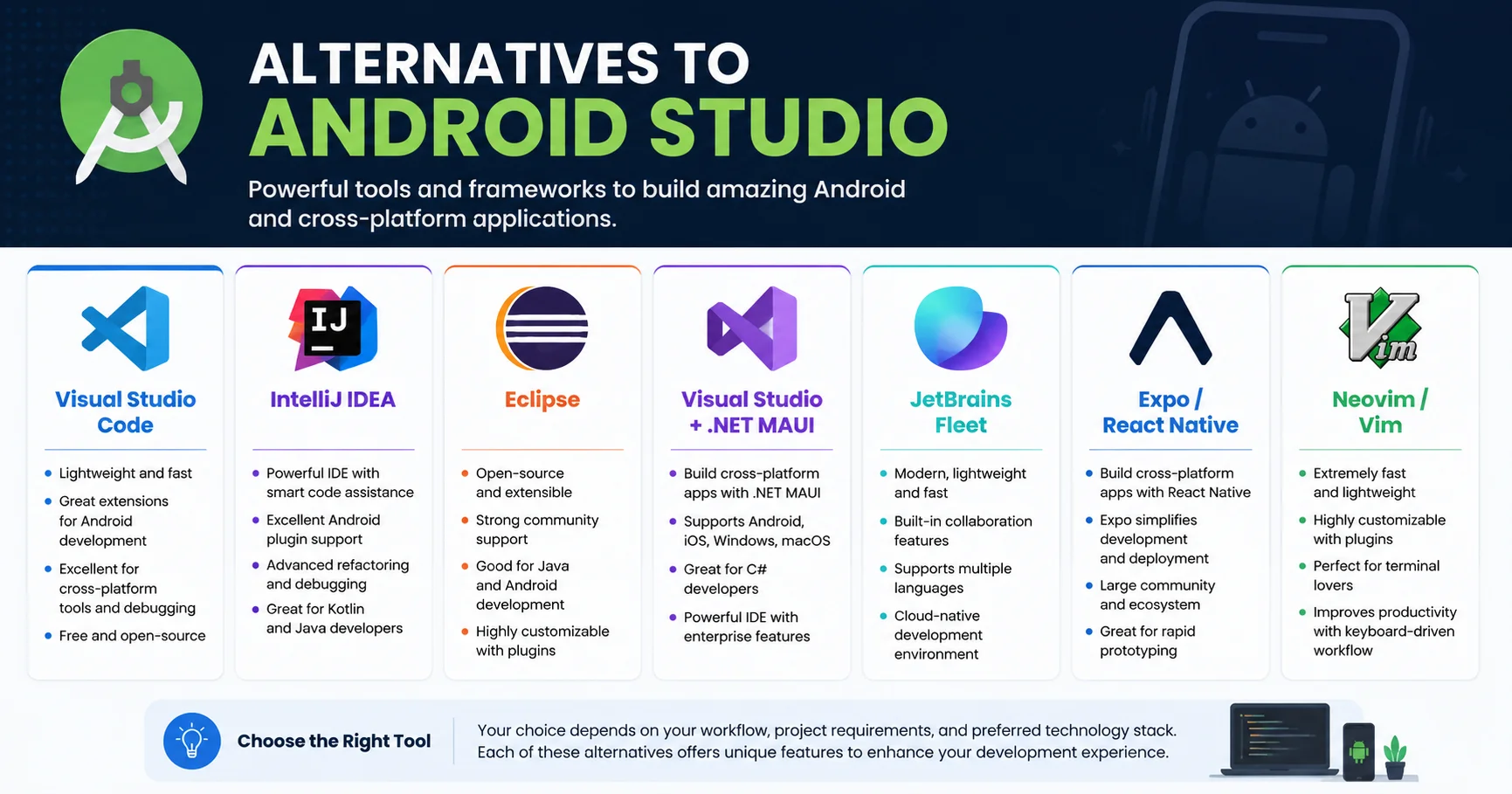
Top 7 Alternatives to Android Studio for Modern App Development
Now that we understand the “why,” let’s get into the “what.” Here are the 7 best Alternatives to Android Studio that are dominating the developer landscape in 2026.
1. Visual Studio Code: The Lightweight Champion
Visual Studio Code is a free, lightweight, and powerful code editor developed by Microsoft. It supports a wide range of programming languages and includes advanced features such as intelligent code completion, built-in debugging, Git integration, and an extensive extension marketplace. With its speed, flexibility, and customizable interface, Visual Studio Code has become one of the most popular development tools for both beginners and professional developers.
When developers discuss Alternatives to Android Studio, Visual Studio Code (VS Code) is almost always the first name mentioned. Created by Microsoft, VS Code is a free, open-source code editor that has taken the world by storm.
Why is it one of the best Alternatives to Android Studio? First, it is incredibly lightweight. It opens in seconds and sips RAM compared to the official IDE. Second, its extension marketplace is massive. By installing the official Flutter or React Native extensions, VS Code transforms into a fully-fledged mobile development environment. You get IntelliSense code completion, integrated terminal, and Git control right out of the box. If you want one of the most versatile Alternatives to Android Studio that can also handle your web and backend development, VS Code is the undisputed king.
Pros
- ✔️ Free and open-source – Available at no cost with a large open-source community.
- ✔️ Lightweight and fast – Starts quickly and runs smoothly on Windows, macOS, and Linux.
- ✔️ Extensive extension marketplace – Thousands of extensions for programming languages, frameworks, themes, and productivity tools.
- ✔️ Excellent language support – Works with JavaScript, TypeScript, Python, C++, Java, PHP, Go, Rust, and many more.
- ✔️ Built-in Git integration – Manage version control, commits, branches, and merges directly from the editor.
- ✔️ Intelligent code completion – Features IntelliSense for smart suggestions, syntax highlighting, and code navigation.
- ✔️ Integrated terminal – Run commands without leaving the editor.
- ✔️ Highly customizable – Personalize themes, keyboard shortcuts, layouts, and settings to match your workflow.
- ✔️ Large community – Extensive documentation, tutorials, and community support.
Cons
- ❌ Can become slower with many extensions – Installing too many extensions may affect startup time and performance.
- ❌ Not a full-featured IDE by default – Advanced development features often require additional extensions.
- ❌ High memory usage for large projects – Resource consumption can increase when working on complex codebases.
- ❌ Extension quality varies – Some third-party extensions may be outdated or poorly maintained.
- ❌ Configuration can be overwhelming – Beginners may find the large number of settings and customization options confusing.
- ❌ Limited advanced refactoring – Some enterprise-level refactoring and code analysis features are not as comprehensive as those in dedicated IDEs like IntelliJ IDEA or Visual Studio.
2. IntelliJ IDEA: The Premium Powerhouse
IntelliJ IDEA is a powerful integrated development environment (IDE) developed by JetBrains, widely recognized for Java development. It features intelligent code completion, advanced refactoring tools, built-in debugging, testing support, and compatibility with numerous programming languages and frameworks. With its productivity-focused features and intuitive interface, IntelliJ IDEA helps developers build high-quality applications faster and more efficiently.
If you love the underlying architecture of the official IDE but want a more polished, premium experience, IntelliJ IDEA is one of the top Alternatives to Android Studio. In fact, Android Studio is built on top of IntelliJ.
By using the Ultimate edition of IntelliJ IDEA, you get a unified environment that supports not just Android, but also backend development, databases, and web frameworks. Many senior developers prefer IntelliJ as one of their Alternatives to Android Studio because its refactoring tools, code analysis, and debugging capabilities are slightly more refined. It is heavier than VS Code, but for complex, enterprise-grade Android applications, IntelliJ remains a phenomenal choice among Alternatives to Android Studio.
Pros
- ✔️ Excellent code intelligence – Provides industry-leading code completion, navigation, and error detection.
- ✔️ Powerful refactoring tools – Safely rename, extract, and restructure code with minimal effort.
- ✔️ Outstanding Java support – One of the best IDEs for Java, Kotlin, and JVM-based development.
- ✔️ Built-in developer tools – Includes Git integration, debugging, testing, database tools, and terminal support.
- ✔️ Framework support – Works seamlessly with Spring, Jakarta EE, Maven, Gradle, Android, and many other frameworks.
- ✔️ Productivity features – Offers smart code generation, inspections, quick fixes, and AI-assisted development tools.
- ✔️ Highly customizable – Supports plugins, themes, keyboard shortcuts, and personalized workflows.
- ✔️ Cross-platform – Available for Windows, macOS, and Linux.
Cons
- ❌ Resource-intensive – Requires more RAM and CPU than lightweight code editors.
- ❌ Longer startup time – Can take longer to launch, especially on older computers.
- ❌ Ultimate Edition is paid – Many advanced enterprise and web development features require a commercial license.
- ❌ Steeper learning curve – Beginners may need time to become familiar with its many features.
- ❌ Large installation size – Occupies more disk space than most code editors.
- ❌ Can be overkill for small projects – Its extensive feature set may be unnecessary for simple scripts or lightweight applications.
3. Eclipse: The Legacy Veteran

Eclipse is a popular open-source integrated development environment (IDE) known for its flexibility and reliability. Originally designed for Java development, it also supports many other programming languages through its extensive plugin ecosystem. Featuring powerful debugging tools, project management capabilities, testing support, and a customizable interface, Eclipse is a solid choice for developers working on projects of all sizes.
It might seem surprising to see Eclipse on a list of modern Alternatives to Android Studio, but this legacy IDE still holds a special place in the hearts of many veteran developers. Before Android Studio took the crown, Eclipse was the official IDE.
While Google no longer supports Android development on Eclipse, the community has kept it alive through various plugins. Some developers stick to Eclipse because they prefer its classic workspace management and its incredibly low resource footprint compared to modern IDEs. If you are maintaining older codebases or working on low-spec hardware, Eclipse remains one of the most accessible Alternatives to Android Studio for those who prefer a traditional, plugin-based architecture.
Pros
- ✔️ Free and open-source – Available at no cost with strong community support.
- ✔️ Excellent Java development – A mature IDE with robust tools for Java programming.
- ✔️ Highly extensible – Thousands of plugins add support for additional languages, frameworks, and tools.
- ✔️ Cross-platform – Runs on Windows, macOS, and Linux.
- ✔️ Built-in debugging and testing – Includes powerful debugging, profiling, and unit testing features.
- ✔️ Strong project management – Well-suited for large, enterprise-scale applications.
- ✔️ Git integration – Comes with built-in Git support through EGit.
- ✔️ Active community – Extensive documentation, tutorials, and community resources are available.
Cons
- ❌ Outdated user interface – The interface can feel less modern and intuitive compared to newer IDEs.
- ❌ High memory usage – Large projects and multiple plugins can consume significant system resources.
- ❌ Slower performance – Startup time and responsiveness may decrease as more plugins are installed.
- ❌ Complex configuration – Setting up workspaces, plugins, and preferences can be confusing for beginners.
- ❌ Plugin compatibility issues – Some plugins may conflict or require specific Eclipse versions.
- ❌ Limited support for some modern languages – While extensible, support for newer languages and frameworks is often not as polished as in specialized IDEs.
4. Visual Studio + .NET MAUI: The Microsoft Ecosystem
Visual Studio is a comprehensive integrated development environment (IDE) developed by Microsoft for building Windows, web, mobile, cloud, and game applications. It provides advanced features such as intelligent code completion, powerful debugging, integrated testing, Git support, and compatibility with multiple programming languages, including C#, C++, Python, and JavaScript. With its professional-grade tools, Visual Studio helps developers build complex applications more efficiently.

For developers who live and breathe the Microsoft ecosystem, Visual Studio paired with .NET MAUI (Multi-platform App UI) is one of the most powerful Alternatives to Android Studio.
.NET MAUI allows you to build native mobile and desktop apps using C# and XAML. Visual Studio provides an unmatched debugging experience, deep integration with Azure, and incredible tooling for enterprise applications. If your team is already heavily invested in .NET, looking at Visual Studio as one of your Alternatives to Android Studio is a no-brainer. It allows you to leverage your existing C# skills to build stunning Android apps without ever needing to learn Kotlin or Java.
Pros
- ✔️ Cross-platform app development – Build native applications for Windows, Android, iOS, and macOS from a single codebase.
- ✔️ Excellent .NET integration – Seamlessly works with C#, .NET, and the broader Microsoft ecosystem.
- ✔️ Powerful IDE – Visual Studio provides advanced debugging, IntelliSense, code refactoring, and testing tools.
- ✔️ Native performance – .NET MAUI compiles to native applications, delivering excellent performance and user experience.
- ✔️ Hot Reload support – See UI and code changes instantly without rebuilding the entire application.
- ✔️ Rich UI controls – Includes a wide range of built-in controls and layouts for creating modern applications.
- ✔️ Strong enterprise support – Ideal for business applications with Azure, SQL Server, and Microsoft services integration.
- ✔️ Large developer community – Extensive documentation, tutorials, and community support are available.
Cons
- ❌ Resource-intensive – Visual Studio and .NET MAUI require a powerful computer with sufficient RAM and storage.
- ❌ Steeper learning curve – Beginners may find cross-platform development and the .NET ecosystem challenging.
- ❌ Large installation size – Installing Visual Studio with MAUI workloads can consume several gigabytes of disk space.
- ❌ Platform-specific issues – Some features still require platform-specific code for Android, iOS, or macOS.
- ❌ Build and deployment complexity – Setting up iOS and macOS development often requires additional configuration and Apple hardware.
- ❌ Smaller ecosystem than Flutter or React Native – While growing, the community and third-party libraries are not as extensive as those of some competing frameworks.
5. JetBrains Fleet: The Next-Gen Distributed IDE

JetBrains Fleet is a modern, lightweight code editor developed by JetBrains, designed to deliver a fast and collaborative development experience. It supports multiple programming languages and includes intelligent code completion, built-in debugging, and real-time collaboration features. With its clean interface and high-performance architecture, JetBrains Fleet is an excellent choice for both individual developers and development teams.
JetBrains, the company behind IntelliJ and Android Studio, realized that developers wanted something lighter. Enter JetBrains Fleet, one of the most innovative Alternatives to Android Studio on the market.
Fleet is designed to be a distributed IDE. It starts as a lightweight, lightning-fast text editor, but with a single click, it can transform into a full-fledged Smart IDE by connecting to a backend server. This means you get the speed of a lightweight editor with the deep code intelligence of a heavy IDE. For developers who want the smart features of IntelliJ but hate the bloat, Fleet is quickly becoming a favorite among Alternatives to Android Studio.
Pros
- ✔️ Lightweight and fast – Launches quickly and delivers a responsive coding experience.
- ✔️ Modern user interface – Features a clean, intuitive design that minimizes distractions.
- ✔️ Intelligent code assistance – Provides smart code completion, navigation, and real-time error detection.
- ✔️ Multi-language support – Supports popular languages such as Java, Kotlin, Python, JavaScript, TypeScript, Go, Rust, and C++.
- ✔️ Built-in collaboration – Enables real-time collaborative coding, making teamwork easier.
- ✔️ Flexible architecture – Can operate as a lightweight editor or connect to a backend for advanced IDE features.
- ✔️ Cross-platform – Available for Windows, macOS, and Linux.
- ✔️ Developed by JetBrains – Benefits from JetBrains’ expertise in creating professional developer tools.
Cons
- ❌ Still evolving – Some features are less mature compared to established IDEs like IntelliJ IDEA or Visual Studio.
- ❌ Smaller plugin ecosystem – Offers fewer extensions than Visual Studio Code or IntelliJ IDEA.
- ❌ Limited advanced features – Certain enterprise-level refactoring and debugging capabilities are still under development.
- ❌ Learning curve – Users familiar with traditional IDEs may need time to adapt to its workflow.
- ❌ Performance varies – Advanced backend features may require more system resources.
- ❌ Smaller community – Has fewer tutorials, plugins, and community resources than more established development environments.
6. Expo / React Native CLI: The JavaScript Revolution
Expo and React Native CLI are two popular tools for building mobile applications with React Native. Expo streamlines development with minimal setup, built-in APIs, and a fast deployment workflow, making it ideal for beginners and rapid prototyping. React Native CLI, on the other hand, provides full access to native project files, allowing advanced customization and integration of native libraries for more complex mobile applications.

If you are building cross-platform apps using JavaScript or TypeScript, you aren’t just looking for a different IDE; you are looking for a completely different paradigm. Expo and the React Native CLI serve as the ultimate Alternatives to Android Studio for web developers transitioning to mobile.
Expo, in particular, abstracts away almost all the native Android build complexities. You don’t even need to open a heavy IDE to build your Android app; you can write your code in any lightweight editor (like VS Code or Sublime Text) and use the Expo Go app on your physical device to test it instantly. For rapid prototyping and cross-platform deployment, the Expo ecosystem provides Alternatives to Android Studio that prioritize speed and developer experience over native granular control.
Pros
- ✔️ Cross-platform development – Build apps for Android and iOS from a single JavaScript or TypeScript codebase.
- ✔️ Fast development workflow – Features like Fast Refresh and hot reloading speed up development.
- ✔️ Expo simplifies setup – Minimal configuration makes it ideal for beginners and rapid prototyping.
- ✔️ Rich built-in APIs (Expo) – Access camera, GPS, notifications, sensors, and more without additional native code.
- ✔️ Full native control (React Native CLI) – Customize native Android and iOS projects and integrate third-party native libraries.
- ✔️ Large community – Extensive documentation, tutorials, and third-party packages are available.
- ✔️ Strong React ecosystem – Leverages React and the JavaScript ecosystem for reusable components and libraries.
- ✔️ Cost-effective – Both Expo and React Native CLI are free and open-source.
Cons
- ❌ Expo has limitations – Some advanced native features require ejecting to the bare React Native workflow.
- ❌ Native configuration can be complex – React Native CLI requires setting up Android Studio, Xcode, and platform-specific tools.
- ❌ Performance limitations – Extremely graphics-intensive or high-performance apps may perform better with fully native development.
- ❌ Dependency compatibility – Some third-party libraries may require additional configuration or may not work with managed Expo projects.
- ❌ Platform-specific debugging – Resolving Android and iOS issues can be time-consuming.
- ❌ Larger app size – React Native apps are often larger than fully native applications, especially when using Expo.
7. Neovim / Vim: The Ultimate Keyboard-Driven Setup
Neovim and Vim are powerful, lightweight text editors widely used by developers for their speed and efficiency. Built around keyboard-driven workflows, they enable fast and productive code editing without relying on a mouse. Neovim enhances Vim with improved extensibility, better performance, and advanced plugin support, making it an excellent choice for developers who want a highly customizable coding environment.
Finally, we have the hardcore option. For the terminal purists who believe that touching a mouse is a waste of time, Neovim and Vim are the ultimate Alternatives to Android Studio.
By configuring Neovim with plugins like LSP (Language Server Protocol), Treesitter, and Telescope, you can build a custom mobile development environment that is entirely keyboard-driven. It is incredibly lightweight, blazing fast, and highly customizable. Setting up Neovim for Android or Flutter development requires a steep learning curve, but once configured, it offers a level of speed and efficiency that GUI-based Alternatives to Android Studio simply cannot match.
Pros
- ✔️ Extremely lightweight – Uses very little memory and runs smoothly even on older hardware.
- ✔️ Blazing-fast performance – Optimized for speed, making it ideal for editing large files and projects.
- ✔️ Keyboard-driven workflow – Enables efficient coding without relying on a mouse, improving productivity.
- ✔️ Highly customizable – Supports extensive configuration, plugins, themes, and custom key mappings.
- ✔️ Powerful plugin ecosystem – Neovim, in particular, offers modern plugin management and Language Server Protocol (LSP) support.
- ✔️ Works everywhere – Available on Windows, macOS, Linux, and remote servers via SSH.
- ✔️ Excellent for terminal users – Integrates seamlessly with command-line development workflows.
- ✔️ Free and open-source – Both Vim and Neovim are free, with active developer communities.
Cons
- ❌ Steep learning curve – The modal editing system and keyboard shortcuts can be difficult for beginners.
- ❌ Requires configuration – Achieving a full IDE-like experience often involves installing and configuring multiple plugins.
- ❌ Limited graphical interface – The default interface is text-based, which may not appeal to all users.
- ❌ Not beginner-friendly – Basic tasks can feel unintuitive until users become familiar with Vim commands.
- ❌ Plugin compatibility differences – Some plugins are designed specifically for Vim or Neovim and may not work across both.
- ❌ Less integrated than traditional IDEs – Advanced features such as visual designers, database tools, and enterprise workflows typically require additional setup or external tools.
Comparative Table: Rating the Best Alternatives to Android Studio
To help you make an informed decision, we have compiled user reviews and expert opinions into a comprehensive comparison table. When evaluating Alternatives to Android Studio, it is crucial to look at how the community rates them across key metrics.
| IDE / Tool | Best For | Learning Curve | Resource Usage | Community Rating |
|---|---|---|---|---|
| Visual Studio Code | Cross-platform, Web, Flutter | Easy | Very Low | ⭐⭐⭐⭐⭐ (5/5) |
| IntelliJ IDEA | Enterprise Native Android, Backend | Moderate | High | ⭐⭐⭐⭐⭐ (5/5) |
| Eclipse | Legacy projects, Low-spec machines | Moderate | Low | ⭐⭐⭐ (3/5) |
| Visual Studio + MAUI | C#/.NET Developers, Enterprise | Moderate | High | ⭐⭐⭐⭐ (4/5) |
| JetBrains Fleet | Smart coding, Fast startup | Easy | Low (Frontend) | ⭐⭐⭐⭐ (4/5) |
| Expo / React Native | JS/TS Devs, Rapid Prototyping | Easy | Very Low | ⭐⭐⭐⭐⭐ (5/5) |
| Neovim / Vim | Terminal purists, Max efficiency | Very Hard | Extremely Low | ⭐⭐⭐⭐ (4/5) |
As you can see from the table, the best Alternatives to Android Studio depend heavily on your specific background and hardware constraints.
Practical Summary: How to Choose the Right Alternatives to Android Studio
Choosing between the various Alternatives to Android Studio can feel overwhelming, but it really comes down to three core questions: What is your primary programming language? What is your hardware capability? And do you need cross-platform support?
If you are a web developer moving into mobile, or if you are building cross-platform apps with Flutter or React Native, Alternatives to Android Studio like Visual Studio Code or the Expo CLI are your best bets. They are fast, familiar, and handle multi-platform deployments beautifully.
If you are a hardcore native Android developer working on massive, enterprise-level Kotlin applications, you need deep refactoring tools. In this case, premium Alternatives to Android Studio like IntelliJ IDEA Ultimate will give you the heavy-duty features you need without the specific bloat of the Google-branded IDE.
Finally, if you are a C# developer, Visual Studio with .NET MAUI is the most logical choice among Alternatives to Android Studio, keeping you firmly within the Microsoft ecosystem while still delivering top-tier Android applications.
The Ultimate Checklist for Migrating from Android Studio
Ready to make the switch? Before you uninstall your current setup and commit to one of the new Alternatives to Android Studio, run through this practical checklist to ensure a smooth transition.
- [ ] Backup Your Configurations: Export your current keymaps, code styles, and live templates from your old IDE.
- [ ] Check SDK Compatibility: Ensure your chosen Alternatives to Android Studio support the latest Android SDK and API levels you are targeting.
- [ ] Install Necessary Plugins: If you choose VS Code or Neovim, spend time installing and configuring the Android, Kotlin, and Flutter extensions.
- [ ] Set Up Emulators/Physical Devices: Make sure your new environment can easily connect to your physical Android device or launch the Android Emulator.
- [ ] Configure Build Tools: Verify that Gradle, CMake, and NDK paths are correctly mapped in your new environment.
- [ ] Test a Sample Build: Run a clean build and debug session on a sample project to ensure the debugging and hot-reload features work flawlessly.
- [ ] Customize Your Theme: Spend 10 minutes setting up your favorite color theme and font to make your new Alternatives to Android Studio feel like home.
Conclusion: Finding Your Perfect Alternatives to Android Studio
The days of being forced to use a single, monolithic IDE for mobile development are long gone. The ecosystem has matured, and developers now have a wealth of powerful, flexible, and highly optimized Alternatives to Android Studio at their fingertips.
Whether you are chasing the blazing speed of Visual Studio Code, the enterprise-grade power of IntelliJ IDEA, the cross-platform magic of Expo, or the keyboard-centric efficiency of Neovim, there is a perfect tool out there for your specific workflow. The key is to evaluate your project requirements, respect your hardware limitations, and choose the Alternatives to Android Studio that empower you to write better code, faster.
Don’t be afraid to experiment. Download a few of these Alternatives to Android Studio, set up a sandbox project, and see which interface makes you feel the most productive. Your RAM, your battery life, and your sanity will thank you. The future of mobile development is flexible, and by embracing the right Alternatives to Android Studio, you are positioning yourself at the very forefront of the industry. Happy coding!
FAQs About Alternatives to Android Studio
We get a lot of questions from developers who are hesitant to leave the official IDE. Here are the most frequently asked questions about Alternatives to Android Studio.
What are the best free Alternatives to Android Studio?
The absolute best free Alternatives to Android Studio are Visual Studio Code, Eclipse, and the community edition of IntelliJ IDEA. VS Code is highly recommended for its massive extension library and lightweight footprint, making it perfect for almost any mobile development workflow without spending a dime.
Are there Alternatives to Android Studio that use less RAM?
Yes, absolutely. If your main goal is to save RAM, Visual Studio Code, JetBrains Fleet, and Neovim are the top Alternatives to Android Studio. These tools are designed to be highly optimized, often using a fraction of the memory required by the official Google IDE, making them perfect for older laptops or machines with 8GB of RAM.
Can I build native Android apps without Android Studio?
Yes, you can. While you will eventually need the Android SDK and command-line tools (which are separate from the IDE itself), you do not need the actual Android Studio interface. Many developers use VS Code or IntelliJ IDEA to write native Kotlin/Java code and use the terminal to run Gradle build commands. These are highly effective Alternatives to Android Studio for native development.
Is it worth switching to cross-platform Alternatives to Android Studio?
If your project requires both an iOS and an Android app, switching to cross-platform Alternatives to Android Studio (like those used for Flutter or React Native) is incredibly worth it. It allows you to maintain a single codebase, drastically reducing development time and long-term maintenance costs.
Will I lose my Android emulator if I switch IDEs?
No. The Android Emulator is part of the Android SDK, not the IDE itself. When you switch to Alternatives to Android Studio like VS Code or IntelliJ, you simply point the new IDE to your existing Android SDK path, and your emulators will work exactly as they did before.