LinkedIn API Guide : Authentication, Features, Integration Examples And Best 5 Alternatives

Introduction
The LinkedIn API looks simple on paper: connect your app, pull some data, publish some posts. In practice, it is one of the most gated and fast-changing APIs on the web. Old tutorials point to endpoints that no longer exist, permissions that are now restricted, and token rules that have changed.
This guide fixes that. It is based on the current structure of the LinkedIn API and on the mistakes developers (myself included) make the first time around.
QUICK ANSWER: What you need to know about the LinkedIn API
- What it is: a set of REST APIs that let approved apps sign members in, publish content, manage Pages, run ads and sync leads.
- Authentication: always OAuth 2.0 (three-legged for members, two-legged for a few approved use cases).
- Access: sign-in and basic sharing are self-serve. Almost everything else needs LinkedIn’s approval.
- Token lifetime: member access tokens last 60 days. Refresh tokens are only available to some approved partners.
- Cost: there is no fee for using the LinkedIn API itself. Ad spend and paid products are billed separately.
- Big limitation: you cannot download a member’s connections or scrape profiles through the official API.
Below you’ll find every LinkedIn API product explained, a step-by-step setup, working code examples, rate limit and error handling advice, a comparison of approaches, a pre-launch checklist and an FAQ.
What Is the LinkedIn API?
The LinkedIn API is the official programmatic interface to LinkedIn’s platform. It lets a registered application act on behalf of a member or an organization. That can mean signing someone in, publishing a post, reading Page analytics or creating an ad campaign.
The platform matters because of its reach. LinkedIn, owned by Microsoft since 2016, reports more than 1.2 billion members on its official About page (https://about.linkedin.com/). For B2B software, that audience is hard to ignore.
Technically, the LinkedIn API follows REST conventions. You send HTTPS requests to api.linkedin.com and receive JSON back. Two details trip up newcomers:
- Versioned endpoints live under
https://api.linkedin.com/rest/. They require aLinkedIn-Versionheader (formatYYYYMM) and anX-Restli-Protocol-Version: 2.0.0header. - Legacy endpoints live under
https://api.linkedin.com/v2/. Some are still active, such as the OpenID Connectuserinfoendpoint. Many others have been replaced.
LinkedIn now publishes its developer documentation on Microsoft Learn (https://learn.microsoft.com/en-us/linkedin/). Apps are created in the LinkedIn Developer Portal (https://www.linkedin.com/developers/apps).
Expert tip: Treat the LinkedIn API as a permissioned partner platform, not an open data source. Your product idea has to fit one of LinkedIn’s approved use cases, or access will not be granted.
LinkedIn API Products and Features at a Glance
The LinkedIn API is not one API. It is a catalog of “products” that you request inside your developer app. Each product unlocks specific endpoints and permissions (called scopes). Knowing which one matches your goal saves weeks.
| Product | Best for | Access | Typical scopes | Ease of access |
|---|---|---|---|---|
| Sign In with LinkedIn (OpenID Connect) | Login and basic identity | Self-serve | openid, profile, email | ⭐⭐⭐⭐⭐ 5/5 |
| Share on LinkedIn | Posting to a member’s own profile | Self-serve | w_member_social | ⭐⭐⭐⭐☆ 4/5 |
| Community Management API | Company Page posting, comments, analytics | Approval required | w_organization_social, r_organization_social, rw_organization_admin | ⭐⭐⭐☆☆ 3/5 |
| Advertising API (LinkedIn Marketing API) | Campaign management and reporting | Approval required | r_ads, rw_ads, r_ads_reporting | ⭐⭐⭐☆☆ 3/5 |
| Lead Sync API | Sending Lead Gen Form data to a CRM | Approval required | r_marketing_leadgen_automation | ⭐⭐⭐☆☆ 3/5 |
| Conversions API | Server-side conversion tracking | Approval required | Conversion-specific scopes | ⭐⭐⭐☆☆ 3/5 |
| Talent Solutions (Job Posting, Apply Connect, Recruiter System Connect) | ATS and recruiting vendors | Partner program | Product-specific | ⭐⭐☆☆☆ 2/5 |
| Learning and Sales Navigator integrations | LMS and CRM vendors | Partner program | Product-specific | ⭐⭐☆☆☆ 2/5 |
| Compliance API | Archiving for regulated industries | Restricted partners | Restricted | ⭐☆☆☆☆ 1/5 |
Ratings are my editorial assessment of how easy it is to get access and start building. They are not crowd-sourced reviews. Product availability and scopes can change, so always confirm in the Developer Portal.
Sign In with LinkedIn using OpenID Connect
This is the most common starting point for a LinkedIn API integration. Since LinkedIn moved to OpenID Connect, the old r_liteprofile and r_emailaddress scopes have been replaced by openid, profile and email. Older tutorials still show the legacy scopes, and they fail for new apps.
Share on LinkedIn and the Posts API
Share on LinkedIn lets a member authorize your app to post to their own feed. You publish through the Posts API at /rest/posts. It handles text, images, video, documents, articles and polls.
Community Management API
Want to post as a company Page, moderate comments or pull Page analytics? This is the product you need. It requires an approved use case, a verified Page association and usually a demo of your app for LinkedIn’s review team. Plan for waiting time.
LinkedIn Marketing API (Advertising, Lead Sync and Conversions)
The LinkedIn Marketing API family covers ad accounts, campaigns, creatives, audiences, reporting, lead forms and conversion tracking. It is built for agencies, ad-tech tools and large advertisers. Approval is strict, and you must explain how your product serves advertisers.
⚠️ WARNING: The LinkedIn API terms restrict how you can store and use member data. Read the LinkedIn API Terms of Use (https://www.linkedin.com/legal/l/api-terms-of-use) before you build. A violation can lead to your app being suspended.
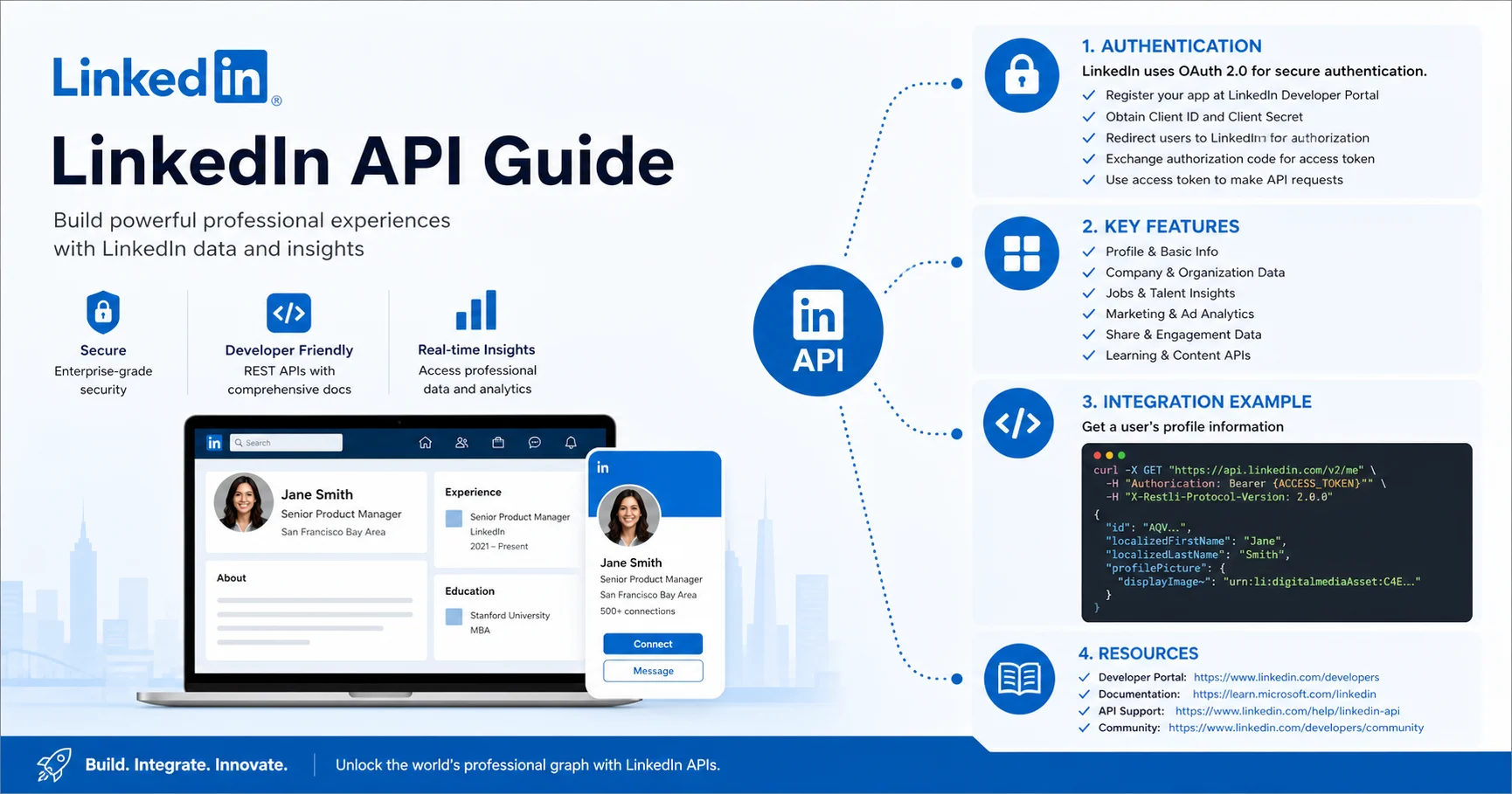
LinkedIn API Authentication Explained (OAuth 2.0)
LinkedIn API authentication relies exclusively on LinkedIn OAuth 2.0. If you know the standard from RFC 6749 (https://datatracker.ietf.org/doc/html/rfc6749), most of it will feel familiar. LinkedIn adds its own rules about scopes, token lifetimes and approvals.
Three-legged OAuth (authorization code flow)
This is the flow you will use most. A real member logs in and grants your app permission. The steps:
- Your app redirects the member to LinkedIn’s authorization URL with your client ID, redirect URI, scopes and a random
statevalue. - The member approves the permissions.
- LinkedIn redirects back to your redirect URI with a temporary
codeand yourstate. - Your server verifies
state, then exchanges the code for an access token athttps://www.linkedin.com/oauth/v2/accessToken. - You call the LinkedIn API with
Authorization: Bearer {token}.
The authorization code expires after 30 minutes, so exchange it right away.
Two-legged OAuth (client credentials)
Two-legged flow has no member in the loop. Your app authenticates as itself. It is only available for certain approved products and use cases, and the tokens are short-lived (30 minutes according to LinkedIn’s documentation). Most developers will never need it.
Understanding scopes
Scopes define what your token can do. Request the minimum. A short scope list is easier to approve and builds more trust with members. Common ones:
openid profile email: sign-in and basic identityw_member_social: create, modify and delete posts as a memberw_organization_socialandr_organization_social: write and read Page contentrw_organization_admin: manage Pages and read Page analyticsr_ads,rw_ads,r_ads_reporting: advertising access
Token lifetimes and refresh
- Access token: 60 days for three-legged flow (the
expires_invalue is 5,184,000 seconds). - Refresh token: valid for 365 days, but programmatic refresh is limited to certain approved partners.
- If you don’t have refresh tokens: you must send the member through authorization again once the token expires.
🚨 IMPORTANT: Never put your client secret in front-end code, mobile apps or a public repository. Store it in environment variables or a secrets manager, and handle the token exchange on your server only.
How to Get LinkedIn API Access, Step by Step
Here is the practical route from zero to a working token. Allow an hour for the self-serve products. Anything needing approval takes longer, and LinkedIn does not publish review times.
- Prepare a LinkedIn Page. Every developer app must be linked to a LinkedIn Page. If your company has none, create one first. It also looks more legitimate to reviewers.
- Create the app. Go to the LinkedIn Developer Portal (https://www.linkedin.com/developers/apps), click Create app, and fill in the name, Page, privacy policy URL and logo.
- Verify the Page association. A Page admin must approve the link using the verification URL generated in the Settings tab. Many people forget this, and later calls fail with permission errors.
- Request products. Open the Products tab. Add “Sign In with LinkedIn using OpenID Connect” and “Share on LinkedIn” (both self-serve). For Community Management or advertising, submit the access request form.
- Add redirect URLs. In the Auth tab, register your exact redirect URI. A trailing slash or a
httpversushttpsdifference counts as a mismatch. - Copy credentials. Note your Client ID and Client Secret. Store the secret safely.
- Test with an API client. Use Postman (https://www.postman.com/) or cURL before you write any app code. The Developer Portal also has a token generator for quick tests.
Beginner advice: Start with sign-in and one test post to your own profile. Once that works, you understand the LinkedIn API authentication cycle and can move on to approval-based products with confidence.
LinkedIn API Integration Examples
These LinkedIn API integration examples cover the most common first projects. Replace placeholders in curly braces with your own values.
Example 1: Send a member to the authorization page
Build this URL on your server and redirect the user to it:
https://www.linkedin.com/oauth/v2/authorization
  ?response_type=code
  &client_id={YOUR_CLIENT_ID}
  &redirect_uri={YOUR_ENCODED_REDIRECT_URI}
  &state={RANDOM_STRING}
  &scope=openid%20profile%20email%20w_member_social
Example 2: Exchange the code for an access token
curl -X POST https://www.linkedin.com/oauth/v2/accessToken \
  -H "Content-Type: application/x-www-form-urlencoded" \
  -d "grant_type=authorization_code" \
  -d "code={AUTHORIZATION_CODE}" \
  -d "client_id={YOUR_CLIENT_ID}" \
  -d "client_secret={YOUR_CLIENT_SECRET}" \
  -d "redirect_uri={YOUR_REDIRECT_URI}"
A successful response contains access_token, expires_in, scope and, when you requested openid, an id_token.
Example 3: Fetch the member’s identity
curl -H "Authorization: Bearer {ACCESS_TOKEN}" \
  https://api.linkedin.com/v2/userinfo
The response includes sub (the member’s unique ID), name, given_name, family_name, picture, email and email_verified. You will use sub to build the author URN, urn:li:person:{sub}, when posting.
Example 4: Publish a text post with the Posts API
curl -X POST https://api.linkedin.com/rest/posts \
  -H "Authorization: Bearer {ACCESS_TOKEN}" \
  -H "LinkedIn-Version: 202601" \
  -H "X-Restli-Protocol-Version: 2.0.0" \
  -H "Content-Type: application/json" \
  -d '{
    "author": "urn:li:person:{SUB}",
    "commentary": "Testing the LinkedIn API from my own app.",
    "visibility": "PUBLIC",
    "distribution": {
      "feedDistribution": "MAIN_FEED",
      "targetEntities": [],
      "thirdPartyDistributionChannels": []
    },
    "lifecycleState": "PUBLISHED",
    "isReshareDisabledByAuthor": false
  }'
A successful call returns HTTP 201 Created with no body. The new post’s URN is in the x-restli-id response header. The version value (202601 here) is an example. Use a currently supported YYYYMM version from the documentation, since LinkedIn retires old ones.
Example 5: A small Python integration
import os
import requests

TOKEN_URL = "https://www.linkedin.com/oauth/v2/accessToken"
API_BASE = "https://api.linkedin.com"


def exchange_code(code):
    resp = requests.post(
        TOKEN_URL,
        data={
            "grant_type": "authorization_code",
            "code": code,
            "client_id": os.environ["LI_CLIENT_ID"],
            "client_secret": os.environ["LI_CLIENT_SECRET"],
            "redirect_uri": os.environ["LI_REDIRECT_URI"],
        },
        timeout=15,
    )
    resp.raise_for_status()
    return resp.json()["access_token"]


def get_member_id(token):
    resp = requests.get(
        f"{API_BASE}/v2/userinfo",
        headers={"Authorization": f"Bearer {token}"},
        timeout=15,
    )
    resp.raise_for_status()
    return resp.json()["sub"]


def publish_post(token, member_id, text):
    headers = {
        "Authorization": f"Bearer {token}",
        "LinkedIn-Version": "202601",
        "X-Restli-Protocol-Version": "2.0.0",
        "Content-Type": "application/json",
    }
    payload = {
        "author": f"urn:li:person:{member_id}",
        "commentary": text,
        "visibility": "PUBLIC",
        "distribution": {
            "feedDistribution": "MAIN_FEED",
            "targetEntities": [],
            "thirdPartyDistributionChannels": [],
        },
        "lifecycleState": "PUBLISHED",
        "isReshareDisabledByAuthor": False,
    }
    resp = requests.post(f"{API_BASE}/rest/posts", headers=headers, json=payload, timeout=15)
    resp.raise_for_status()
    return resp.headers.get("x-restli-id")
The Requests library (https://requests.readthedocs.io/) keeps it readable. In production, add token storage, expiry tracking and retry logic.
Posting images and video
Media posts use a two-step upload through the Images, Videos or Documents APIs:
- Call the
initializeUploadaction with the owner URN. You receive anuploadUrland an asset URN. - Upload the binary file to that
uploadUrl. - Create the post and reference the asset URN in the post’s
content.media.idfield.
Posting as a company Page
Change the author to urn:li:organization:{PAGE_ID}. Your token needs w_organization_social, and the authenticated member must hold an admin or content-admin role on that Page. This requires the Community Management API, so it won’t work with only the self-serve products.
LinkedIn API Rate Limits, Versioning and Error Handling
Rate limits
LinkedIn does not publish a universal rate limit table. Limits vary by endpoint, and there are both application-level and member-level quotas. Daily limits reset at midnight UTC. After you make your first call to an endpoint, the Developer Portal’s analytics page shows the limits that apply to your app. Check it early, before you design anything around call volume.
If you exceed a limit, you get HTTP 429 Too Many Requests. Back off, cache what you can, and avoid polling.
Versioning
Versioned LinkedIn API endpoints use the LinkedIn-Version header. LinkedIn releases a version monthly and supports each for a limited period (at least a year, according to its documentation). Calling a retired version returns an error (HTTP 426). Put a calendar reminder in your team’s schedule to upgrade at least once a year.
Common errors and fixes
| HTTP code | Typical cause | Fix |
|---|---|---|
| 400 | Bad request, invalid redirect_uri, malformed JSON | Match the redirect URI exactly and validate your payload |
| 401 | Expired, revoked or invalid token | Re-authorize the member, or refresh if you have partner access |
| 403 | Missing scope or product, or no Page role | Check products, scopes and the member’s Page permissions |
| 422 | Valid JSON but invalid content (e.g. bad URN) | Check URN formats and required fields |
| 426 | Inactive or retired API version | Update the LinkedIn-Version header |
| 429 | Rate limit exceeded | Exponential backoff, caching, fewer calls |
| 5xx | Temporary LinkedIn-side issue | Retry with backoff and log the request ID |
What the LinkedIn API Cannot Do
This section saves the most time. Many project ideas die here, so check your plan against this list before you start.
- No access to connections lists. The old network-reading permission is closed for general developers.
- No arbitrary profile lookups. You can read the profile of the member who authorized your app, but you can’t search or fetch other people’s profiles.
- No people-search or bulk lead extraction. Sales Navigator and Recruiter data are only available through approved partner integrations.
- No automated messaging or connection requests for general apps.
- No scraping. LinkedIn’s User Agreement prohibits it, and the company has pursued legal action against scrapers.
⚠️ REALITY CHECK: If a tool promises “full LinkedIn API access to any profile,” it is not using the official LinkedIn API. You risk account restrictions and legal exposure.
Pros and Cons of the LinkedIn API
| ✅ Advantages | ❌ Drawbacks |
|---|---|
| Official, stable and compliant | Most valuable products need approval |
| Standard OAuth 2.0 and REST conventions | Frequent changes and deprecations |
| Reaches a large professional audience | Strict data-use rules and limited data |
| Free to use (no API fee) | Rate limits are not fully public |
| Strong ad and analytics tooling | 60-day tokens with limited refresh options |
Common LinkedIn API Mistakes and How to Avoid Them
These are the traps I see most often when someone builds their first LinkedIn API integration:
- Following outdated tutorials. Check the publication date. If a guide uses
r_liteprofileor the oldugcPostsendpoint for a new project, look for a current source. - Forgetting Page verification. The app looks fine, but calls return 403 until a Page admin approves the association.
- Redirect URI mismatches. A single character difference fails the flow. Copy and paste, never retype.
- Ignoring token expiry. Tokens silently die after 60 days. Store the expiry date and notify users to reconnect a week early.
- Requesting too many scopes. Over-asking lowers consent rates and slows approval.
- Skipping the state parameter. It protects against CSRF attacks. Always generate it and verify it on return.
- Building before checking eligibility. Confirm your use case fits an approved product before writing a line of code.
- Weak approval submissions. Reviewers want a clear description, a privacy policy and often a screen recording of the whole user flow. Vague applications get rejected.
Lesson learned: Build a tiny “connect, post, disconnect” prototype first. If it runs end to end, you’ve proven the LinkedIn API authentication layer works. Everything else is incremental.
Ways to Integrate With LinkedIn Compared
You don’t always have to build directly against the LinkedIn API. Here is how the main options compare:
| Approach | Best for | Flexibility | Risk | Ease of use |
|---|---|---|---|---|
| Direct LinkedIn API integration | Products with custom workflows | High | Low (official) | ⭐⭐⭐☆☆ 3/5 |
| No-code tools (Zapier, Make) | Simple automations without coding | Medium | Low | ⭐⭐⭐⭐⭐ 5/5 |
| Social schedulers (Buffer, Hootsuite) | Marketing teams publishing content | Low | Low | ⭐⭐⭐⭐⭐ 5/5 |
| Unofficial scrapers and “unofficial APIs” | Nothing I would recommend | Appears high | High (terms violations, bans, legal issues) | ⭐⭐☆☆☆ 2/5 |
Tool links: Zapier (https://zapier.com/apps/linkedin/integrations), Make (https://www.make.com/), Buffer (https://buffer.com/), Hootsuite (https://www.hootsuite.com/).
My rule of thumb: if you only need to publish content on a schedule, use an existing tool. If LinkedIn is a core part of your product, invest in a direct integration and apply for approval early.
Security and compliance best practices
- Store tokens encrypted at rest and never log them.
- Request only the scopes you actually use.
- Offer members a clear “disconnect” option and delete their data on request.
- Follow GDPR and local privacy laws, especially for members in the EU.
- Monitor for 401 and 403 responses so you can spot revoked access quickly.
LinkedIn API Launch Checklist
Run through this list before going live:
- ☐ App created and linked to a verified LinkedIn Page
- ☐ Required products requested and approved
- ☐ Redirect URIs registered exactly (HTTPS in production)
- ☐ Client secret stored server-side only
- ☐
stateparameter generated and verified - ☐ Minimum scopes requested
- ☐
LinkedIn-VersionandX-Restli-Protocol-Versionheaders set - ☐ Token expiry stored, with reconnect reminders
- ☐ Retry with exponential backoff for 429 and 5xx errors
- ☐ Rate limits checked in the Developer Portal
- ☐ Privacy policy and data deletion process published
- ☐ Version upgrade reminder in the team calendar
5 Alternatives to the LinkedIn API
The right alternative depends on what you need: publishing, automation, data, or deep integration. Here are five options, from lowest to highest effort.
1. Zapier or Make (no-code automation)
- Best for: Connecting LinkedIn to your CRM, Google Sheets or Slack without writing code.
- Pros: Setup in minutes, no approval process to manage, and the LinkedIn connection is already built.
- Cons: Limited to the actions the platform supports, and costs rise with task volume.
- Links: Zapier (https://zapier.com/apps/linkedin/integrations) · Make (https://www.make.com/)
2. Buffer or Hootsuite (social media schedulers)
- Best for: Marketing teams that only need to schedule and publish content to profiles or Pages.
- Pros: Easy to use, with analytics, team workflows and approval flows included.
- Cons: Little flexibility, and you can’t build custom features on top of them.
- Links: Buffer (https://buffer.com/) · Hootsuite (https://www.hootsuite.com/)
3. Ayrshare (unified social media API)
- Best for: Developers who want one API to post to LinkedIn, Facebook, X, Instagram and others, without managing each platform’s approval process.
- Pros: One integration covers many networks, and it saves weeks of setup.
- Cons: You depend on a third party, it adds a monthly cost, and features are limited to what they expose.
- Link: Ayrshare (https://www.ayrshare.com/)
4. Licensed data providers (People Data Labs, Coresignal)
- Best for: Teams that need professional or company data for enrichment, analytics or research, which the official LinkedIn API does not provide.
- Pros: Large datasets are available through a standard API, with no member authorization flow.
- Cons: It is paid, the data is not live LinkedIn data, and you must check the provider’s sourcing and your own GDPR/CCPA obligations.
- Links: People Data Labs (https://www.peopledatalabs.com/) · Coresignal (https://coresignal.com/)
5. LinkedIn partner programs (official, deeper access)
- Best for: ATS, CRM, learning and sales software vendors that need integrations beyond the self-serve products.
- Pros: Official and compliant, with access to products like Talent Solutions and Sales Navigator integrations.
- Cons: Strict eligibility, a long approval process, and limited availability.
- Link: LinkedIn developer documentation (https://learn.microsoft.com/en-us/linkedin/)
Quick comparison
| Alternative | Best for | Coding needed | Risk level | Ease of use |
|---|---|---|---|---|
| Zapier / Make | Automation | No | Low | ⭐⭐⭐⭐⭐ 5/5 |
| Buffer / Hootsuite | Publishing | No | Low | ⭐⭐⭐⭐⭐ 5/5 |
| Ayrshare | Multi-network posting via API | Yes | Low | ⭐⭐⭐⭐☆ 4/5 |
| Data providers | Enrichment and research | Yes | Medium (compliance) | ⭐⭐⭐⭐☆ 4/5 |
| Partner programs | Deep official integrations | Yes | Low | ⭐⭐☆☆☆ 2/5 |
Ratings are editorial assessments, not user reviews.
⚠️ Warning: Scrapers and “unofficial LinkedIn APIs” (including tools built on browser automation) violate LinkedIn’s User Agreement. They can lead to account restrictions and legal exposure, so I deliberately left them off this list.
Pricing and features change often, so check each provider’s website before you commit.
LinkedIn API FAQ
Is the LinkedIn API free to use?
Yes. LinkedIn does not charge for calling the LinkedIn API itself. However, some products depend on paid LinkedIn services (such as Sales Navigator, Learning or ad spend), and partner programs have their own eligibility rules.
How long does a LinkedIn API access token last?
A standard member access token lasts 60 days. Refresh tokens last 365 days, but programmatic refresh is available only to certain approved partners. Otherwise, the member has to authorize your app again.
Can I get a list of someone’s connections with the LinkedIn API?
No. Connection data is not available to general developers. Any tool claiming otherwise is either a partner with special access or is using methods that go against LinkedIn’s terms.
How do I get approved for the LinkedIn Marketing API or Community Management API?
Submit an access request in the Developer Portal. Describe your use case clearly, link a verified Page, provide a privacy policy and be ready to show a demo of your app’s complete flow. LinkedIn does not publish approval times, so apply well before your launch date.
Can the LinkedIn API post to both personal profiles and company Pages?
Yes. Personal posting uses w_member_social with a urn:li:person author. Page posting uses w_organization_social with a urn:li:organization author and requires Community Management API access plus a suitable Page role.
Which programming languages work with the LinkedIn API?
Any language that can send HTTPS requests will work. Python, JavaScript (Node.js), PHP, Java and Go are the most common. The LinkedIn API is language-agnostic REST, so pick what your team knows best.
Is scraping LinkedIn a legal alternative to the LinkedIn API?
It is a risky one. LinkedIn’s User Agreement prohibits scraping, and the company enforces it through account restrictions and legal action. If you need data at scale, pursue an official partnership.
Conclusion: Is the LinkedIn API Worth It?
The LinkedIn API is worth the effort if your product serves professionals, marketers or recruiters and fits one of LinkedIn’s approved use cases. It is official, stable and reaches a huge audience. The price is a stricter approval process, limited data and regular maintenance.
The path that works is simple:
- Pick the right product for your goal.
- Master LinkedIn API authentication with a small prototype.
- Apply early for any restricted access.
- Build in token tracking, retries and version upgrades from day one.
Use the checklist above as your launch gate. For deeper details on any endpoint, keep the official LinkedIn documentation (https://learn.microsoft.com/en-us/linkedin/) open as your source of truth. Start with sign-in and a single test post, and you’ll quickly see how the rest of the LinkedIn API fits together.