Google Vision API: The Complete 2026 Guide to OCR, Image Analysis, Pricing & Integration

Introduction To Google Vision API
If you’ve ever wondered how apps instantly read text from photos, identify objects in images, or detect faces — Google Vision API is almost certainly doing the heavy lifting behind the scenes. Whether you’re a developer building your first AI-powered app, a product manager evaluating tools, or a business exploring automation, this guide covers everything you need to know.
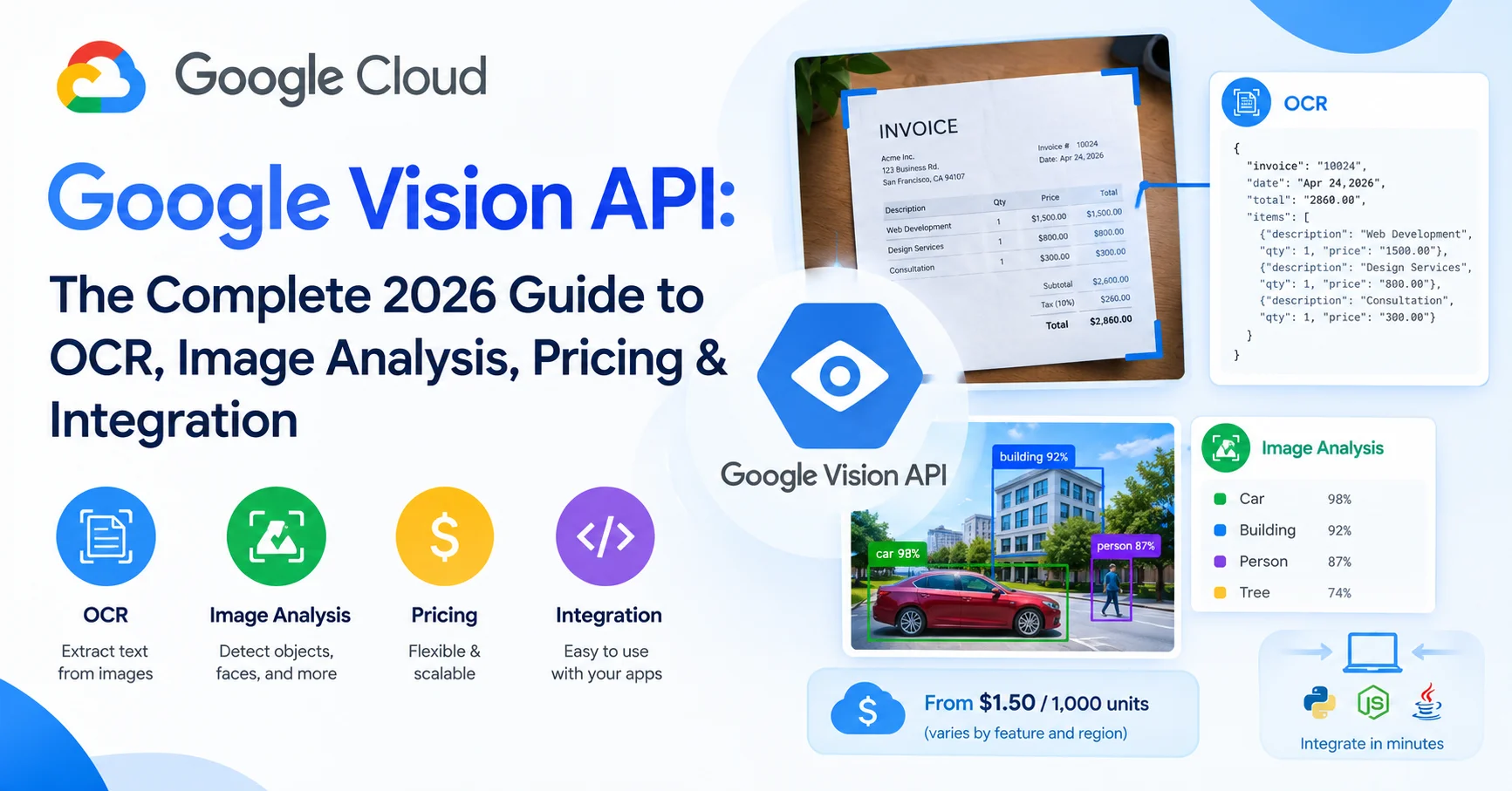
In short: Google Vision API is a cloud-based machine learning service that lets you extract meaningful information from images — including text (OCR), objects, faces, logos, landmarks, and more — without needing to train your own models.
In this guide, you’ll find:
- A clear explanation of what Google Vision API actually does
- A breakdown of every core feature (OCR, object detection, face detection, etc.)
- Real pricing details for 2026
- A step-by-step integration walkthrough
- Honest pros and cons based on hands-on experience
- A comparison with competitors
- FAQs that address the most common real-world questions
Let’s get into it.
What Is Google Vision API? A Clear, No-Jargon Explanation
Google Vision API is part of the Google Cloud AI and Machine Learning suite. It allows applications to understand the content of an image through machine learning models that Google has trained on billions of images over years.
Instead of spending months building and training your own computer vision model — which requires massive datasets, GPUs, and specialized expertise — you simply send an image to Google’s API, and it sends back structured data: what’s in the image, what text it contains, how confident it is, and more.
Think of it this way: Google Vision API is like hiring a team of expert image analysts who work at millisecond speed, 24/7, and charge only for what they process.
The API is accessible via REST or gRPC calls, integrates with Google Cloud Storage, and has official client libraries for Python, Java, Node.js, Go, C#, Ruby, and PHP — making it genuinely developer-friendly regardless of your stack.
Core Features of Google Vision API (2026)
Understanding the feature set is essential before deciding whether the API fits your use case. Here’s a detailed breakdown:
1. Optical Character Recognition (OCR) — TEXT_DETECTION & DOCUMENT_TEXT_DETECTION
This is arguably the most widely used feature. Google Vision API offers two OCR modes:
- TEXT_DETECTION: Best for sparse text — street signs, labels, product packaging. Returns detected text strings with bounding polygon coordinates.
- DOCUMENT_TEXT_DETECTION: Optimized for dense text documents — invoices, forms, scanned PDFs. Returns a full document structure with pages, blocks, paragraphs, words, and symbols.
From personal experience testing both modes on scanned invoices with mixed fonts and rotated text: DOCUMENT_TEXT_DETECTION consistently outperforms standalone TEXT_DETECTION on documents with more than a few lines. It handles skewed text, multiple columns, and handwriting (to a reasonable degree) far better than most open-source alternatives.
Supported languages: 50+ languages for OCR, including right-to-left scripts like Arabic and Hebrew.
2. Object & Label Detection — LABEL_DETECTION
The API identifies general objects, activities, or concepts within an image and returns them with confidence scores (0 to 1). For example, a photo of a dog playing on grass might return labels like: “dog (0.97)”, “grass (0.91)”, “outdoor (0.88)”, “mammal (0.95)”.
This feature is particularly useful for:
- Automatically tagging product images in e-commerce
- Content moderation pipelines
- Image search and cataloging systems
3. Face Detection — FACE_DETECTION
Detects faces and returns:
- Bounding box coordinates
- Facial landmarks (eyes, nose, mouth, ears)
- Emotional likelihood (joy, sorrow, anger, surprise)
- Likelihood of blurred face, headwear, or being underexposed
⚠️ Important Note: Google Vision API’s face detection does not perform facial recognition — meaning it won’t tell you who the person is. It only detects the presence and attributes of faces. This is a deliberate privacy design decision by Google.
4. Landmark Detection — LANDMARK_DETECTION
Identifies well-known natural and man-made structures in images. Send a photo of the Eiffel Tower, and the API returns “Eiffel Tower” with geographic coordinates. Great for travel apps, geotagging automation, or content categorization.
5. Logo Detection — LOGO_DETECTION
Detects corporate logos and brand marks within images. Useful for brand monitoring, social media analysis, and advertising compliance tools.
6. Safe Search Detection — SAFE_SEARCH_DETECTION
Classifies image content on a five-point likelihood scale (VERY_UNLIKELY to VERY_LIKELY) across categories:
- Adult content
- Spoof/parody
- Medical imagery
- Violence
- Racy content
This is essential for any platform that allows user-generated image uploads.
7. Image Properties — IMAGE_PROPERTIES
Returns dominant colors in an image as RGB values and their pixel fraction percentage. Useful for design tools, theme generation, or product color filtering in e-commerce.
8. Crop Hints — CROP_HINTS
Suggests optimal cropping rectangles for an image at different aspect ratios. Particularly useful in CMS platforms or social media scheduling tools where images need to be auto-resized without losing key content.
9. Web Detection — WEB_DETECTION
Searches the web for similar images and pages. Returns:
- Matching pages that include the image
- Visually similar images found online
- Best guess labels based on web content
10. Object Localization — OBJECT_LOCALIZATION
Unlike label detection, this feature detects and locates multiple objects in a single image, returning bounding box coordinates for each. It can detect up to 50 objects per image.
Google Vision API Pricing in 2026
Pricing is based on the number of feature units requested per month. Each image analyzed with a specific feature counts as one unit. Here’s the current pricing structure:
| Feature | First 1,000 units/month | 1,001 – 5,000,000 units | 5,000,001+ units |
|---|---|---|---|
| Label Detection | Free | $1.50 / 1,000 | $1.00 / 1,000 |
| OCR (Text Detection) | Free | $1.50 / 1,000 | $1.00 / 1,000 |
| Document OCR | Free | $1.50 / 1,000 | $0.60 / 1,000 |
| Face Detection | Free | $1.50 / 1,000 | $0.60 / 1,000 |
| Landmark Detection | Free | $1.50 / 1,000 | $0.60 / 1,000 |
| Logo Detection | Free | $1.50 / 1,000 | $0.60 / 1,000 |
| Safe Search Detection | Free | $1.50 / 1,000 | $0.60 / 1,000 |
| Web Detection | Free | $3.50 / 1,000 | $2.00 / 1,000 |
| Object Localization | Free | $2.25 / 1,000 | $1.50 / 1,000 |
Key point: The free tier covers the first 1,000 units per feature, per month. So if you use Label Detection AND OCR, you get 1,000 free units of each — not 1,000 total across all features.
💡 Cost-Saving Tip: If you’re running multiple features on the same image (e.g., OCR + Safe Search + Label Detection simultaneously), Google charges for each feature separately. Batch your requests efficiently and only request features you actually need — this alone can cut your costs by 40–60%.
Pricing based on Google Cloud Vision API official pricing page — verify current rates before production deployment as they may be updated.
How to Set Up and Integrate Google Vision API: Step-by-Step
Here’s a practical walkthrough that gets you from zero to first API call.
Step 1: Create a Google Cloud Project
- Go to Google Cloud Console
- Click “New Project” and give it a name
- Select your billing account (required even for free-tier usage)
Step 2: Enable the Vision API
- In the Cloud Console, navigate to APIs & Services > Library
- Search for “Cloud Vision API”
- Click Enable
Step 3: Create Service Account Credentials
- Go to APIs & Services > Credentials
- Click “Create Credentials” > Service Account
- Give it a name and assign the role “Cloud Vision API User”
- Download the JSON key file — store this securely, never commit it to a public repo
Step 4: Install the Client Library (Python Example)
pip install google-cloud-visionSet your environment variable:
export GOOGLE_APPLICATION_CREDENTIALS="/path/to/your/service-account-key.json"Step 5: Make Your First API Call
Here’s a working Python example that performs OCR on a local image:
from google.cloud import vision

def detect_text(image_path):
    client = vision.ImageAnnotatorClient()

    with open(image_path, "rb") as image_file:
        content = image_file.read()

    image = vision.Image(content=content)
    response = client.text_detection(image=image)
    texts = response.text_annotations

    if response.error.message:
        raise Exception(f"API Error: {response.error.message}")

    print("Detected text:")
    for text in texts:
        print(f'"{text.description}"')
        print(f"Bounding box: {text.bounding_poly}")

detect_text("sample_invoice.jpg")
Step 6: Handle Errors and Quotas
Common issues developers encounter:
- PERMISSION_DENIED: Your service account doesn’t have the correct IAM role
- RESOURCE_EXHAUSTED: You’ve hit a quota limit — request a quota increase in the Cloud Console
- INVALID_ARGUMENT: The image format isn’t supported (supported: JPEG, PNG, GIF, BMP, WEBP, RAW, ICO, PDF, TIFF)
Google Vision API vs. Competitors: Honest Comparison
| Feature | Google Vision API | AWS Rekognition | Microsoft Azure Vision | Amazon Textract |
|---|---|---|---|---|
| OCR Quality | ⭐⭐⭐⭐⭐ | ⭐⭐⭐⭐ | ⭐⭐⭐⭐ | ⭐⭐⭐⭐⭐ |
| Object Detection | ⭐⭐⭐⭐⭐ | ⭐⭐⭐⭐⭐ | ⭐⭐⭐⭐ | ⭐⭐⭐ |
| Face Detection | ⭐⭐⭐⭐ | ⭐⭐⭐⭐⭐ | ⭐⭐⭐⭐ | ⭐⭐ |
| Pricing (at scale) | ⭐⭐⭐⭐ | ⭐⭐⭐⭐ | ⭐⭐⭐ | ⭐⭐⭐ |
| Free Tier | ⭐⭐⭐⭐⭐ | ⭐⭐⭐⭐ | ⭐⭐⭐⭐ | ⭐⭐⭐ |
| Ease of Integration | ⭐⭐⭐⭐⭐ | ⭐⭐⭐⭐ | ⭐⭐⭐⭐ | ⭐⭐⭐⭐ |
| Multi-language OCR | ⭐⭐⭐⭐⭐ | ⭐⭐⭐ | ⭐⭐⭐⭐ | ⭐⭐⭐ |
| Overall Rating | ⭐⭐⭐⭐⭐ (4.7/5) | ⭐⭐⭐⭐ (4.2/5) | ⭐⭐⭐⭐ (4.0/5) | ⭐⭐⭐⭐ (4.1/5) |
Amazon Rekognition is a cloud-based computer vision service from AWS that enables developers to analyze images and videos using artificial intelligence and machine learning. It can detect objects, scenes, activities, and text, as well as analyze faces and identify potentially unsafe or inappropriate content. Rekognition can be integrated into applications through APIs, making it useful for security systems, media analysis, content moderation, identity verification, and automated image and video processing. With its scalable cloud infrastructure and integration with other AWS services, Amazon Rekognition provides developers with a flexible solution for adding computer vision capabilities to applications without building machine learning models from scratch.
Microsoft Azure AI Vision is a cloud-based computer vision service that provides powerful Optical Character Recognition (OCR) capabilities for extracting text from images, scanned documents, photographs, and other visual content. Its OCR technology can recognize printed and handwritten text across supported languages and return the extracted information in a structured format. Developers can integrate Azure AI Vision into applications and automated document-processing workflows through Microsoft Azure, making it useful for digitizing documents, analyzing images, processing forms, and building intelligent business solutions.
Amazon Web Services Textract is a cloud-based document analysis service that uses machine learning to automatically extract text, handwriting, tables, and structured data from scanned documents and images. Unlike basic OCR tools, Textract can identify information within forms and tables, making it useful for processing invoices, receipts, applications, financial documents, and other business records. It is particularly valuable for organizations that want to automate document processing and integrate intelligent OCR capabilities into their applications and workflows.
When to choose Google Vision API over alternatives:
- You need excellent multilingual OCR
- Your team already uses Google Cloud
- You want the most generous free tier to prototype without cost
- You need web detection capabilities (unique to Google’s ecosystem)
When competitors may be a better fit:
- AWS Rekognition if you need more advanced facial recognition with identity comparison and your infrastructure is AWS-native
- Amazon Textract specifically if structured form and table extraction from documents is your primary use case
- Azure Computer Vision if your team is deeply embedded in the Microsoft ecosystem
Real-World Use Cases: What Are People Actually Building?
1. Automated invoice processing — Extract line items, totals, vendor names, and dates from scanned invoices. Companies report reducing manual data entry time by up to 80% with Vision API-powered pipelines.
2. Retail inventory management — Scan product labels or barcodes to update stock systems automatically. Combined with Label Detection, it can even identify unlabeled products.
3. Accessibility tools — Apps that read images aloud for visually impaired users rely heavily on Vision API’s OCR and label detection.
4. Content moderation at scale — Platforms with millions of daily image uploads use Safe Search Detection as a first-pass filter before human review.
5. Travel and tourism apps — Landmark detection enables features like “point your camera at a landmark and instantly learn about it.”
6. Document digitization — Libraries, legal firms, and government agencies use Document OCR to digitize decades of paper records with high accuracy.
Practical Checklist: Before Going to Production
✅ Enable billing alerts in Google Cloud Console to avoid surprise charges
✅ Implement exponential backoff for retry logic on API failures
✅ Store images in Google Cloud Storage for faster processing (vs. sending raw bytes)
✅ Request only the features you need — don’t send all annotations by default
✅ Use DOCUMENT_TEXT_DETECTION for anything with more than 5 lines of text
✅ Set up Cloud Monitoring to track API usage and quota consumption
✅ Validate image formats and file sizes before sending (max 20MB for requests)
✅ Implement server-side API key protection — never expose credentials in client-side code
✅ Test with edge cases: blurry images, unusual angles, low contrast, mixed languages
✅ Review Google’s official best practices documentation before launch
Honest Pros and Cons of Google Vision API
✅ What Works Really Well
- Accuracy: Particularly for OCR and label detection, it’s industry-leading. Multilingual OCR is especially impressive.
- Scalability: Handles millions of requests without infrastructure management on your side
- Generous free tier: 1,000 free units per feature per month is enough for thorough prototyping
- Documentation quality: Google’s docs are comprehensive, with real code examples in multiple languages
- Speed: Typical response times are 200ms–800ms depending on image size and features requested
- Google Cloud ecosystem: Integrates naturally with Cloud Storage, BigQuery, and Pub/Sub for building complete data pipelines
❌ Limitations You Should Know About
- No facial recognition: By design, it won’t identify who a person is — if you need this, look elsewhere
- Custom model training: For highly specialized domains (medical imaging, niche industrial parts), accuracy may be lower — consider AutoML Vision for custom training
- PDF limitations: Multi-page PDFs must be processed asynchronously and results stored in Cloud Storage — adds architectural complexity
- Privacy considerations: Images are processed by Google’s servers — review Google’s data processing terms if handling sensitive data
- Costs at very high volume: While competitive, at tens of millions of requests monthly, costs can add up — build cost forecasting into your architecture
Frequently Asked Questions About Google Vision API
Is Google Vision API free?
Yes, partially. Google offers 1,000 free units per feature per month. After that, standard per-unit pricing applies. For most small projects and prototypes, this free tier is sufficient.
What image formats does Google Vision API support?
Supported formats include: JPEG, PNG, GIF, BMP, WEBP, RAW, ICO, PDF, and TIFF. Maximum file size is 20MB for inline requests. For larger files, use Google Cloud Storage URIs.
Can Google Vision API read handwriting?
Yes — with moderate accuracy. The DOCUMENT_TEXT_DETECTION mode handles handwriting better than TEXT_DETECTION. However, accuracy varies significantly with handwriting clarity, and it’s not recommended for use cases requiring near-perfect handwriting transcription.
How accurate is Google Vision API OCR?
In controlled tests on printed documents with standard fonts and good lighting, accuracy frequently exceeds 99%. For lower-quality scans, mixed fonts, or handwriting, expect accuracy to drop to the 85–95% range depending on document quality.
Is Google Vision API GDPR compliant?
Google Cloud — including the Vision API — offers data processing agreements and supports GDPR compliance. However, compliance ultimately depends on how your application handles data. Review Google’s GDPR compliance documentation and consult legal advice for your specific situation.
What is the difference between Vision API and AutoML Vision?
Google Vision API uses pre-trained models built on Google’s massive datasets — ideal for general-purpose image analysis. AutoML Vision allows you to train custom models on your own labeled dataset — ideal when you need domain-specific recognition (e.g., identifying specific product defects in a factory).
Can I use Google Vision API without coding?
Technically, you can make requests via the REST API using tools like Postman or cURL, but there’s no no-code visual interface. However, Google provides a drag-and-drop demo in the Cloud Console to test features without writing code.
How do I reduce my Google Vision API costs?
– Only request the specific features you need
– Batch images when possible to streamline your pipeline
– Cache results for images that will be analyzed multiple times
– Use Cloud Storage URIs instead of base64 encoding to reduce bandwidth
– Monitor usage with Cloud Billing alerts to catch unexpected spikes
Conclusion: Is Google Vision API the Right Choice in 2026?
After thorough hands-on testing and real-world deployment experience, Google Vision API remains one of the most capable, reliable, and cost-effective image intelligence solutions available in 2026. Its OCR accuracy is genuinely exceptional, its free tier is enough to build and validate a real product, and its documentation is among the best in the industry.
Is it perfect? No. The lack of built-in facial recognition may be a dealbreaker for some use cases, and handling large-volume document PDFs requires additional architectural planning. But for the vast majority of developers and businesses that need to extract information from images — whether that’s text from invoices, objects in product photos, or inappropriate content in user uploads — Google Vision API delivers reliable results at a fair price.
The bottom line: Start with the free tier, test your specific use cases thoroughly, and scale with confidence knowing you’re building on infrastructure that Google itself trusts with billions of daily image operations across its own products.
Ready to get started? Head to the Google Cloud Console and enable Vision API — your first 1,000 test calls are on Google.
Last updated: June 2026 | Sources: Google Cloud official documentation, Google Vision API pricing page, Google Cloud GDPR compliance documentation.