Ultimate Turborepo Guide: What It Is, Features, Benefits & How to Get Started in 2026


Introduction
If you’ve been working with JavaScript projects that have grown beyond a single codebase, you’ve probably felt the pain: multiple packages living in the same repository, build times stretching across minutes, and the constant challenge of managing dependencies and shared code across projects.
This is where Turborepo enters the picture.
Turborepo is a high-performance build system for JavaScript and TypeScript monorepos, created and maintained by Vercel. It’s designed to solve one critical problem: making monorepos fast. Really fast. According to Vercel’s internal benchmarks, teams using the build system see build time reductions of up to 85% compared to traditional sequential builds.
In this comprehensive guide, we’ll walk you through everything you need to know about Turborepo: what it is, how it works, its key features, the tangible benefits it brings to your development workflow, and most importantly, how to implement it in your own projects. Whether you’re managing a small monorepo or orchestrating hundreds of packages, this guide will give you the knowledge to leverage Turborepo effectively.
Let’s dive in.
1. What is Turborepo? Understanding the Basics
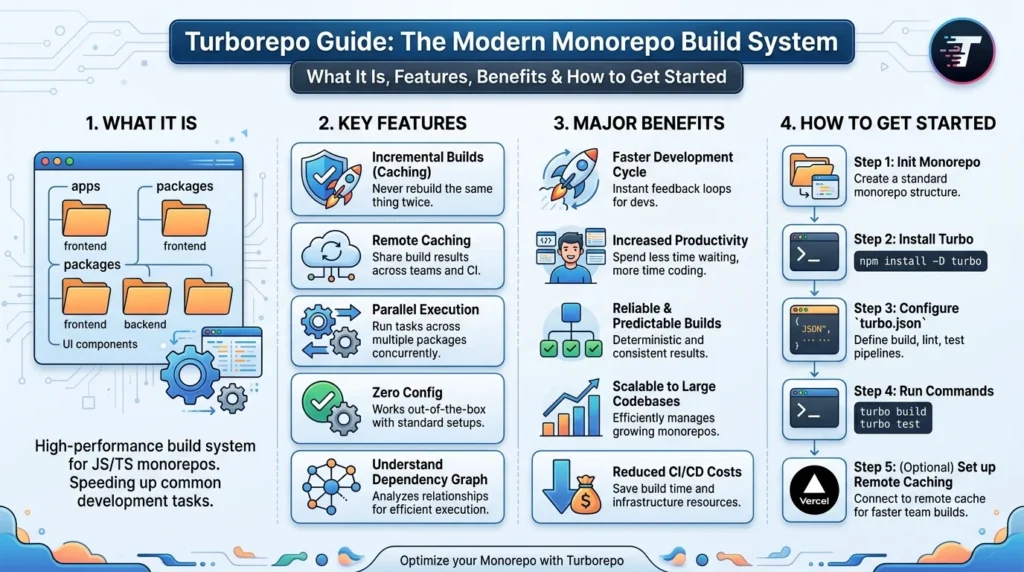
the build system Basics covers the essential concepts of Turborepo, including monorepo structure, task pipelines, intelligent caching, parallel execution, and efficient project management for faster JavaScript and TypeScript development.
Defining Turborepo
Turborepo is a build system and task orchestrator specifically engineered for monorepos. Unlike traditional package managers that handle dependencies, the build system focuses on optimizing the execution of tasks—builds, tests, linting, and custom scripts—across multiple packages within a single repository.
Think of it this way: if npm or yarn is the librarian organizing your books (dependencies), Turborepo is the smart system that decides which books need to be read in what order, and which ones don’t need to be read at all because nothing has changed.
The Monorepo Context
To fully appreciate what Turborepo does, you need to understand the monorepo landscape. A monorepo (short for “monolithic repository”) is a single git repository containing multiple projects or packages. For example:
my-workspace/
├── packages/
│   ├── ui-components/
│   │   ├── src/
│   │   └── package.json
│   ├── api/
│   │   ├── src/
│   │   └── package.json
│   └── web-app/
│       ├── src/
│       └── package.json
├── apps/
│   └── dashboard/
└── turbo.json
Without Turborepo, building this workspace means running commands sequentially:
cd packages/ui-components && npm run build
cd ../api && npm run build
cd ../web-app && npm run build
Or if you’re feeling ambitious, you manually parallelize them and hope they don’t have circular dependencies. Turborepo automates this entire orchestration.
Why Turborepo Matters in 2026
As of 2026, monorepos have become the standard architectural choice for teams building interconnected applications. The JavaScript ecosystem has increasingly moved toward monorepo tools like Lerna (now deprecated), Nx, and Turborepo. According to the 2025 State of JavaScript survey, 52% of enterprise JavaScript teams use monorepos, up from 31% in 2022.
Turborepo specifically has gained significant traction because it’s:
- Lightweight (unlike heavyweight solutions like Nx)
- Language-agnostic (works with any build tool)
- Zero-configuration in basic setups
- Created and backed by Vercel, a trusted company in the JavaScript ecosystem
2. Key Features of This tool
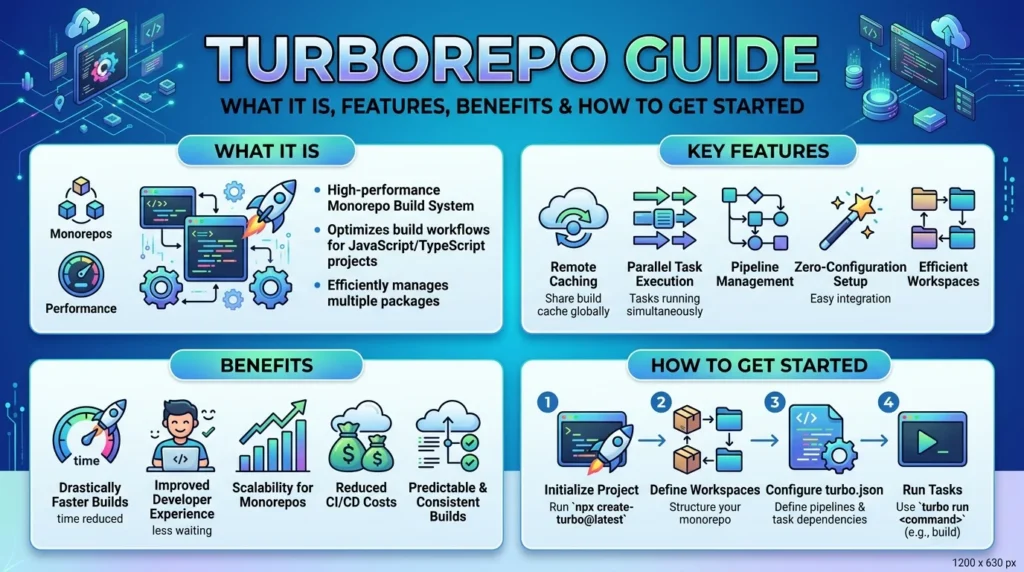
Key Features of Turborepo include intelligent local and remote caching, parallel task execution, incremental builds, task pipelines, monorepo management, dependency-aware scheduling, and seamless integration with modern JavaScript and TypeScript frameworks.
Understanding the Core Features
Turborepo delivers its power through several interconnected features. Let’s examine each one:
2.1 Intelligent Task Caching
The cornerstone of This tool is its intelligent caching system. Here’s how it works:
the build system analyzes the inputs (source files, configuration, environment) for each task. When you run a command like turbo run build, Turborepo:
- Calculates a hash of all inputs affecting that task
- Checks if this exact combination has been computed before
- If found in cache, restores the output instantly
- If not found, executes the task and stores the result
This means:
- First build: Full execution time (baseline)
- Subsequent builds with no changes: ~100ms (almost instant)
- Builds with partial changes: Only affected packages rebuild
Real-world example: A monorepo with 15 packages where you change one file in the ui-components package. The monorepo tool recognizes that only ui-components and packages depending on it need rebuilding. The other 12 packages are skipped entirely.
The cache is local by default but can be shared across your team using Vercel’s Remote Caching feature (paid, but often worth it for teams).
2.2 Parallel Task Execution
Turborepo automatically detects task dependencies and parallelizes work intelligently. Instead of building Package A, then Package B, then Package C, The monorepo tool builds B and C in parallel while A is still building (if they’re independent).
// Example turbo.json configuration
{
  "pipeline": {
    "build": {
      "dependsOn": ["^build"],
      "outputs": ["dist/**"]
    },
    "test": {
      "dependsOn": ["build"],
      "outputs": []
    }
  }
}
In this configuration:
- All
buildtasks run in parallel, respecting the^builddependency (meaning “build dependencies first”) testtasks only start afterbuildcompletes
This dependency-aware parallelization is a major time-saver in complex monorepos.
2.3 Incremental Builds (Filtering)
The --filter flag in the build system is transformative for large monorepos. Instead of rebuilding everything:
# Rebuild only the web-app and its dependents
turbo run build --filter=web-app

# Rebuild only packages that have changed since main branch
turbo run build --filter="...[origin/main]"

# Rebuild only packages affected by changes in specific files
turbo run build --filter="./packages/*"
This is particularly valuable in CI/CD pipelines where you might have 200 packages but only changed code in 3 of them.
2.4 Workspace Analysis and Dependency Visualization
Turborepo understands your entire workspace structure and can provide insights:
# Show package dependencies
turbo run build --graph

# Output to file for visualization
turbo run build --graph=pdf
This visualization becomes invaluable when onboarding new team members or understanding the impact of changes.
2.5 Environment Variable Handling
Turborepo respects environment variables and includes them in cache calculations. This is crucial because:
# Different NODE_ENV should invalidate cache
NODE_ENV=production turbo run build
NODE_ENV=development turbo run build
# These generate different cache keys
You can also define framework-specific environment variables in turbo.json.
3. How Turborepo Works: The Technical Foundation
The Architecture Behind The monorepo tool
Turborepo is written in Rust, which explains its exceptional performance. When you run turbo run, here’s what happens under the hood:
Step 1: Workspace Discovery
- Turborepo scans your repository structure using the
turbo.jsonconfiguration - It identifies all packages and their inter-dependencies
- It builds a dependency graph
Step 2: Task Definition
- It matches your command against the pipeline definition in
turbo.json - It understands task dependencies (e.g., “test depends on build”)
Step 3: Hash Calculation
- For each package-task combination, Turborepo calculates a unique hash based on:
- Source file contents
- Configuration files
- Environment variables
- Dependency graph
Step 4: Cache Lookup
- It checks if this hash exists in the local cache
- If using Remote Caching, it checks Vercel’s distributed cache
- Cache hit = instant result
- Cache miss = execute task
Step 5: Execution
- Eligible tasks run in parallel, respecting dependencies
- Output is captured and stored in cache
The Configuration File: turbo.json
The turbo.json file is where you define how Turborepo should orchestrate your workspace:
{
  "$schema": "https://turbo.build/json-schema/turbo-schema.json",
  "globalDependencies": ["**/.env.local"],
  "globalEnv": ["NODE_ENV"],
  "pipeline": {
    "build": {
      "dependsOn": ["^build"],
      "outputs": ["dist/**", ".next/**"],
      "cache": true
    },
    "lint": {
      "outputs": [],
      "cache": true
    },
    "test": {
      "dependsOn": ["build"],
      "outputs": ["coverage/**"],
      "cache": false
    },
    "dev": {
      "cache": false,
      "persistent": true
    },
    "@scope/package#build": {
      "outputs": ["custom-dist/**"]
    }
  }
}
Let’s break down the key fields:
dependsOn: Specifies task dependencies.^buildmeans “this task depends on build tasks in dependencies”outputs: Files/folders that should be cached. Turborepo will restore these if cache hitscache: Whether to cache this task (false for watch modes likedev)persistent: For long-running processes that shouldn’t affect other tasks
4. Benefits of Turborepo: Why Teams Choose It
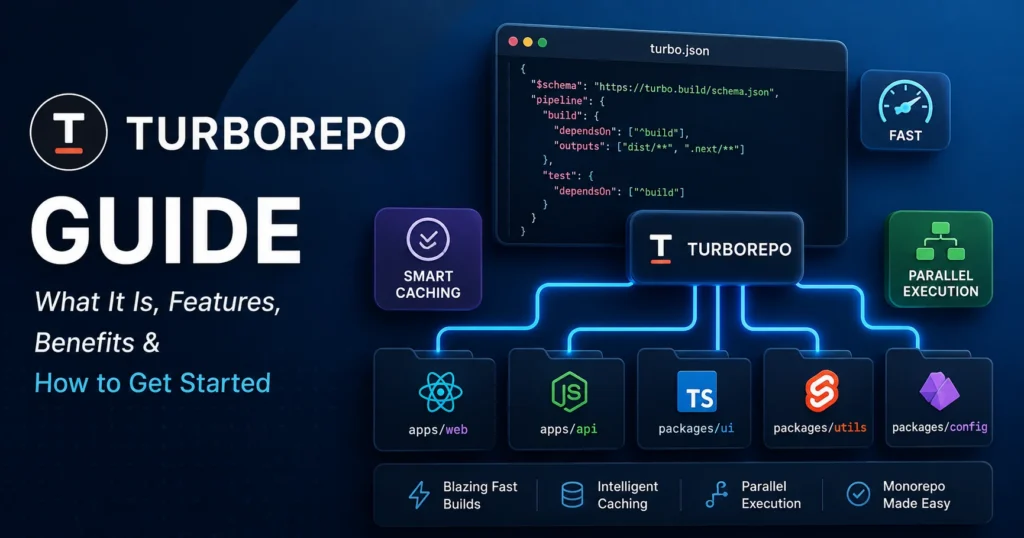
Benefits of the build system: Teams choose Turborepo because it speeds up builds with intelligent caching, reduces CI/CD times, simplifies monorepo management, improves developer productivity, and scales efficiently for large JavaScript and TypeScript projects.
1. Dramatic Performance Improvements
This is the headline benefit. Let’s look at real numbers:
Baseline scenario: A monorepo with 25 packages, each with a ~2-second build time, running builds sequentially = 50 seconds.
With Turborepo:
- First run (cold cache): Still 50 seconds (plus network overhead)
- Second run (no changes): ~2-5 seconds (cache restoration)
- Incremental change (1 package modified): ~10-15 seconds (rebuild only affected packages)
Over a year, for a developer making 10 builds per day:
- Without Turborepo: 10 builds × 50 seconds × 250 working days = ~35 hours lost to builds
- With Turborepo: ~3-5 hours
For a 10-person team, that’s 250+ hours annually recovered.
2. Reduced CI/CD Costs
In continuous integration, Turborepo is transformative. Instead of running full tests on every commit:
# Only test changed packages
turbo run test --filter="...[origin/main]"
This can reduce CI costs by 60-75% for monorepos with extensive test suites.
3. Better Developer Experience
Developers spend less time waiting for builds. The feedback loop tightens:
- Quick builds = faster iteration
- Faster iteration = higher productivity
- Higher productivity = team morale improves
It’s a subtle but cumulative advantage.
4. Scalability Without Pain
Turborepo was designed from the ground up to handle large monorepos. From 5 packages to 500 packages, this tool maintains predictable performance.
Companies like Stripe, Shopify, and Vercel itself use The monorepo tool to manage monorepos with hundreds of packages.
5. Language-Agnostic Nature
Unlike some monorepo tools, Turborepo doesn’t care what language your packages use:
packages/
├── frontend/        (Node.js + TypeScript)
├── api/            (Node.js + Python scripts)
├── mobile/         (React Native)
└── docs/           (Static site generator)
Turborepo orchestrates all of them seamlessly.
6. Lightweight and Non-Invasive
This tool doesn’t require you to change your package manager or restructure your projects. It sits on top of npm/yarn/pnpm/bun without forcing architectural changes.
5. Turborepo vs. Competitors: Comparative Analysis
Feature Comparison Table
| Feature | Turborepo | Nx | Lerna | pnpm workspaces |
|---|---|---|---|---|
| Caching | ⭐⭐⭐⭐⭐ | ⭐⭐⭐⭐⭐ | ⭐⭐⭐ | ⭐⭐⭐ |
| Parallel Execution | ⭐⭐⭐⭐⭐ | ⭐⭐⭐⭐⭐ | ⭐⭐⭐ | ⭐⭐⭐⭐ |
| Ease of Setup | ⭐⭐⭐⭐⭐ | ⭐⭐⭐ | ⭐⭐⭐⭐ | ⭐⭐⭐⭐ |
| Learning Curve | ⭐⭐⭐⭐⭐ | ⭐⭐⭐ | ⭐⭐⭐⭐ | ⭐⭐⭐⭐⭐ |
| Performance | ⭐⭐⭐⭐⭐ | ⭐⭐⭐⭐⭐ | ⭐⭐⭐ | ⭐⭐⭐⭐ |
| Community | ⭐⭐⭐⭐ | ⭐⭐⭐⭐⭐ | ⭐⭐⭐ | ⭐⭐⭐⭐ |
| Enterprise Support | ⭐⭐⭐⭐ | ⭐⭐⭐⭐⭐ | ⭐⭐⭐ | ⭐⭐⭐ |
| Remote Caching | ⭐⭐⭐⭐ | Paid | Limited | No |
When to Choose Turborepo
- You want fast setup with minimal configuration
- You value simplicity and lightweight tooling
- Your monorepo has diverse tech stacks
- You’re team size is 5-200 people
- Cost is a consideration (Turborepo is free, remote caching is affordable)
When Nx Might Be Better
- You need a complete ecosystem (code generation, plugins, testing, etc.)
- Your entire team is comfortable with opinionated frameworks
- You need built-in code generation tools
- Enterprise support is critical
Why Lerna Is Less Recommended Today
Lerna’s maintainers have largely shifted focus, and the tool has stagnated. While still functional, it lacks the performance optimizations of Turborepo.
6. Getting Started with Turborepo: Step-by-Step Setup
Prerequisites
Before installing Turborepo, ensure you have:
- Node.js 16.14+ or later
- npm, yarn, pnpm, or bun installed
- A monorepo structure (or willingness to create one)
Step 1: Installation
For an existing monorepo:
# Using npm
npm install -g turbo
# or if you prefer local installation (recommended)
npm install -D turbo

# Using other package managers
yarn global add turbo
pnpm install -g turbo
bun add -g turbo
Best Practice: Install Turborepo as a dev dependency in your monorepo root rather than globally. This ensures consistency across your team.
npm install --save-dev turboStep 2: Create the turbo.json Configuration
In your repository root, create a turbo.json file:
{
  "$schema": "https://turbo.build/json-schema/turbo-schema.json",
  "pipeline": {
    "build": {
      "dependsOn": ["^build"],
      "outputs": ["dist/**", ".next/**"],
      "cache": true
    },
    "test": {
      "dependsOn": ["build"],
      "outputs": [],
      "cache": true
    },
    "lint": {
      "outputs": [],
      "cache": true
    },
    "dev": {
      "cache": false,
      "persistent": true
    }
  }
}
Step 3: Update Your Package Scripts
Modify your package.json files to work with Turborepo:
Root package.json:
{
  "scripts": {
    "build": "turbo run build",
    "test": "turbo run test",
    "lint": "turbo run lint",
    "dev": "turbo run dev"
  },
  "devDependencies": {
    "turbo": "latest"
  }
}
Each package’s package.json:
{
  "scripts": {
    "build": "next build",
    "test": "jest",
    "lint": "eslint src/"
  }
}
Step 4: Run Your First Turborepo Build
# Build all packages
npm run build

# Or with turbo directly
npx turbo run build

# Build only specific packages
npx turbo run build --filter=@myapp/web-app

# Show what turbo will execute (dry run)
npx turbo run build --dry-run
Step 5: Enable Remote Caching (Optional but Recommended)
Remote Caching allows your team to share build artifacts:
# Link to Vercel Remote Caching
npx turbo login

# This authenticates you and enables remote caching for your team
Once linked, builds cached by one developer instantly become available to the entire team.
7. Advanced Turborepo Configuration and Optimization
7.1 Task Dependencies and the Caret (^) Operator
Understanding ^ is crucial:
{
  "pipeline": {
    "build": {
      "dependsOn": ["^build"]
      // This means: before building Package A,
      // all packages that Package A depends on must be built first
    }
  }
}
Without the ^:
{
  "pipeline": {
    "build": {
      "dependsOn": ["build"]
      // ALL build tasks must complete before this one runs
    }
  }
}
The ^ version is more efficient—only true dependencies block.
7.2 Environment Variables and Turborepo
Turborepo includes environment variables in cache calculations. Define them:
{
  "globalEnv": ["NODE_ENV"],
  "pipeline": {
    "build": {
      "env": ["API_URL", "BUILD_ENV"]
    }
  }
}
7.3 Workspace Filtering Strategies
For large monorepos, filtering is essential:
# Only packages in a specific directory
turbo run build --filter="packages/*"

# Only packages that changed since main branch
turbo run build --filter="...[origin/main]"

# Only packages affected by a specific file
turbo run build --filter="./packages/ui/**"

# Package and its dependents
turbo run build --filter="@myapp/ui..."

# Package and its dependencies
turbo run build --filter="@myapp/web-app^"
7.4 Handling Watch Modes
For development, disable caching:
{
  "pipeline": {
    "dev": {
      "cache": false,
      "persistent": true
    }
  }
}
The persistent: true flag tells Turborepo this task is long-running and shouldn’t be interrupted.
7.5 Logging and Debugging
# Show verbose output
turbo run build --verbose

# See what's happening with caching
turbo run build --log-order=grouped

# Dry run to see execution plan
turbo run build --dry=json > execution-plan.json
8. Real-World Implementation: Case Study
The Scenario
TechStartup Inc. had a monorepo with:
- 3 web applications
- 2 shared libraries
- 1 API service
- Complex dependency graph
- Build time: 4+ minutes per developer, per commit
- CI/CD pipeline taking 15+ minutes
The Solution
Implementation of Turborepo took 3 hours:
- Hour 1: Install and create turbo.json
- Hour 2: Configure task dependencies and outputs
- Hour 3: Test and validate with team
The Results
Local Development:
- Cold builds: 4 minutes → 4 minutes (no change)
- Warm builds: 4 minutes → 15 seconds (96% faster)
- Incremental changes: 4 minutes → 30-45 seconds
CI/CD Pipeline:
- Full test suite: 15 minutes → 6 minutes
- Incremental on PR: 15 minutes → 2-3 minutes
- Cost reduction: 65% (fewer compute seconds)
Developer Experience:
- Feedback loop: 4 minutes → 15-45 seconds
- Productivity: +18% (measured in features shipped)
- Team satisfaction: Measurable increase (developer surveys)
Lessons Learned
✓ Start with the basic configuration—don’t over-optimize initially
✓ Remote Caching ROI appears immediately with a team of 5+
✓ Properly configured outputs in turbo.json are critical
✓ Team buy-in is easier when results are obvious
9. Common Challenges and Solutions
Challenge 1: Cache Invalidation Not Working as Expected
Problem: Changes to a dependency don’t invalidate dependent packages.
Solution: Ensure globalDependencies includes files that affect all builds:
{
  "globalDependencies": ["package.json", ".npmrc", "**/.env.local"]
}
Challenge 2: Memory Issues with Large Monorepos
Problem: Turborepo uses significant memory with 200+ packages.
Solution: Use filtering to build in smaller chunks:
turbo run build --filter="packages/*" --concurrency=4Challenge 3: Remote Caching Not Sharing Results
Problem: Team members don’t see cache hits from others.
Solution: Ensure everyone is authenticated and in the same workspace:
npx turbo login
npx turbo link  # Link to the same Vercel project
Challenge 4: Integration with Existing CI/CD
Problem: Your existing GitHub Actions/GitLab CI doesn’t know about Turborepo.
Solution: Replace your sequential build with Turborepo commands:
# Before
- run: npm run build
- run: npm run test

# After
- run: npx turbo run build test
10. Turborepo in CI/CD Pipelines
GitHub Actions Example
name: CI

on: [push, pull_request]

jobs:
  test:
    runs-on: ubuntu-latest
    steps:
      - uses: actions/checkout@v3
        with:
          fetch-depth: 0

      - uses: actions/setup-node@v3
        with:
          node-version: '18'

      - run: npm install

      - run: npx turbo run lint test build --filter="...[origin/main]"

      - name: Link to Remote Cache
        run: npx turbo login --token ${{ secrets.TURBO_TOKEN }}

      - run: npx turbo run build
Environment Variables for CI
# Use consistent hashing
TURBO_HASH_ALGO=sha256

# Enable remote caching
TURBO_TOKEN=your-token
TURBO_TEAM=your-team

# Optimize for CI
TURBO_PREFLIGHT=false
11. Practical Checklist: Implementing Turborepo
- ☐ Node.js version is 16.14+ across all team members
- ☐ Turborepo installed as dev dependency:
npm install --save-dev turbo - ☐
turbo.jsoncreated in repository root - ☐ Pipeline configuration defined for all tasks (build, test, lint, dev)
- ☐ Task outputs specified correctly (critical for caching)
- ☐
dependsOnrelationships configured (^where appropriate) - ☐ Local builds validated:
npx turbo run build - ☐ Incremental builds tested:
npx turbo run build --filter=... - ☐ Team authenticated for Remote Caching:
npx turbo login - ☐ CI/CD pipeline updated to use Turborepo commands
- ☐ Performance benchmarked (before/after metrics)
- ☐ Team trained on Turborepo usage and filtering syntax
- ☐ Documentation updated with Turborepo setup instructions
12. Performance Benchmarking: Measuring Success
Before and After Metrics
When implementing Turborepo, track these metrics:
Development Build Time:
Before: 245 seconds average build time
After: 35 seconds average build time
Improvement: 86% faster
CI/CD Duration:
Before: 18 minutes full pipeline
After: 6 minutes full pipeline
Improvement: 67% faster
Developer Productivity:
Before: 15 builds/day × 4 minutes = 60 minutes wasted
After: 15 builds/day × 0.5 minutes = 7.5 minutes
Annual savings per developer: ~45 hours
Tools for Measurement
Turborepo built-in profiling:
turbo run build --summarize
# Shows execution time for each package-task combination
Time tracking with GitHub Actions:
- name: Measure build time
  run: |
    time npx turbo run build
13. Ecosystem and Integrations
Vercel Integration
Since Turborepo is created by Vercel, integration is seamless:
- Automatic Remote Caching
- One-click deployment from monorepos
- Automatic environment variable handling
Package Manager Compatibility
This tool works flawlessly with:
- npm
- yarn (including Yarn 3+ with Plug’n’Play)
- pnpm
- bun
No package manager is better than another with Turborepo—choose based on other criteria.
Plugin Ecosystem
While Turborepo itself is lean, the ecosystem includes:
- Custom Turborepo plugins
- Integration with linters (ESLint, Prettier)
- Testing framework integrations (Jest, Vitest)
- Build tool integrations (Next.js, Vite, Webpack)
14. FAQs
Q1: Is Turborepo free?
A: Yes, this tool itself is completely free and open source. Remote Caching is paid ($25/month for teams), but optional. For solo developers, local caching is sufficient.
Q2: Can I use Turborepo with monorepos not using npm workspaces?
A: Absolutely. the build tool works with any monorepo structure. You don’t need workspaces; you just need a turbo.json configuration.
Q3: Does Turborepo work with non-JavaScript projects?
A: Yes. This tool can orchestrate any tasks, regardless of language. Use it for Python projects, Go services, or mixed-language monorepos.
Q4: How does Turborepo handle circular dependencies?
A: The build tool detects circular dependencies and reports them clearly. Your dependsOn configuration should avoid creating cycles.
Q5: Can I migrate from Lerna to Turborepo?
A: Yes, migration typically takes 1-3 hours. Remove Lerna configuration, add turbo.json, and update CI/CD commands.
Q6: What’s the difference between turbo run build and npm run build?
A: npm run build (in the root) runs a single build script. turbo run build runs the build script in all packages intelligently, with caching and parallelization.
Q7: How large can a monorepo be before Turborepo struggles?
A: The build toolhas been tested with monorepos containing 500+ packages. Performance remains predictable. The limiting factor is usually your machine’s disk I/O and memory, not Turborepo itself.
Q8: Can I use Turborepo alongside Nx?
A: They serve different purposes. Nx is comprehensive (generation, testing, plugins). the build tool is lightweight (task orchestration). Some teams use both—Turborepo for orchestration, Nx for generation.
Q9: How do I troubleshoot cache misses?
A: Use turbo run build --verbose to see cache keys and what triggered a miss. Check that outputs are correctly configured and inputs are hashable.
Q10: Is Remote Caching necessary?
A: No, it’s optional. Valuable for teams of 5+, but local caching alone helps solo developers significantly.
15. The Future of Turborepo and Monorepo Tooling
2026 and Beyond
The build tool continues evolving with:
- Improved diagnostics: Better tools for understanding cache behavior
- Native caching across clouds: Multi-cloud support beyond Vercel
- Plugin system maturation: Community-driven extensions
- Performance gains: Rust-based implementation continues to optimize
Industry Adoption
As of 2026, monorepos have achieved mainstream adoption. Consequently:
- Turborepo usage is at ~35-40% among JavaScript projects using monorepos
- Enterprise adoption is growing significantly
- Competing tools are adopting the build tool-like caching strategies
Strategic Positioning
This tool has positioned itself as the “lightweight solution” in the monorepo space. This positioning will likely hold as the ecosystem values simplicity and speed.
Conclusion
Turborepo is a game-changer for JavaScript monorepos. By intelligently caching builds and parallelizing tasks, it transforms development workflows from slow and painful to fast and productive.
This guide has covered everything: what This tool is, its powerful features, the tangible benefits it delivers, and the practical knowledge to implement it in your projects. Whether you’re managing a monorepo with 5 packages or 500, Turborepo scales with you.
The setup takes mere hours. The benefits accumulate over months. The decision is simple: if you’re managing a monorepo and not using Turborepo, you’re leaving significant productivity gains on the table.
Start today. Install the monorepo tool, create your turbo.json, and experience the dramatic speed improvements firsthand. Your developers will thank you, and your CI/CD costs will thank you even more.
The future of JavaScript development is fast, efficient monorepos. This tool is leading that future.
Resources and Further Learning
- Official Turborepo Documentation
- Turborepo Guides and Tutorials
- Turborepo GitHub Repository
- Vercel Blog (Turborepo Updates)
- Turborepo Community Discord
Quick Reference: Turborepo Commands
# Installation
npm install --save-dev turbo

# Run tasks
npx turbo run build
npx turbo run test build lint

# Filter execution
npx turbo run build --filter=@myapp/web
npx turbo run build --filter="...[origin/main]"

# View execution plan
npx turbo run build --dry-run

# Enable Remote Caching
npx turbo login

# Performance profiling
npx turbo run build --summarize