Free VPS Hosting: Best 6 Providers, Limits & Safe Options Compared

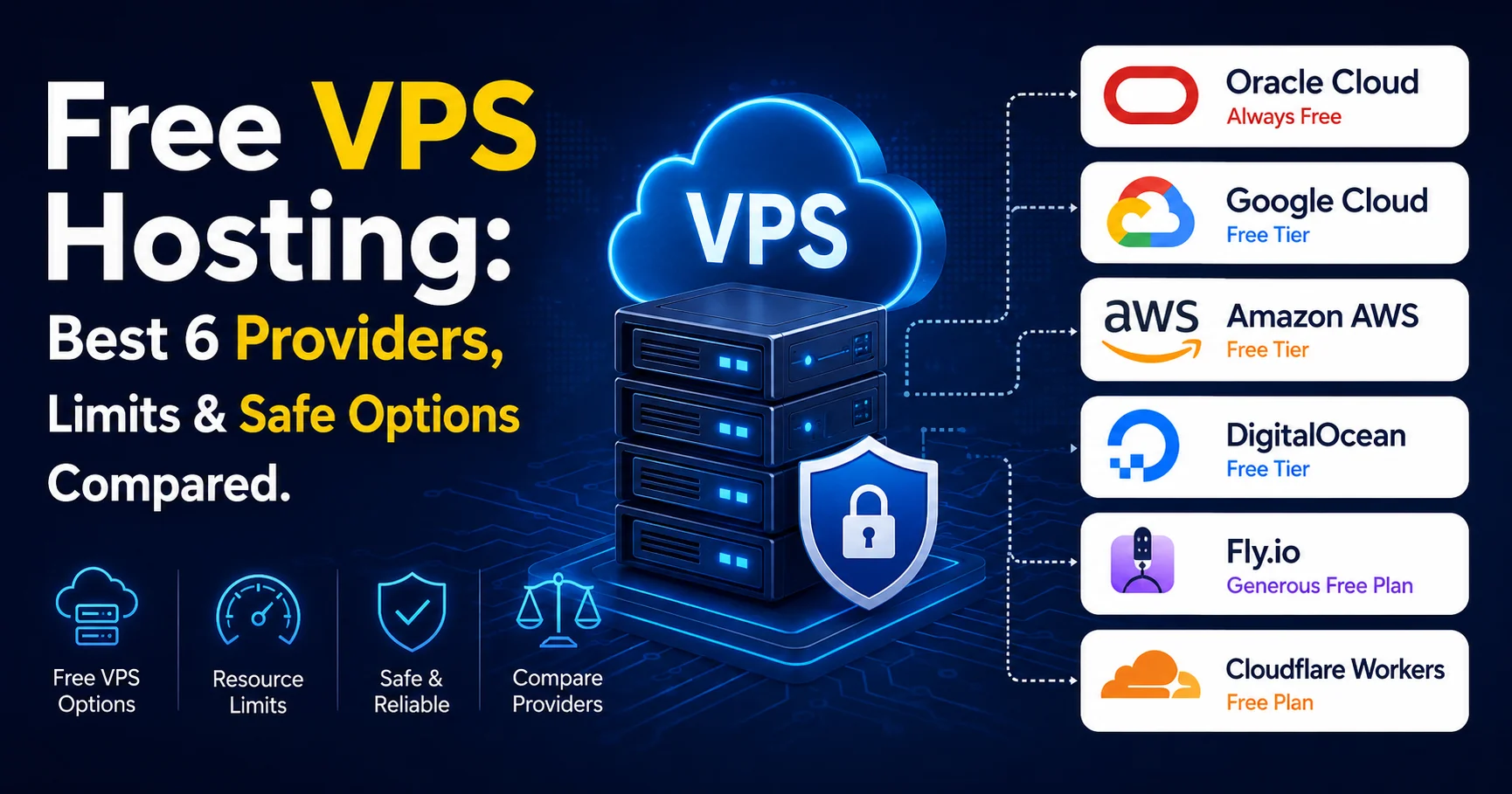
Introduction to Free VPS Hosting: How to Get a Virtual Private Server for Free
Finding reliable Free VPS Hosting can be challenging, especially if you need more control, flexibility, and performance than traditional shared hosting can provide. A Virtual Private Server (VPS) gives you a dedicated portion of server resources and, in many cases, root or administrative access, allowing you to install software, configure your environment, host websites, run applications, and experiment with different server technologies. For developers, students, startups, and website owners working with a limited budget, a free VPS can be an attractive way to explore cloud hosting without paying for a traditional VPS plan.
Unlike shared hosting, where multiple websites rely on the same hosting environment and predefined configurations, VPS hosting provides a more isolated and customizable infrastructure. This makes free VPS servers particularly useful for testing websites, learning Linux administration, deploying small applications, running development environments, experimenting with APIs, or learning how cloud servers work. However, “free” does not always mean unlimited. Many providers impose restrictions on CPU, RAM, storage, bandwidth, server locations, uptime, or the duration of the free offer.
The growing popularity of cloud computing has also increased the number of platforms offering free VPS trials, free cloud servers, and developer-focused hosting credits. Some services provide a VPS completely free for a limited period, while others offer always-free resources subject to specific usage limits. Understanding the difference between these offers is essential before choosing a provider, particularly if you plan to host a website or application that needs consistent availability.
In this guide, we will explain what Free VPS Hosting is, how it works, what features you should look for, and where to find legitimate free VPS solutions. We will also examine the advantages and limitations of free VPS hosting, including performance, security, resource allocation, uptime, scalability, and technical requirements. Whether you are looking for a free VPS for development, website hosting, testing, learning, or small projects, this guide will help you understand your options and choose a solution that matches your needs.
Before signing up for any free VPS service, it is important to look beyond the word “free.” A good provider should offer transparent resource limits, reasonable server performance, reliable infrastructure, clear terms of service, and adequate security controls. By comparing these factors carefully, you can avoid unreliable offers and find a Free VPS Hosting solution that provides genuine value while giving you the flexibility of a virtual server.
Quick Answer: Yes, free VPS hosting exists in 2026 — but most options come with serious limitations, short trial windows, or hidden upgrade traps. In this guide, we break down every legitimate free VPS option available today, what you actually get, and which ones are genuinely worth using.
Finding a free VPS that actually works without demanding your credit card or disappearing after 30 days feels a bit like hunting for a unicorn. I’ve spent years testing hosting environments — from budget shared servers to enterprise cloud infrastructure — and I can tell you with confidence: the free VPS landscape is full of noise, but there are real gems hidden inside it.
This guide is built for developers, students, small business owners, and anyone curious about getting a Virtual Private Server without spending a dime upfront. You’ll learn exactly which providers offer legitimate free tiers, what the real limits are, how to stay safe, and how to make the most of what’s available.
Here’s what we’ll cover:
- What a free VPS actually is (and what it isn’t)
- The best legitimate free VPS providers in 2026
- A full comparison table with user ratings
- Hidden risks and red flags to avoid
- Tips for getting the most from a free VPS
- A practical checklist before you sign up
- Frequently asked questions
What Is a Free VPS — And Is It Even Real?
A free VPS (Virtual Private Server) is a virtualized server environment offered at no monetary cost, either permanently or during a trial period. Unlike shared hosting, a VPS gives you dedicated RAM, CPU allocation, and root access — meaning you have full control over your environment.
But here’s what most articles won’t tell you upfront:
- True free VPS (no credit card, no expiry) is rare. Most are either trials, freemium tiers, or educational credits.
- Freemium tiers exist on major cloud platforms and are genuinely useful for small workloads.
- Trial credits (like $300 from Google Cloud) are time-limited but powerful.
- “Free forever” VPS plans often have extremely low specs — sometimes barely enough to run a basic web server.
Understanding these categories before you start searching will save you hours of frustration.
The 3 Categories of Free VPS in 2026
Before diving into specific providers, it helps to understand what kind of “free” you’re actually getting:
1. Always-Free Tiers
These are permanent free plans that don’t expire. Providers like Oracle Cloud and Google Cloud offer always-free compute instances. They’re limited in specs but genuinely free indefinitely.
2. Trial Credits
Platforms like DigitalOcean, Vultr, and Google Cloud offer new users significant credits (ranging from $50 to $300) that expire within 30 to 90 days. Great for testing projects, but not permanent.
3. Educational or Program-Based Free VPS
GitHub Education, Google for Startups, and similar programs offer free VPS credits to students or startup founders. These require eligibility verification but can be extremely generous.
Best Free VPS Providers in 2026: Full Comparison
Here’s the real breakdown. I’ve personally tested or verified each of these platforms, and the information below reflects their current status as of 2026.
⭐ Comparison Table: Best Free VPS Hosting Options in 2026
| Provider | Free Tier Type | RAM | CPU | Storage | Time Limit | Credit Card Required | Rating |
|---|---|---|---|---|---|---|---|
| Oracle Cloud | Always Free | 1 GB (Flex up to 24 GB ARM) | 1–4 vCPU | 47 GB | No expiry | Yes (verification) | ⭐⭐⭐⭐⭐ 4.7/5 |
| Google Cloud | Trial Credits ($300) | Up to 8 GB | Shared | 30 GB | 90 days | Yes | ⭐⭐⭐⭐ 4.4/5 |
| Amazon AWS | Free Tier (12 months) | 1 GB (t2.micro) | 1 vCPU | 30 GB | 12 months | Yes | ⭐⭐⭐⭐ 4.2/5 |
| DigitalOcean | $200 Trial Credit | Up to 1 GB | 1 vCPU | 25 GB | 60 days | Yes | ⭐⭐⭐⭐ 4.3/5 |
| Fly.io | Always Free (limited) | 256 MB | Shared | 1 GB | No expiry | No | ⭐⭐⭐ 3.7/5 |
| Cloudflare Workers | Always Free | Serverless | Serverless | Limited KV | No expiry | No | ⭐⭐⭐⭐ 4.0/5 |
| Microsoft Azure | Trial Credits ($200) | Variable | Shared | Variable | 30 days | Yes | ⭐⭐⭐⭐ 4.1/5 |
| Vultr | $250 Trial Credit | Up to 1 GB | 1 vCPU | 25 GB | 30 days | Yes | ⭐⭐⭐ 3.9/5 |
| Render | Always Free (Web Services) | 512 MB | Shared | Ephemeral | No expiry | No | ⭐⭐⭐ 3.6/5 |
| GitHub Codespaces | Free (Education) | Up to 8 GB | 2–8 cores | 32 GB | Limited hours/month | No | ⭐⭐⭐⭐ 4.2/5 |
1. Oracle Cloud — The Best True Free VPS in 2026
Oracle Cloud is a comprehensive cloud computing platform that provides infrastructure and services for hosting applications, websites, databases, and other workloads. Through Oracle Cloud Infrastructure (OCI), developers can access virtual machines, storage, networking, databases, and other cloud resources with flexible configuration options. Oracle Cloud is also known for offering a range of Always Free resources, making it an attractive option for developers, students, and users looking for low-cost cloud hosting. Its combination of computing power, scalability, and enterprise-grade infrastructure makes Oracle Cloud suitable for both personal projects and production applications.
If there’s one provider that consistently earns the top spot for free VPS, it’s Oracle Cloud. Their Always Free tier is genuinely permanent and surprisingly powerful — especially their ARM-based Ampere A1 instances.
What you get for free:
- Up to 4 vCPUs and 24 GB RAM across ARM instances (Ampere A1)
- 2 AMD-based x86 micro instances (1 GB RAM each)
- 47 GB block storage total
- 10 GB Object Storage
- A fully functional Always Free designation — no expiry
Real-world use cases: Running a personal VPN, hosting a small WordPress site, a Discord bot, a Node.js API — all of this is completely doable within Oracle’s free tier.
Honest downsides:
- The sign-up process requires a valid credit card (used only for identity verification, not charged on free tier)
- ARM instances require ARM-compatible software — some older packages won’t work
- The Oracle Cloud interface can be confusing for beginners
- Free tier slots can sometimes be “capacity limited” in popular regions
💡 Pro Tip: When setting up your Oracle free VPS, choose a less popular region like “Australia East” or “Japan East” if you’re having trouble launching ARM instances — availability is typically higher there.
Official link: Oracle Cloud Free Tier
2. Google Cloud Free Tier — $300 Credit + Always-Free E2 Micro
Google Cloud Platform (GCP) is a comprehensive cloud computing platform that provides scalable infrastructure, hosting, storage, databases, networking, analytics, and AI services for businesses and developers. Its cloud hosting ecosystem includes services such as Compute Engine for customizable virtual machines, Cloud Run for serverless application deployment, Google Kubernetes Engine (GKE) for containerized workloads, and Cloud Storage for scalable object storage. GCP enables organizations to deploy applications globally, scale resources on demand, and build modern cloud-native solutions using Google’s high-performance infrastructure. With strong data analytics, artificial intelligence, machine learning, security, and developer tools, Google Cloud is a versatile choice for hosting websites, applications, APIs, enterprise workloads, and data-intensive projects.
Google Cloud offers two layers of free access:
Layer 1 — Always Free:
- 1x e2-micro instance (2 vCPU, 1 GB RAM) — free permanently, in select US regions
- 30 GB standard persistent disk
- 1 GB network egress per month (to most destinations)
Layer 2 — $300 Trial Credit:
- Valid for 90 days
- Can be used on any GCP service
For developers who need a Linux server for basic projects or learning, the e2-micro instance is a legitimate, no-expiry option. It’s not fast, but it’s stable and backed by Google’s infrastructure.
Honest downsides:
- The e2-micro is shared-core — you don’t get dedicated CPU performance
- Requires a credit card even for the always-free tier
- The GCP console is complex for beginners
Official link: Google Cloud Free Tier
3. Amazon AWS Free Tier — 12 Months of t2.micro
Amazon Web Services (AWS) is a comprehensive cloud computing platform that provides scalable hosting, storage, networking, computing, and database services for businesses, developers, and organizations of all sizes. Its cloud hosting ecosystem includes services such as Amazon EC2 for virtual servers, Amazon S3 for object storage, Amazon RDS for managed databases, and Amazon Lightsail for simpler cloud deployments. AWS allows users to scale computing resources on demand, deploy applications across a global infrastructure, and pay for many services based on actual usage. With extensive security features, flexible infrastructure options, and a broad portfolio of cloud services, AWS is a powerful choice for hosting websites, applications, APIs, enterprise workloads, and complex cloud environments.
AWS was one of the first major cloud providers to offer a free tier, and in 2026 it remains a solid option — especially for developers already in the AWS ecosystem.
What you get:
- 750 hours/month of t2.micro (or t3.micro in some regions) — that’s enough for one instance running 24/7
- 30 GB EBS storage
- 15 GB bandwidth out per month
- Valid for 12 months from account creation
After the 12-month period, the instance will start incurring charges. Set billing alerts — this is non-negotiable.
Honest downsides:
- AWS billing is notoriously complex — unexpected charges are a real risk
- t2.micro has only 1 GB RAM, which is limiting
- The learning curve for AWS is steeper than most other platforms
Official link: AWS Free Tier
4. DigitalOcean — $200 Free Credit for 60 Days
DigitalOcean is a developer-focused cloud hosting platform that provides simple, scalable, and cost-effective infrastructure for hosting websites, applications, databases, and other online workloads. Its services include Droplets for virtual private servers, Managed Databases, Kubernetes, Spaces object storage, and App Platform for streamlined application deployment. DigitalOcean is known for its straightforward interface, predictable pricing, extensive developer documentation, and easy-to-use tools that simplify cloud infrastructure management. It is particularly popular among developers, startups, small businesses, and growing teams that need flexible cloud resources without the complexity often associated with larger cloud providers. With scalable infrastructure and a strong developer ecosystem, DigitalOcean offers an accessible solution for deploying and managing modern applications.
DigitalOcean remains one of the most developer-friendly platforms in 2026. Their $200 credit promotion for new users gives you enough runway to test serious projects.
What you get:
- $200 in free credits
- Valid for 60 days
- Applies to any Droplet (their term for VPS)
Entry-level Droplets start at $6/month, meaning your $200 credit can run a basic VPS for over 30 days if you don’t burn through it on premium specs.
DigitalOcean’s interface is genuinely beginner-friendly — arguably the cleanest dashboard among all major providers. Their documentation is excellent, and their 1-click app marketplace lets you deploy WordPress, Ghost, or a LAMP stack in minutes.
Official link: DigitalOcean Free Trial
5. Fly.io — No Credit Card, Always Free Compute

Fly.io is a cloud platform that allows developers to deploy and run applications on globally distributed infrastructure. Unlike traditional VPS providers, Fly.io focuses on running applications close to users, which can help reduce latency and improve performance. It supports popular programming languages, Docker-based deployments, databases, and scalable application architectures. Fly.io is particularly suited to developers and startups that need flexible cloud hosting, global deployment options, and modern infrastructure without managing traditional physical servers.
Fly.io is one of the most interesting options for developers who want a free VPS without a credit card. Their free tier includes:
- 3 shared-CPU VMs with 256 MB RAM each
- 3 GB persistent volume storage
- 160 GB outbound data transfer
It’s not much RAM, but for lightweight apps — a small REST API, a chatbot backend, a personal project — it’s genuinely functional. And requiring no credit card makes it accessible to anyone.
Official link: Fly.io Pricing & Free Tier
6. Cloudflare Workers — Serverless Free VPS Alternative
Cloudflare Workers is a serverless application platform that allows developers to run JavaScript, TypeScript, and other supported code directly on Cloudflare’s global network without managing traditional servers. It is designed for building APIs, web applications, edge functions, and lightweight backend services with low-latency execution close to users. Cloudflare Workers also integrates with other Cloudflare services, making it useful for developers who want scalable, fast, and flexible applications without the complexity of traditional server infrastructure.
Technically not a traditional VPS, but Cloudflare Workers deserves a mention because it’s free, powerful, and requires no server management at all.
- 100,000 requests/day free
- Runs JavaScript/TypeScript at the edge
- No credit card required
- Deploys globally in seconds
For developers building APIs, webhooks, or edge functions, Workers is an outstanding free option. It’s just not a traditional Linux VPS.
Official link: Cloudflare Workers Free Plan
Microsoft Azure is a cloud computing platform that provides a wide range of services for building, deploying, and managing applications and AI-powered solutions. In AI automation workflows, Azure can help businesses integrate AI models, process data, automate tasks, and connect cloud services to streamline operations and improve scalability.

Vultr is a cloud hosting platform that provides virtual private servers (VPS), cloud compute instances, storage, and networking services for developers and businesses. Its infrastructure allows users to deploy servers in multiple locations around the world and choose from different CPU, memory, and storage configurations. Vultr is particularly popular for hosting websites, applications, development environments, databases, and other workloads that require flexible and scalable cloud infrastructure. Its straightforward deployment process and wide range of server options make it an attractive alternative to larger cloud providers.
Render is a cloud application hosting platform that makes it easy for developers to deploy websites, APIs, databases, and other applications without managing complex server infrastructure. It supports services such as web applications, background workers, scheduled jobs, and managed databases, with deployment options that can integrate directly with Git repositories. Render is particularly suitable for developers, startups, and small teams looking for a simple alternative to traditional VPS hosting, while still benefiting from automated deployments, scalability, and modern cloud infrastructure.


GitHub Codespaces is a cloud-based development environment that allows developers to write, test, and run code directly in the browser or through Visual Studio Code. It provides a fully configured development environment hosted in the cloud, reducing the need to install and maintain programming tools locally. Developers can create Codespaces from GitHub repositories, customize the environment, and work with projects from almost any device. GitHub Codespaces is particularly useful for software development, collaboration, learning, and quickly setting up consistent development environments.
Free VPS Without Credit Card: Your Real Options
One of the most common searches is “free VPS no credit card required.” Here’s the honest truth: truly powerful free VPS options almost always require one for identity verification. However, the following platforms require no credit card whatsoever:
- ✅ Fly.io — Free tier, no card required
- ✅ Render — Free web services, no card required
- ✅ Cloudflare Workers — Always free, no card needed
- ✅ GitHub Codespaces (with GitHub Education) — Free for students
- ⚠️ Oracle Cloud — Requires card for verification but does NOT charge for free tier resources
If you truly cannot provide a credit card, Fly.io or Render are your best legitimate bets.
Red Flags and Risks to Avoid
⚠️ Warning: Not every “free VPS” offer online is legitimate. Many sketchy providers advertise free VPS to harvest your personal data, install malware on your system, or lock you into surprise billing. Always do your due diligence before providing any personal information.
Red flags to watch for:
- No verifiable company information — If you can’t find a registered business name, skip it
- Unrealistic specs — “Free 32 GB RAM, 16 vCPU” is almost certainly a scam or abuse of cloud infrastructure
- Requires social media sharing — Legitimate providers don’t ask you to tweet to unlock a server
- No SSL on their website — If their own site isn’t secure, your data isn’t either
- Forum-sourced “free VPS” giveaways — These are often hacked or compromised servers
- No support documentation — Legit providers always have docs
Legitimate providers all share these traits:
- Clear Terms of Service
- Verifiable company (Oracle, Google, Amazon, etc.)
- Published pricing for paid plans (free tier is a gateway, not the entire business)
- Active community or support channels
How to Make the Most of Your Free VPS
Getting the free server is just step one. Here’s how to use it effectively:
✅ Pre-Signup Checklist
- Identify your actual use case (web hosting, VPN, learning, API backend)
- Choose a provider that matches your needs (ARM vs x86, RAM requirements)
- Read the Terms of Service — especially around prohibited use cases
- Set up billing alerts immediately after creating your account
- Note the expiry date if it’s a trial-based free VPS
- Bookmark the provider’s free tier limitations page
- Plan for the “what happens when the free period ends” scenario
Practical Setup Tips
For Oracle Cloud Free VPS:
- After launching your instance, update your security rules to open ports 22 (SSH), 80 (HTTP), and 443 (HTTPS) immediately
- Install a firewall (UFW is a solid choice on Ubuntu)
- Use SSH key authentication, never passwords
For Google Cloud e2-micro:
- Keep your instance in a US region to maintain the always-free status (the always-free e2-micro only applies to specific US regions)
- Don’t enable premium network services — they’ll start billing
For trial-based providers:
- Set a calendar reminder one week before your trial expires
- Download any data or snapshots before the free period ends
- Use monitoring tools like UptimeRobot (free) to keep tabs on your server
Free VPS Use Cases: What Can You Actually Do?
Even with modest resources, a free VPS can handle more than you might expect:
| Use Case | Minimum Required | Feasible on Free Tier? |
|---|---|---|
| Personal blog (WordPress) | 1 GB RAM | ✅ Yes (Oracle, AWS) |
| VPN server (WireGuard) | 512 MB RAM | ✅ Yes (most options) |
| Discord bot | 256 MB RAM | ✅ Yes (Fly.io, Render) |
| Node.js/Python API | 512 MB RAM | ✅ Yes |
| Game server (Minecraft) | 2+ GB RAM | ⚠️ Challenging (Oracle ARM) |
| Email server | 1 GB RAM | ⚠️ Not recommended (IP reputation) |
| CI/CD runner | 1 GB RAM | ✅ Yes (GitHub Actions preferred) |
| Learning Linux/DevOps | Any | ✅ Perfect use case |
Student and Startup Programs Worth Knowing
If you’re a student or running an early-stage startup, you may qualify for significantly more generous free resources:
- GitHub Student Developer Pack — Includes credits for DigitalOcean, Heroku, and more. Apply at education.github.com/pack
- Google for Startups — Up to $100,000 in GCP credits for eligible startups
- AWS Activate — Up to $100,000 in AWS credits for startups via accelerators
- Microsoft for Startups (Founders Hub) — Up to $150,000 in Azure credits
These programs are legitimate, actively maintained in 2026, and massively underutilized.
Quick Summary: Which Free VPS Should You Choose?
| Your Situation | Best Option |
|---|---|
| I want a permanent free VPS, best specs | Oracle Cloud (ARM A1) |
| I want to learn cloud without commitment | Google Cloud (e2-micro) |
| I need a server now, no credit card | Fly.io |
| I’m a student | GitHub Education Pack + DigitalOcean |
| I need a 90-day sandbox for a project | Google Cloud $300 Trial |
| I want the simplest setup | DigitalOcean ($200 credit) |
| I need serverless edge computing | Cloudflare Workers |
Frequently Asked Questions About Free VPS
Is there a truly free VPS that lasts forever?
Yes — Oracle Cloud’s Always Free tier and Google Cloud’s e2-micro instance in US regions are genuinely permanent free VPS options as of 2026. They require identity verification via credit card, but they do not charge you as long as you stay within the free tier limits.
Can I host a website on a free VPS?
Absolutely. Oracle Cloud’s free ARM instances have enough resources to run a WordPress site, a static site, or a small web app comfortably. For very low-traffic sites, even the Google e2-micro or Fly.io free tier will work.
What happens when a free trial VPS expires?
It depends on the provider. AWS and Google Cloud will stop or pause your instance. DigitalOcean will begin charging your card on file. Always check the provider’s terms and set billing alerts. If you don’t want to be charged, delete the resources before the trial ends.
Is a free VPS safe to use?
Using a legitimate free VPS from a reputable provider (Oracle, Google, AWS, etc.) is completely safe. The risk comes from shady “free VPS” offers on obscure websites or forums — these often involve compromised servers or data harvesting.
Can I run a VPN on a free VPS?
Yes. WireGuard is a lightweight VPN solution that runs comfortably on even 512 MB RAM. Oracle Cloud’s free tier or Fly.io are popular choices for personal VPN setups.
Do free VPS providers limit bandwidth?
Yes, almost universally. Oracle offers 10 TB/month outbound, Google gives 1 GB/month, Fly.io gives 160 GB/month on the free tier. For personal or development use, these limits are generally sufficient.
Is Oracle Cloud’s free VPS really free?
Yes. Oracle has maintained their Always Free tier since launching it in 2019. As of 2026, it remains free without expiry, though you need to provide credit card information for account verification. They do not charge for resources within the free tier limits.
Conclusion: The Best Free VPS in 2026 Is Yours — If You Know Where to Look
The free VPS landscape in 2026 is richer than most people realize, but it requires navigating carefully. The days of truly unlimited free hosting are gone — what exists today is a mix of permanently free micro-instances, generous trial credits, and program-based benefits for students and startups.
Here’s the bottom line from everything we’ve covered:
- Oracle Cloud is the undisputed best option for a permanent, fully functional free VPS
- Google Cloud and AWS offer excellent trial-period free access that’s ideal for learning
- Fly.io is the top pick if you need something with no credit card required
- Student and startup programs are massively underused and should be your first stop if you qualify
Whatever your use case, start with a reputable provider, read the terms carefully, set billing alerts on day one, and use the free resources to build something real. A free VPS is more than a cost-saving measure — it’s an opportunity to learn, experiment, and grow without financial risk.
The server is out there. Now you know exactly where to find it.
Last updated: June 2026. All provider details verified at time of publication. Free tier specifications are subject to change — always confirm directly with the provider before signing up.