Coding AI Tools: Best 5 AI Coding Assistants for Developers and Programmers


Introduction to Coding AI: Top 5 AI Coding Assistants for Developers 2026
Programming has never been more accessible — or more competitive. Whether you’re a seasoned software engineer drowning in repetitive boilerplate code or a self-taught developer trying to close the skills gap faster, coding AI tools have fundamentally reshaped what’s possible at the keyboard.
I’ve spent the better part of two years integrating AI coding assistants into my daily development workflow — across Python, JavaScript, TypeScript, and even some Rust projects. What I discovered surprised me: these tools don’t just autocomplete code. The best ones think alongside you, catch bugs before they reach production, explain legacy code you’ve never seen before, and dramatically compress the time between idea and working product.
Here’s a snapshot of the five best coding AI tools you’ll discover in this guide:
- 🥇 GitHub Copilot — The industry benchmark for AI pair programming
- 🥈 Cursor — The AI-native IDE redefining the development experience
- 🥉 Tabnine — The privacy-first option for enterprise teams
- 🏅 Amazon CodeWhisperer (now Amazon Q Developer) — Best for AWS ecosystem developers
- 🏅 Codeium — The most generous free tier in the market
In this complete guide, you’ll find:
- Honest, experience-based reviews of each coding AI tool
- Side-by-side feature and pricing comparisons
- Real limitations you won’t find in marketing materials
- A practical decision framework to choose the right tool for your situation
- Answers to the questions developers actually ask
Let’s get into it.
Why Coding AI Has Become Non-Negotiable for Developers in 2026

Coding AI tools are intelligent software solutions that use artificial intelligence to help developers write, understand, debug, and optimize code more efficiently. They can generate code from natural language prompts, provide real-time suggestions, explain complex programming concepts, detect bugs, automate repetitive tasks, and assist with code refactoring and documentation. These tools support a wide range of programming languages and development environments, making them valuable for beginners, professional developers, and software engineering teams. By accelerating development workflows and reducing time spent on routine coding tasks, Coding AI tools can improve productivity while helping developers focus more on solving complex problems and building innovative applications.
Before we compare specific tools, it’s worth understanding why the adoption curve for coding AI has been so steep.
According to GitHub’s 2025 Developer Survey, 92% of developers in the U.S. are now using AI coding tools both inside and outside of work — up from 70% just two years prior. That’s not a trend. That’s a profession-wide shift.
The productivity case is compelling. A controlled study by GitHub found that developers using Copilot completed tasks 55% faster than those without AI assistance. McKinsey research similarly found that generative AI tools reduced time spent on coding tasks by 35-45% depending on complexity.
But raw speed isn’t the only story. Here’s what I’ve personally found after two years of daily use:
- Cognitive load reduction: Less mental energy spent on syntax means more focus on architecture and logic
- Faster debugging: AI tools explain error messages and suggest fixes in context
- Language bridge: Moving into unfamiliar languages or frameworks is far less intimidating
- Documentation acceleration: Generating docstrings and comments that actually explain intent, not just mechanics
💡 Key Insight: The developers who benefit most from coding AI aren’t beginners replacing learning — they’re experienced engineers who use AI to eliminate the parts of programming that never required human creativity in the first place.
The concern that AI will replace programmers misses the point entirely. Coding AI amplifies human developers. The developers who will be displaced aren’t replaced by AI — they’re replaced by developers who know how to use AI effectively.
The Best 5 Coding AI Tools: In-Depth Reviews
1. GitHub Copilot Coding AI Tool — The Gold Standard of AI Pair Programming
GitHub Copilot is an advanced AI-powered “pair programmer” developed by GitHub and OpenAI, designed to significantly accelerate the software development process. Integrated seamlessly into popular code editors like Visual Studio Code, it leverages large language models trained on vast amounts of public code to provide real-time, context-aware suggestions for entire lines, functions, or complex code blocks. Beyond intelligent autocomplete, Copilot can generate code from natural language comments, write unit tests, explain existing code, and assist with debugging, making it an indispensable tool for developers looking to boost productivity, reduce boilerplate, and streamline their coding workflows.
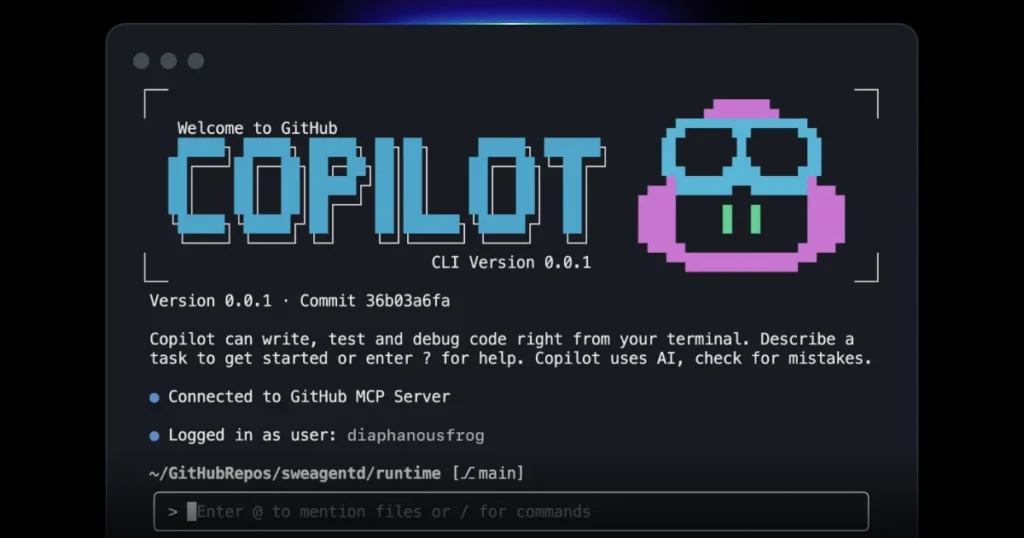
GitHub Copilot is where most developers encounter coding AI for the first time, and for good reason. Backed by OpenAI and Microsoft, it has over 1.8 million paid subscribers and powers AI coding features across multiple platforms.
What Makes Copilot Stand Out
Inline code completion is Copilot’s bread and butter, and it remains the best in class. As you type, ghost text appears suggesting not just the next line but sometimes entire functions. What impresses me most is how it reads intent from comments — write a natural language description of what you need, and Copilot often writes the function body before you’ve typed a single character of actual code.
Copilot Chat transformed how I approach debugging. Instead of pasting errors into a separate ChatGPT window, I ask directly within VS Code: “Why is this function returning undefined?” or “Refactor this to use async/await.” The contextual awareness — it knows your entire open file and sometimes adjacent files — produces genuinely useful answers.
Copilot for CLI is underrated. It translates natural language into terminal commands. I’ve stopped Googling grep, awk, and curl syntax — I just describe what I need and verify the output.
Multi-file context in the latest version (Copilot Workspace) is a leap forward. Previous versions were mostly file-aware. Now it understands project structure, imports, and dependencies across your entire repository.
Languages and IDE Support
Copilot works across virtually every language, with strongest performance in:
- JavaScript / TypeScript
- Python
- Ruby
- Go
- C# and C++
IDE support covers VS Code, Visual Studio, JetBrains IDEs, Neovim, and Xcode.
Pricing
| Plan | Price | Key Inclusions |
|---|---|---|
| Free | $0/month | 2,000 completions + 50 chat messages/month |
| Pro | $10/month | Unlimited completions and chat |
| Business | $19/user/month | Team management, IP indemnity |
| Enterprise | $39/user/month | Fine-tuning on private codebase |
My Honest Assessment
Strengths:
- Deepest ecosystem integration (GitHub, VS Code, Azure)
- Consistently best-in-class suggestions for popular languages
- Copilot Chat is genuinely conversational and contextually aware
- Active development — features ship monthly
Limitations:
- Suggestions occasionally hallucinate deprecated APIs or non-existent methods
- Code review doesn’t catch all security vulnerabilities
- Enterprise fine-tuning is expensive for smaller teams
- Privacy controls, while improved, still concern some corporate IT departments
Best for: Individual developers and teams already in the GitHub/Microsoft ecosystem, especially those using VS Code daily.
User Rating: ⭐⭐⭐⭐⭐ (4.7/5 — based on 12,400+ reviews on G2 and Product Hunt)
2. Cursor Coding AI Tool — The AI-Native IDE That’s Changing Everything

Cursor is an innovative, AI-first code editor built on the foundation of VS Code, designed to provide a deeply integrated and seamless AI programming experience. Unlike traditional AI plugins, it embeds advanced machine learning capabilities directly into the core of the editor, allowing developers to chat with their entire codebase, perform complex multi-file edits, and generate code with full project context. By supporting a variety of leading large language models and offering intuitive features like smart inline edits and natural language commands, Cursor empowers software engineers to write, refactor, and debug code with unprecedented speed and efficiency.
Cursor isn’t just a coding AI plugin — it’s an entirely reimagined code editor built from the ground up around AI assistance. Built on VS Code’s foundation, it feels familiar but operates on a fundamentally different level.
I switched to Cursor as my primary editor eight months ago and haven’t looked back.
What Cursor Does Differently
Composer mode is the feature that separates Cursor from every other tool on this list. Instead of asking AI to suggest code inline, you open Composer and describe an entire feature: “Create a REST API endpoint that accepts a user ID, fetches their order history from the database, and returns it paginated with 20 items per page.” Cursor then writes the code across multiple files, creates new files where needed, and shows you exactly what it changed — like a pull request from an AI collaborator.
The @ symbol system for context is genuinely clever. Type @file to include a specific file in your prompt context. Type @docs to pull in documentation from any URL. Type @web to search the internet and incorporate results. This contextual control solves the biggest frustration with other tools — the AI not knowing enough about your specific project to give useful answers.
Auto-debug mode watches your terminal. When an error appears, Cursor analyzes the full context and proposes a fix. I’ve had bugs disappear within 30 seconds of them appearing in the terminal.
YOLO mode (their actual term) lets Cursor run commands and apply changes autonomously. Powerful — and something to use carefully. I use it for scaffolding and routine refactoring, not production code changes.
Performance in Practice
Working on a mid-sized TypeScript project (approximately 40,000 lines of code), I tested how well Cursor understood our codebase. The results were genuinely impressive — it correctly understood our custom hooks, identified our naming conventions without being told, and suggested code that matched our existing patterns rather than generic examples.
This is where Cursor’s codebase indexing shines. It reads and indexes your entire project, so suggestions are grounded in your actual architecture rather than generic patterns.
Pricing
| Plan | Price | What You Get |
|---|---|---|
| Hobby | $0/month | 2,000 completions, 50 slow premium requests |
| Pro | $20/month | 500 fast premium requests, unlimited completions |
| Business | $40/user/month | SSO, admin controls, privacy mode |
Honest Evaluation
Strengths:
- Composer mode is a productivity category of its own
- Codebase indexing produces the most contextually accurate suggestions
- Built on VS Code — zero learning curve for existing users
- Fastest-improving product in this space
Limitations:
- $20/month is steeper than Copilot at comparable usage
- Composer mode occasionally makes assumptions that require course correction
- Heavier resource usage than a standard VS Code with plugin
- Smaller community than GitHub Copilot — fewer tutorials and guides
Best for: Developers who want the most powerful AI-native coding experience available, particularly for larger codebases and complex feature development.
User Rating: ⭐⭐⭐⭐⭐ (4.8/5 — highest-rated AI coding tool on Product Hunt in 2025)
3. Tabnine Coding AI Tool — The Privacy-First Coding AI for Enterprise Teams
Tabnine is an artificial intelligence software company specializing in code autocompletion and programming assistance. Known for its seamless integration into development environments, it helps developers write code faster and with fewer errors using generative AI models trained on open-source code.

Tabnine occupies a unique and important position in the coding AI landscape. While Copilot and Cursor generate suggestions using cloud-based models, Tabnine built its reputation on running models locally — meaning your code never leaves your machine.
For teams handling proprietary IP, regulated data, or operating in high-security environments, this isn’t a preference — it’s a requirement.
Tabnine’s Core Strengths
Local model deployment is Tabnine’s defining feature. You can run a capable AI coding assistant entirely on your hardware, with zero data leaving your network. For my client projects under NDA, this eliminated months of security review processes that Copilot would have required.
Team learning is Tabnine’s most underrated capability. Over time, it learns your team’s specific coding patterns, naming conventions, and architectural preferences. After about three weeks, suggestions began reflecting our team’s style guide without explicit configuration. This is different from just being trained on your codebase — it actively adapts to how your team writes code.
Fine-tuning on private repositories allows enterprises to train Tabnine specifically on their own codebases. The resulting suggestions are remarkably consistent with existing code — critical for large teams where consistency matters as much as functionality.
IDE breadth is exceptional — Tabnine supports VS Code, JetBrains family, Eclipse, Sublime Text, Vim/Neovim, Emacs, and more legacy environments than any competitor.
A Realistic Look at Performance
Tabnine’s suggestions are excellent within the patterns it knows. Where I’ve found it less impressive is with cutting-edge libraries or very recent framework versions — it lags behind Copilot and Cursor in incorporating the latest ecosystem developments. This is an inherent trade-off of the privacy-first architecture.
The conversational chat features are also less polished than Copilot’s or Cursor’s. Tabnine Chat exists but feels like a supporting feature rather than a core strength.
Pricing
| Plan | Price | Key Features |
|---|---|---|
| Free | $0/month | Basic completions, cloud model |
| Pro | $12/user/month | Advanced completions, chat, local model option |
| Enterprise | Custom | Self-hosted, team learning, fine-tuning, SSO |
My Honest Breakdown
Strengths:
- Best-in-class data privacy — no code sent to external servers
- Team learning genuinely improves suggestions over time
- Widest IDE support including legacy environments
- Compliance-ready for regulated industries (healthcare, finance, defense)
Limitations:
- Chat capabilities lag significantly behind Copilot and Cursor
- Suggestions on bleeding-edge libraries can be outdated
- Local model requires significant machine resources (minimum 16GB RAM recommended)
- Enterprise pricing requires direct negotiation — can be complex for smaller teams
Best for: Enterprise engineering teams, security-conscious organizations, developers working with sensitive IP, and teams using legacy IDEs.
User Rating: ⭐⭐⭐⭐ (4.2/5 — based on 2,800+ G2 reviews)
4. Amazon Q Developer Coding AI Tool — The Coding AI Built for AWS Developers

Amazon Q Developer is an AI-powered development assistant designed by AWS to help developers write, understand, and optimize code directly within their development environments. It can generate functions, explain existing code, detect errors, suggest fixes, and accelerate cloud development tasks, particularly on AWS services. Integrated with tools like Visual Studio Code and JetBrains IDEs, it stands out for its strong focus on the cloud ecosystem and best practices for security and performance.
Formerly known as CodeWhisperer, Amazon Q Developer has evolved into a significantly more capable coding AI platform specifically engineered for teams building on AWS infrastructure.
If your stack lives in AWS, this tool has contextual advantages no competitor can match.
What Amazon Q Developer Brings to the Table
AWS API awareness is genuinely unmatched. When writing infrastructure code, Lambda functions, or DynamoDB queries, Q Developer understands AWS-specific patterns and best practices at a depth Copilot and Cursor simply can’t replicate. I’ve received suggestions that correctly referenced the latest AWS SDK method signatures — something generic models frequently get wrong.
Security scanning is built directly into the workflow. As you write code, Q Developer flags potential security vulnerabilities in real time. In one session, it caught a potential SQL injection vulnerability and an incorrectly configured S3 bucket policy before I’d even finished the function. This isn’t a separate scan step — it’s continuous and passive.
Code transformation handles Java upgrades automatically. If you’re maintaining legacy Java 8 applications that need migration to Java 17 or 21, Q Developer analyzes the codebase and generates the migration — a task that could take a team weeks of careful manual work.
Agent for software development enables multi-step tasks: “Implement a user authentication system using Cognito with email verification.” It plans the implementation, creates multiple files, and walks you through each step.
Honest Performance Assessment
Outside the AWS ecosystem, Q Developer is competent but unremarkable. For vanilla web development in React or Node without AWS services, Copilot and Cursor consistently outperform it. The tool’s excellence is genuinely AWS-specific — which makes it exceptional for a large portion of enterprise development but limited for full-stack teams working across multiple cloud providers or without cloud infrastructure.
Pricing
| Plan | Price | Highlights |
|---|---|---|
| Free | $0/month | 50 code suggestions/day, 10 chats/month |
| Pro | $19/user/month | Unlimited suggestions, security scanning, code transformation |
Balanced Assessment
Strengths:
- Deepest AWS service knowledge available in any coding tool
- Integrated security scanning catches real vulnerabilities passively
- Code transformation for Java migrations is a legitimate enterprise time-saver
- Generous free tier for individual developers
Limitations:
- Noticeably weaker outside AWS context
- Interface is less refined than Cursor or Copilot
- Free tier limits are restrictive for serious development
- Chat experience lacks the conversational fluency of competitors
Best for: AWS-native engineering teams, cloud developers, and organizations heavily invested in the AWS ecosystem.
User Rating: ⭐⭐⭐⭐ (4.1/5 — based on 1,400+ verified reviews)
5. Codeium Coding AI Tool — The Best Free Coding AI for Individual Developers
Codeium is an artificial intelligence platform dedicated to coding assistance, developed by Exafunction. It offers code completion, explanations, and automatic generation features in various integrated development environments (IDEs). Codeium is among the leading AI tools designed to increase developer productivity.

Codeium has built something genuinely remarkable: a coding AI tool with an unlimited free tier that outperforms many paid competitors. For individual developers, students, and open-source contributors working without a budget, Codeium is the answer.
Why Codeium Deserves Serious Consideration
Truly unlimited free completions — not a trial, not 2,000 per month. Unlimited. This alone makes Codeium worth installing immediately for any developer not yet committed to a paid tool. I ran it as my primary assistant for three months to evaluate it honestly, and it earned genuine respect.
Speed is Codeium’s technical differentiator. Suggestions appear faster than any other tool I tested — an important quality-of-life factor when you’re working at high velocity and latency breaks your flow.
Broad language support covers over 70 programming languages, including several that Copilot handles poorly — Ada, COBOL, and several niche data science languages. For developers working in unusual environments, this breadth matters.
Codeium Chat is surprisingly capable for a free tool. Context-aware questions about your code, explanation of complex functions, and bug diagnosis all work reliably. It’s not as sophisticated as Copilot Chat, but the gap is narrower than the price difference suggests.
Search is a feature competitors lack. Codeium indexes your codebase and lets you search semantically: “find the function that handles user session expiration.” For large codebases, this is legitimately useful.
Where the Free Model Has Trade-offs
Suggestion quality in Codeium is good — genuinely good — but not consistently at Copilot or Cursor’s level. Complex multi-step suggestions occasionally miss nuance. The conversational AI features are more limited, and there’s no equivalent to Cursor’s Composer mode.
The paid tier (Teams and Enterprise) adds features like fine-tuning and administrative controls, but most individual developers will never need them.
Pricing
| Plan | Price | Key Features |
|---|---|---|
| Individual | $0/month | Unlimited completions, chat, 70+ languages |
| Teams | $12/user/month | Collaboration, usage analytics |
| Enterprise | Custom | Fine-tuning, SSO, self-hosting |
Fair Assessment
Strengths:
- Genuinely unlimited free tier — no catches, no credit system
- Fastest suggestion latency in this comparison
- Broadest language support
- Excellent value proposition at every price point
Limitations:
- Suggestion quality doesn’t consistently match Copilot or Cursor for complex tasks
- No equivalent to Cursor’s Composer or multi-file generation
- Smaller model training set means less accuracy on niche libraries
- Community and support resources less mature than GitHub Copilot
Best for: Students, individual developers, open-source contributors, developers in budget-constrained environments, and anyone wanting to try coding AI without financial commitment.
User Rating: ⭐⭐⭐⭐ (4.4/5 — based on 3,200+ reviews)
Comprehensive Comparison Table about Coding AI Tools
| Tool | Best For | Starting Price | Languages | Privacy Option | IDE Support | User Rating |
|---|---|---|---|---|---|---|
| GitHub Copilot | All-around excellence | Free / $10/mo | All major | Limited | VS Code, JetBrains, Vim | ⭐⭐⭐⭐⭐ 4.7/5 |
| Cursor | AI-native power users | Free / $20/mo | All major | Business plan | VS Code-based | ⭐⭐⭐⭐⭐ 4.8/5 |
| Tabnine | Enterprise & privacy | Free / $12/mo | All major | ✅ Full local | VS Code, JetBrains, Vim, Eclipse, Emacs | ⭐⭐⭐⭐ 4.2/5 |
| Amazon Q Developer | AWS ecosystem | Free / $19/mo | All major | AWS VPC option | VS Code, JetBrains | ⭐⭐⭐⭐ 4.1/5 |
| Codeium | Budget & beginners | $0/mo | 70+ | Limited | VS Code, JetBrains, Vim, Emacs | ⭐⭐⭐⭐ 4.4/5 |
How to Choose the Right Coding AI Tool: A Practical Framework
Rather than telling you which tool is “the best,” let me walk you through the framework I’d use if starting from scratch today.
Step 1 — Identify Your Primary Use Case
Ask yourself honestly what you need most:
- Faster daily coding with suggestions: Copilot or Codeium
- Complex feature generation across multiple files: Cursor
- Team consistency and security compliance: Tabnine
- AWS infrastructure development: Amazon Q Developer
- Zero budget, maximum value: Codeium
Step 2 — Assess Your Privacy and Security Requirements
⚠️ Important for Enterprise Teams: Before deploying any cloud-based coding AI tool, verify compliance with your organization’s data governance policies. Code sent to external servers may include proprietary algorithms, API keys embedded in comments, or confidential business logic. Tabnine’s local deployment option exists specifically to address this concern.
If your team works with:
- Regulated data (HIPAA, SOC 2, GDPR): Tabnine Enterprise with local deployment
- Standard enterprise environments: GitHub Copilot Business or Cursor Business
- Individual projects with no sensitivity concerns: Any tool works
Step 3 — Consider Your Ecosystem
Your existing tools create real switching costs:
- Deep in GitHub/Azure: Copilot integrates natively
- Using VS Code as primary editor: Cursor offers the most powerful upgrade
- Legacy IDEs (Eclipse, Emacs): Tabnine has the broadest support
- Heavy AWS infrastructure work: Amazon Q Developer
Step 4 — Evaluate Before Committing
Every tool on this list offers a free tier or trial. My recommendation:
- Install Codeium immediately (it’s free and has no downside)
- Trial GitHub Copilot for one month
- Try Cursor for two weeks on a real project
- Compare actual impact on your productivity, not marketing claims
Practical Checklist Before Choosing Your Coding AI Tool
✅ Does it support my primary programming languages?
✅ Does it integrate with my current IDE?
✅ Have I verified data privacy compliance with my employer or clients?
✅ Does the pricing scale reasonably with my usage?
✅ Have I tested it on a real project, not just a demo?
✅ Does the suggestion quality match my codebase’s complexity?
✅ Is there adequate documentation and community support?
✅ Does it improve my speed on the tasks I do most frequently?
Advanced Tips for Getting More from Coding AI Tools
These are the lessons that took me months to learn — saving you the same discovery time.
Write Better Comments to Get Better Code
The single most impactful habit I developed: writing precise, detailed comments before writing code. Coding AI tools generate suggestions based on surrounding context. A vague comment produces generic code. A specific comment produces accurate code.
Instead of: // get user data
Write: // Fetch user profile by ID from PostgreSQL, return null if not found, throw error if database unavailable
The difference in suggestion quality is dramatic.
Use AI for Code Review, Not Just Generation
Most developers use coding AI for writing code. Fewer use it for reviewing code. Open a pull request diff and ask: “What edge cases does this function miss?” or “What would happen if this input is null?” You’ll catch bugs your human reviewers miss.
Build a Prompt Library for Repetitive Tasks
Over time, I’ve accumulated a personal library of prompts that produce reliable outputs for common tasks:
- “Refactor this function to handle errors gracefully using try-catch and log the error with context”
- “Write Jest unit tests for this function covering happy path, empty input, and error cases”
- “Explain this code as if teaching someone who knows Python but not JavaScript”
Reusing tested prompts produces consistent, reliable results.
Don’t Accept Suggestions Blindly — Develop Critical Review Habits
🚨 Critical Warning: AI-generated code can contain subtle security vulnerabilities, deprecated API calls, or logical errors that pass casual review. Always understand what generated code does before accepting it. Treat AI suggestions like code from a very fast junior developer — valuable, but requiring review.
Establish a personal rule: never accept AI-generated code you don’t understand. If you can’t explain what a suggested function does, ask the AI to explain it before accepting.
The State of Coding AI in 2026: What’s Coming Next
Understanding where these tools are headed helps you invest your learning time wisely.
Autonomous agents are maturing. The gap between “suggest code” and “implement a feature autonomously” is closing rapidly. Tools like Cursor’s Composer and GitHub Copilot Workspace already demonstrate this direction. Within 12-18 months, expect AI agents that can take a ticket description and open a pull request with minimal human intervention.
Codebase understanding is deepening. Current tools understand files and sometimes projects. The next generation understands full organizational codebases — thousands of repositories, years of history, and the reasoning behind architectural decisions.
Testing and security integration are expanding. The next frontier isn’t just generating code — it’s generating code alongside its tests, security analysis, and documentation simultaneously.
Personalization is becoming meaningful. Models that adapt to individual developer style — not just team patterns, but personal preferences — are emerging. The assistant that knows you prefer functional patterns over object-oriented, or that you always want error logging, is coming.
FAQs About Coding AI
What is Coding AI and how does it actually work?
Coding AI refers to artificial intelligence tools designed to assist programmers by generating, completing, explaining, reviewing, and debugging code. These systems are trained on billions of lines of code from public repositories, documentation, and technical content. They use large language models (LLMs) — similar to the technology behind ChatGPT — to understand patterns in code and generate contextually appropriate suggestions. When you type or describe what you need, the model analyzes your current code context and generates predictions about what should come next, ranging from a single variable name to entire functions or classes.
Is Coding AI suitable for beginners or just experienced developers?
Both, but differently. Beginners benefit from having AI explain unfamiliar syntax, generate starter code for learning exercises, and identify errors with explanations. However, beginners who use AI as a crutch without understanding the generated code risk developing shallow understanding. My recommendation for beginners: use AI to accelerate understanding, not bypass it. Ask it to explain every suggestion, not just accept it. Experienced developers benefit most from raw speed and automation of tedious tasks — boilerplate generation, test writing, documentation, and refactoring.
Can Coding AI replace software developers?
No — and this is worth examining honestly. AI tools dramatically increase individual developer productivity, but software development involves far more than writing syntax. System design, understanding business requirements, managing trade-offs, communicating with stakeholders, ensuring reliability at scale, and making architectural decisions that age well are human responsibilities that AI currently cannot take over. What AI is replacing is the portion of developer time spent on rote, repetitive coding tasks — which frees developers to focus on higher-value work. The most pragmatic view: developers who use coding AI effectively are becoming significantly more valuable, while those who ignore these tools risk competitive disadvantage.
Which Coding AI tool is the best for Python developers?
GitHub Copilot and Cursor lead for Python, consistently generating idiomatic, accurate Python code. Copilot has the edge on popular Python libraries (Django, FastAPI, NumPy, Pandas) because its training set is heavily weighted toward widely-used code. Cursor’s advantage comes from codebase-wide context — for larger Python projects, it understands your module structure and suggests code that fits your existing patterns. For data scientists and ML engineers specifically, Codeium performs surprisingly well on scientific Python libraries.
How private is my code when using Coding AI tools?
This varies critically by tool. GitHub Copilot sends code snippets to Microsoft/GitHub servers to generate suggestions — they offer options to disable training on your code, but the code does travel over the network. Cursor similarly uses cloud models, with a privacy mode available on Business plans. Tabnine offers genuine local model deployment where code never leaves your machine. Amazon Q Developer processes code through AWS infrastructure. Codeium uses cloud models but has stated strong data privacy commitments. For proprietary codebases, review each provider’s data processing terms carefully before deployment.
Do Coding AI tools work offline?
Most tools require internet connectivity because suggestions are generated by cloud-based models. Tabnine is the primary exception — its local model runs entirely offline once downloaded. This makes it the only reliable option for air-gapped development environments or situations with unreliable internet connectivity. GitHub Copilot, Cursor, and Codeium require active internet connections to function.
What programming languages do Coding AI tools support best?
JavaScript, TypeScript, Python, Java, C#, and C++ receive the strongest support across all major tools — these languages dominate public repositories and training data. Go, Ruby, Rust, and PHP receive solid support. Less common languages (Ada, COBOL, Assembly) receive variable support — Codeium explicitly supports 70+ languages and often outperforms competitors in niche languages. For any language outside the mainstream, test your specific tool with real-world examples from your codebase before committing to a subscription.
How much does a good Coding AI tool cost per year?
For individual developers: expect $120-$240/year for solid paid tools (Copilot at $10/month or Cursor at $20/month). Codeium provides a legitimate free alternative. For teams: $144-$468/user/year depending on the platform and feature tier. Enterprise pricing with fine-tuning, SSO, and administrative controls varies widely — expect significant premiums. The productivity case is typically straightforward: if a tool saves one hour of work per week and your hourly rate exceeds $2.50, it pays for itself.
Conclusion: Choosing Your Coding AI Partner in 2026
After two years of daily use across multiple projects, teams, and languages, my honest conclusion is this: coding AI is no longer optional for developers who want to operate at peak productivity. The question has shifted from “should I use AI coding tools?” to “which tools suit my situation, and how do I use them effectively?”
Here’s my final recommendation framework, distilled to its simplest form:
- Start with Codeium today — it’s free, unlimited, and better than doing nothing while you evaluate paid options
- Choose Copilot if you want the most reliable, widely-supported, ecosystem-integrated experience
- Choose Cursor if you’re ready to commit to the most powerful AI-native development environment
- Choose Tabnine if data privacy is a non-negotiable requirement for your organization
- Choose Amazon Q Developer if your stack runs heavily on AWS infrastructure
The developers who will define the next decade of software aren’t those who fear AI assistance — they’re the ones who’ve learned to collaborate with it intelligently, maintaining rigorous code quality while operating at speeds that were simply impossible just five years ago.
The tools are ready. Your next step is to install one today, commit to a genuine two-week trial on a real project, and experience the difference firsthand. The productivity gains aren’t theoretical — they’re waiting in your next coding session.
All pricing and feature information reflects platform offerings as of early 2026. AI tool landscapes evolve rapidly — verify current plans directly with each provider before subscribing.