VPS Server Explained: Benefits, Use Cases, Pricing & the 5 Best Providers

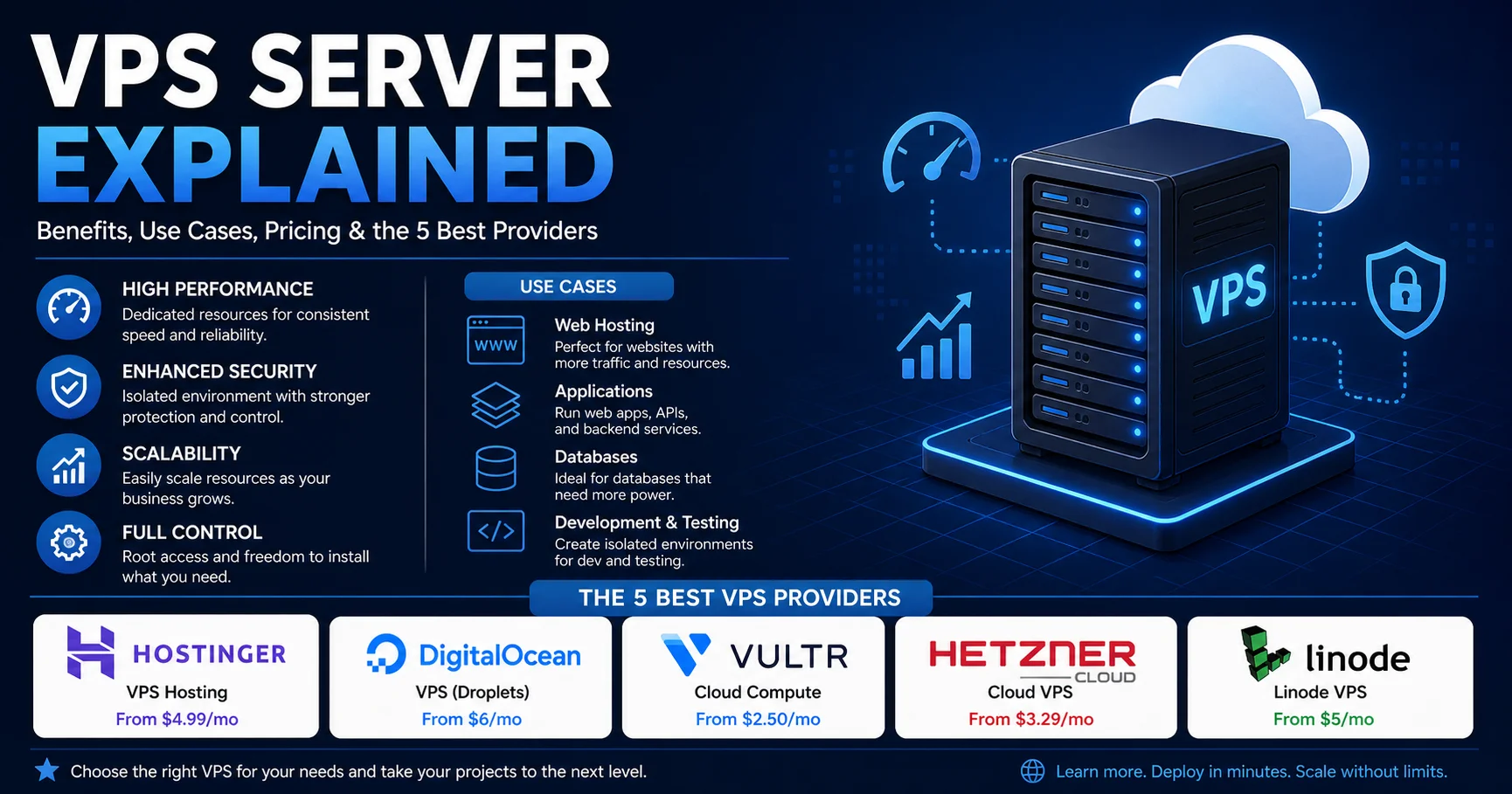
If your website feels sluggish on shared hosting, or you want full control without paying for an entire physical machine, a VPS server is probably your next step. It is the middle ground of web hosting: far more power and freedom than a budget shared plan, at a fraction of the cost of a dedicated machine.
But the market is crowded, the jargon is confusing, and the pricing pages are full of traps. This guide cuts through all of it.
Quick answer: what is a VPS server?
- A VPS (Virtual Private Server) is a virtual machine carved out of a powerful physical server.
- You get guaranteed CPU, RAM and storage, plus root access, so you control the operating system and software.
- Typical cost in 2026: roughly $4–$12 per month for an entry-level VPS server, and $20–$80 for serious production workloads.
- Best for: growing websites, web apps, online stores, game servers, VPNs, development environments and automation tools.
In this guide you will learn how a VPS server works, how it compares with other hosting types, what it really costs, which workloads suit it, and how to set one up safely. You will also find a side-by-side comparison of the five best VPS providers for 2026, a checklist, and an FAQ.
What Is a VPS Server?
A VPS server is a virtual computer that lives inside a much larger physical server in a data center. A piece of software called a hypervisor slices that big machine into several isolated environments. Each one behaves like a standalone server, with its own operating system, its own allocated resources and its own root (administrator) access.
The apartment analogy
Think of a building. Shared hosting is a dormitory: everyone shares the kitchen, the bathroom and the bandwidth, and one noisy neighbor affects everybody. A dedicated server is a whole house, which is great but expensive. A VPS server is a private apartment. You share the building (the physical hardware), but you have your own locked door, your own utilities and the freedom to redecorate however you like.
How a VPS server works technically
The physical host runs a hypervisor such as KVM, VMware or Xen. The hypervisor allocates virtual CPU cores (vCPUs), memory, disk space and network bandwidth to each virtual machine. Your VPS server then runs its own copy of Linux or Windows on top of those resources.
Two virtualization types matter when you shop:
- KVM (full virtualization): Each VPS has its own kernel. Resources are better isolated, and you can run almost anything, including Docker, custom kernel modules and Windows. This is the standard today and what I recommend.
- Container-based (OpenVZ, LXC): Virtual servers share the host’s kernel. They are cheaper but more restrictive, and resources are easier to oversell. Some Docker setups simply will not run.
Tip for beginners: Before paying, check that the plan uses KVM virtualization and NVMe or SSD storage. If the provider does not state the virtualization type clearly, treat that as a warning sign.
VPS vs Shared, Dedicated and Cloud Hosting
The question I hear most is whether a VPS is worth the jump from a cheaper plan. The comparison of VPS vs shared hosting, dedicated and cloud options below should make it clear.
| Feature | Shared Hosting | VPS Server | Dedicated Server | Cloud Hosting |
|---|---|---|---|---|
| Typical price | $2–$10/mo | $4–$80/mo | $80–$400+/mo | Pay as you go |
| Resources | Shared, unpredictable | Allocated to you | Entire machine | Scalable, flexible |
| Root access | No | Yes | Yes | Usually yes |
| Performance consistency | Low | High | Very high | High |
| Technical skill needed | Beginner | Intermediate | Advanced | Intermediate–Advanced |
| Best for | Small blogs, brochure sites | Growing sites, apps, stores | Heavy databases, enterprise | Variable traffic, big projects |
In practice, the line between a VPS server and “cloud” has blurred. Providers like DigitalOcean and Vultr sell cloud virtual machines that work exactly like a classic VPS, billed hourly. For most people, the difference is only in the billing model and scaling tools.
Key Benefits of a VPS Server
1. Dedicated, predictable resources
On shared hosting, a neighbor’s traffic spike can slow your site down. With a VPS server, the CPU and RAM you pay for are reserved for you. Performance matters because visitors are impatient. Google’s research found that the probability of a mobile visitor bouncing increases by 32% as page load time goes from one second to three seconds.
2. Full root access and freedom
You decide the operating system, the web server (Nginx, Apache, Caddy), the database, the PHP version and the security rules. If you have ever been told “that feature isn’t supported on our hosting plan,” you will appreciate this.
3. Better security and isolation
Your VPS server is walled off from other tenants. You can configure your own firewall, install intrusion prevention, enforce SSH keys and control exactly what is exposed to the internet. Security becomes your responsibility, but the control is real.
4. Scalability
Most providers let you upgrade CPU, RAM and storage in a few clicks. Some require a short reboot. This makes a VPS server a comfortable place to grow, because you can start small and resize as traffic builds.
5. Cost efficiency compared with dedicated hardware
A dedicated machine can cost ten times more. If you do not need an entire physical server, a VPS server gives you most of the advantages for a fraction of the price.
6. Multiple projects on one machine
Agencies and freelancers often host several client sites, a staging environment and a monitoring tool on a single VPS. Just be disciplined about isolation and backups.
“A VPS doesn’t make a slow website fast by magic. It gives you the tools to make it fast. The tuning is still your job.”
Drawbacks of a VPS Server You Should Know About
Any honest guide has to cover the downsides.
- A learning curve. Unmanaged plans expect you to use the command line, apply updates and fix things when they break.
- Security is on you. Leave SSH open with a weak password and bots will find it within hours. Automated login attempts start almost as soon as a new server gets a public IP address.
- Shared hardware still exists. Cheap providers can oversell CPU. “Noisy neighbor” issues are rarer than on shared hosting but not impossible, especially on shared-vCPU plans.
- Backups are not always included. Many providers charge extra for automated backups or snapshots, typically around 20% of the server price.
- Renewal price jumps. Some budget hosts advertise a low introductory rate and raise it sharply at renewal.
Warning: A VPS server without a firewall, SSH key authentication and regular updates is an easy target. If you are not comfortable handling this, choose a managed plan or budget time to learn the basics first.
VPS Server Use Cases: What Can You Actually Run?
The flexibility of a VPS server is its biggest strength. Here are the most common and practical uses.
- High-traffic websites and WordPress. Perfect when a site outgrows shared hosting. Combine Nginx, PHP-FPM, Redis caching and a CDN for strong results.
- Online stores. WooCommerce, Magento, PrestaShop and custom stores benefit from stable resources and the ability to meet PCI-related security requirements.
- Web applications and APIs. Node.js, Python (Django, FastAPI), Laravel, Ruby on Rails or Go services run comfortably on a small VPS.
- Development and staging environments. Test new code on a server that mirrors production before going live.
- Game servers. Minecraft, Rust, Valheim and others run well on a VPS server with enough RAM and a fast CPU. Check single-core performance, because many game servers are not heavily multithreaded.
- Private VPN. Tools like WireGuard or OpenVPN let you run your own VPN, which is a fun beginner project.
- Self-hosted tools. Nextcloud, n8n, Vaultwarden, Uptime Kuma, Plausible Analytics and Ghost are popular self-hosted apps for privacy-conscious users.
- Email and mailing infrastructure. Possible, but tricky. Many providers block port 25 by default to fight spam, and building IP reputation takes work.
- Docker and container hosting. A KVM-based VPS server is ideal for Docker Compose stacks.
- Trading bots and automation. Scripts that need to run 24/7 without depending on your home internet connection.
Fun fact: According to W3Techs, Unix-like systems run the large majority of websites whose operating system is known, with Linux the dominant choice. That is why most VPS plans default to Ubuntu, Debian, AlmaLinux or Rocky Linux.
Managed vs Unmanaged VPS: Which One Should You Pick?
The choice between managed vs unmanaged VPS is the most important decision after budget.
| Aspect | Unmanaged VPS | Managed VPS |
|---|---|---|
| Who maintains the server? | You | The provider |
| Price | Lower | Often 2x–5x higher |
| Control | Total | Often restricted |
| Updates and security patches | Manual | Handled for you |
| Support | Hardware and network only | Software and configuration help |
| Best for | Developers, sysadmins, learners | Business owners, non-technical teams |
My rule of thumb: if you enjoy learning and can spend a few evenings with documentation, go unmanaged and save money. If downtime would cost you real revenue and nobody on your team knows Linux, pay for managed.
There are also middle options. Control panels like CloudPanel, RunCloud, Plesk or cPanel can make an unmanaged VPS server much friendlier, though some carry monthly license fees.
VPS Hosting Pricing in 2026: What Does It Really Cost?
Understanding VPS hosting pricing means looking beyond the headline price. Below are realistic ranges for 2026. Providers change prices regularly, so always confirm on their official pages before buying.
| Tier | Typical specs | Typical monthly cost | Suitable for |
|---|---|---|---|
| Entry | 1 vCPU, 1–4 GB RAM, 25–50 GB SSD/NVMe | $4–$8 | Small sites, VPN, testing, bots |
| Standard | 2 vCPU, 4–8 GB RAM, 80–100 GB | $12–$30 | WordPress, small stores, apps |
| Performance | 4 vCPU, 8–16 GB RAM, 160+ GB | $40–$80 | Busy stores, databases, game servers |
| High-end | 8+ vCPU, 32+ GB RAM | $100+ | Large applications, heavy workloads |
Hidden costs that catch beginners off guard
- Renewal rates: The cheap price you see may only apply to a 12- or 24-month first term.
- Backups and snapshots: Often an add-on.
- Control panel licenses: cPanel and Plesk can add $15–$50 or more per month.
- Bandwidth overages: Hourly-billed cloud providers charge for traffic beyond your included allowance.
- Extra IP addresses and managed databases: Small charges that add up.
- Your time: An unmanaged VPS saves money but costs hours.
Money-saving tip: Hourly billing is perfect for experimenting. You can spin up a server, test for an afternoon and destroy it, paying only cents. Long-term contracts are cheaper per month but lock you in, so test first.
How Much Power Does Your VPS Server Need?
Over-buying wastes money and under-buying causes crashes. Use these starting points and adjust after monitoring real usage.
| Workload | Suggested starting point |
|---|---|
| Personal VPN or small script | 1 vCPU, 1 GB RAM |
| Small WordPress blog (up to ~20k visits/month) | 1–2 vCPU, 2 GB RAM |
| Business site or WooCommerce store | 2 vCPU, 4 GB RAM |
| Node.js or Python app with database | 2 vCPU, 4 GB RAM |
| Minecraft server (10–20 players) | 2–4 vCPU, 4–8 GB RAM |
| Docker stack with several services | 4 vCPU, 8 GB RAM |
These are rough guidelines, not guarantees. Caching, image optimization and database design influence the outcome as much as raw hardware. RAM is usually the first bottleneck, so if you must choose where to spend, spend there.
The 5 Best VPS Server Providers in 2026
Choosing among the best VPS hosting providers depends on your goals. I selected these five for their reputation, transparent plans, KVM-based virtualization and strong value. Pricing is approximate and based on publicly listed entry plans, so verify current numbers on each site.
How the ratings work: The star scores below are editorial ratings out of 5. They combine plan value, performance reputation, ease of use, support quality and general user sentiment on public review platforms. They are not a lab benchmark, and your results will vary by region and workload.
Quick comparison table
| Provider | Starting price (approx.) | Best for | Ease of use | User rating |
|---|---|---|---|---|
| Hostinger | ~$5–$7/mo (long-term promo) | Beginners, WordPress, value | Very easy | ⭐⭐⭐⭐⭐ 4.6/5 |
| DigitalOcean | From $4/mo | Developers, startups, tutorials | Easy | ⭐⭐⭐⭐☆ 4.5/5 |
| Vultr | From ~$2.50–$5/mo | Global locations, flexibility | Easy | ⭐⭐⭐⭐☆ 4.4/5 |
| Hetzner Cloud | From ~€4/mo | Best raw value in Europe | Moderate | ⭐⭐⭐⭐⭐ 4.7/5 |
| Linode (Akamai Cloud) | From $5/mo | Stable performance, long track record | Easy | ⭐⭐⭐⭐☆ 4.4/5 |
1. Hostinger VPS: Best for Beginners and Overall Value

Hostinger VPS is a virtual private server hosting solution designed for developers, businesses, and website owners who need more control, flexibility, and dedicated resources than traditional shared hosting provides. It offers dedicated virtual server resources, root access, and support for multiple operating systems and development environments, allowing users to configure their hosting infrastructure according to their needs. Hostinger also provides VPS management tools, automated backups, security features, and one-click application deployment options, depending on the plan. Its VPS hosting is suitable for running websites, applications, game servers, databases, and other online projects. With scalable resources and competitive pricing, Hostinger VPS is a practical choice for users seeking affordable hosting with greater performance and customization.
Hostinger has built its reputation on affordability and a clean, friendly dashboard. Its KVM plans come with NVMe storage, generous bandwidth and a browser-based terminal, so you can manage your VPS server without installing any tools. One-click templates for Ubuntu, WordPress, n8n and others save a lot of setup time. Their AI assistant can also walk beginners through common tasks.
Pros:
- Excellent price-to-spec ratio on long-term plans
- Beginner-friendly panel and one-click apps
- Weekly backups available, plus snapshot options
- 24/7 live chat support
Cons:
- Renewal prices are noticeably higher than the promo rate
- Monthly billing costs more than multi-year commitments
- Less granular than hyperscaler-style cloud tooling
Verdict: The safest starting point if you are new to a VPS server and want guidance rather than raw tooling.
2. DigitalOcean: Best for Developers and Documentation
DigitalOcean is a developer-focused cloud hosting platform that provides simple, scalable, and cost-effective infrastructure for hosting websites, applications, databases, and other online workloads. Its services include Droplets for virtual private servers, Managed Databases, Kubernetes, Spaces object storage, and App Platform for streamlined application deployment. DigitalOcean is known for its straightforward interface, predictable pricing, extensive developer documentation, and easy-to-use tools that simplify cloud infrastructure management. It is particularly popular among developers, startups, small businesses, and growing teams that need flexible cloud resources without the complexity often associated with larger cloud providers. With scalable infrastructure and a strong developer ecosystem, DigitalOcean offers an accessible solution for deploying and managing modern applications.

DigitalOcean calls its virtual servers “Droplets.” Billing is hourly, the interface is clean, and its tutorial library is one of the best on the internet. I often suggest that newcomers learn by following a DigitalOcean guide, because the explanations are clear and the commands are well tested. It also offers managed databases, Kubernetes, load balancers and object storage when your project grows.
Pros:
- Outstanding documentation and community tutorials
- Hourly billing with monthly caps
- Strong API, Terraform support and ecosystem
- Easy scaling and snapshots
Cons:
- Backups cost extra
- Entry plans have less RAM than some competitors at a similar price
- Bandwidth overages are billed beyond the included transfer
Verdict: A great all-rounder for developers and startups who value reliability and learning resources.
3. Vultr: Best for Global Reach and Flexibility

Vultr is a cloud hosting platform that provides virtual private servers (VPS), cloud compute instances, storage, and networking services for developers and businesses. Its infrastructure allows users to deploy servers in multiple locations around the world and choose from different CPU, memory, and storage configurations. Vultr is particularly popular for hosting websites, applications, development environments, databases, and other workloads that require flexible and scalable cloud infrastructure. Its straightforward deployment process and wide range of server options make it an attractive alternative to larger cloud providers.
Vultr operates a large network of data center locations across multiple continents. That is valuable if your audience is spread worldwide or you need low latency in a specific region. It offers regular cloud compute, high-frequency instances, bare metal and GPU options, plus a wide choice of operating systems, including custom ISO uploads.
Pros:
- Many locations worldwide
- Hourly billing and flexible instance types
- Custom ISO support and a good API
- Very cheap IPv6-only entry option
Cons:
- Support can feel slower on lower-tier accounts
- Automated backups are an add-on
- The product catalog can overwhelm newcomers
Verdict: The best pick when location choice and flexibility matter most.
4. Hetzner Cloud: Best Raw Value (Especially for Europe)
Hetzner Cloud is a cloud hosting platform that provides high-performance and cost-effective virtual servers for developers, businesses, and IT professionals. It allows users to quickly deploy scalable cloud servers with customizable CPU, RAM, storage, and networking resources. Known for its competitive pricing, reliable infrastructure, and straightforward management interface, Hetzner Cloud is suitable for hosting websites, web applications, databases, development environments, and other demanding workloads. With flexible server configurations and data centers in Europe and other regions, it offers an attractive solution for users looking for powerful cloud infrastructure without the high costs often associated with major cloud providers.

Hetzner is famous among technical users for delivering generous specs at very low prices, often with more RAM, storage and traffic than rivals at the same cost. Data centers are located in Germany and Finland, with additional locations in the US and Singapore. The interface is simple, and billing is hourly with a monthly cap.
Pros:
- Exceptional price-to-performance ratio
- Large traffic allowances on European plans
- Clean console, with firewalls and private networks included
- Strong reputation in the self-hosting community
Cons:
- Fewer locations than Vultr or DigitalOcean
- Account verification can be strict, sometimes slowing sign-up
- Less hand-holding for beginners, with fewer one-click apps
Verdict: If you are comfortable with Linux and your audience is in Europe, it is hard to beat for the money.
5. Linode (Akamai Cloud): Best for Stability and Network Strength

Linode (Akamai Cloud) is a cloud computing platform that provides reliable and scalable infrastructure solutions for developers, businesses, and IT professionals. Now part of Akamai, Linode offers cloud computing instances, dedicated CPU servers, high-performance storage, managed databases, Kubernetes services, and other cloud infrastructure tools. Its user-friendly platform makes it easy to deploy and manage virtual servers for websites, applications, databases, and development environments. With competitive pricing, flexible configurations, and Akamai’s global cloud network, Linode (Akamai Cloud) is a strong choice for users seeking a balance of performance, scalability, and simplicity.
Linode, now part of Akamai, has been around since 2003 and has a solid reputation for stable performance and straightforward pricing. Being tied to Akamai’s global network gives it an edge for content delivery and network reliability. Plans are predictable, with generous transfer allowances and flat monthly caps.
Pros:
- Long track record and consistent performance
- Simple, predictable pricing
- Good documentation and a clean control panel
- Strong network backing from Akamai
Cons:
- Backups are an extra cost
- Fewer one-click apps than Hostinger
- Branding and plan changes after the Akamai acquisition confused some long-time users
Verdict: A dependable choice for production workloads that value stability over novelty.
How to Choose the Right VPS Server Provider
Before you click “buy,” run through these questions:
- Where are your visitors? Pick a data center close to them. Distance affects latency.
- What is your skill level? Beginners should favor Hostinger or DigitalOcean. Experienced admins may prefer Hetzner or Vultr.
- What is the true cost after a year? Check renewal pricing, backup fees and bandwidth rules.
- What is the uptime commitment? A 99.9% SLA allows about 8.8 hours of downtime per year. 99.99% allows about 53 minutes. Read what compensation the provider actually offers.
- How good is the support? Test the live chat with a pre-sales question. Response quality tells you a lot.
- Can you scale easily? Look for simple resizing, snapshots and an API.
- Are backups simple? Automated backups can save your project.
Practical advice: Do a one-week trial on hourly billing before committing to a long contract. Run your real site or app, measure response times from your target regions, and test restoring a backup. Many people skip the restore test, then discover too late that their backup was incomplete.
Setting Up Your First VPS Server: A Beginner-Friendly Walkthrough
Here is a simple, safe baseline for a Linux VPS server running Ubuntu or Debian. The commands are examples, so adapt them to your own username and system.
Step 1: Connect via SSH
ssh root@YOUR_SERVER_IP
Step 2: Update the system
apt update && apt upgrade -y
Step 3: Create a non-root user
adduser yournameusermod -aG sudo yourname
Step 4: Set up SSH keys and disable password login
Generate a key on your computer, copy it to the server, then set PasswordAuthentication no in /etc/ssh/sshd_config. Keep your current session open while you test a second login, so you do not lock yourself out.
Step 5: Enable a firewall
ufw allow OpenSSHufw allow 80ufw allow 443ufw enable
Step 6: Add protection against brute-force attempts
Install Fail2ban to automatically block IP addresses that repeatedly fail to log in.
Step 7: Turn on automatic security updates and backups
Enable unattended upgrades for security patches and schedule regular snapshots or off-site backups. A backup stored on the same server is not a real backup.
Step 8: Install your stack
Now install Nginx or Apache, your database and your application. For WordPress, a lightweight panel such as CloudPanel can save time.
Mistake I see constantly: People install everything as root, leave password login enabled and skip backups “for now.” Do the security basics on day one. It takes about 20 minutes, and it prevents most beginner disasters on a VPS server.
VPS Server Checklist and Common Mistakes
Pre-purchase checklist
- ☐ KVM virtualization with SSD or NVMe storage
- ☐ Data center near your audience
- ☐ Renewal price and billing terms understood
- ☐ Backup and snapshot policy checked
- ☐ Bandwidth allowance and overage rules read
- ☐ Support channels tested
- ☐ Scaling path confirmed
Post-setup security checklist
- ☐ System fully updated
- ☐ Non-root sudo user created
- ☐ SSH key login enabled, password login disabled
- ☐ Firewall active with only necessary ports open
- ☐ Fail2ban or equivalent installed
- ☐ Automatic security updates turned on
- ☐ Off-site backup tested with a real restore
- ☐ Uptime monitoring set up
Common mistakes to avoid
- Buying the biggest plan “just in case.” Start small and resize.
- Ignoring monitoring. Tools like Uptime Kuma or your provider’s graphs catch problems early.
- Running everything in one place. Databases, email and web traffic compete for the same RAM.
- Never updating software. Outdated packages are the top entry point for attackers.
- Choosing only on price. A $3 saving is meaningless if support is absent during an outage.
Quick Summary: Is a VPS Server Right for You?
- Choose a VPS server if you have outgrown shared hosting, need root access, or want to run custom software.
- Stay on shared hosting if you run a small brochure site and have no technical interest.
- Go dedicated if you need maximum, uninterrupted hardware performance.
- Best overall for beginners: Hostinger. Best for developers: DigitalOcean. Best for global reach: Vultr. Best value: Hetzner. Best for stability: Linode.
Frequently Asked Questions About VPS Servers
What is a VPS server in simple terms?
A VPS server is a private, virtual computer that runs on a larger physical machine. You get reserved resources and full administrative control, without paying for the entire hardware.
How much does a VPS server cost per month?
Entry-level plans start around $4–$8 per month. Mid-range plans for business sites usually cost $12–$30, and powerful configurations can exceed $80. Always check renewal prices, backup fees and bandwidth rules.
Is a VPS server better than shared hosting?
For performance, control and security, yes. A VPS server gives you dedicated resources and root access. Shared hosting is easier and cheaper, so it remains fine for small, simple sites.
Do I need technical skills to use a VPS server?
For unmanaged plans, basic Linux and command-line skills help a great deal. If you lack them, choose a managed VPS or use a control panel. Many beginners learn the essentials in a weekend with good tutorials.
Can I host multiple websites on one VPS server?
Yes. With Nginx or Apache virtual hosts, or a control panel, you can host several sites on a single VPS server. Make sure you have enough RAM and a solid backup routine.
What is the difference between VPS and cloud hosting?
A traditional VPS is a fixed slice of one physical server. Cloud hosting spreads resources across multiple machines, offering easier scaling and redundancy. In practice, many “cloud servers” from providers like DigitalOcean or Vultr work just like a VPS server with hourly billing.
Is a VPS server secure?
The virtualization layer isolates you from other customers, but your own configuration determines real security. With a firewall, SSH keys, regular updates and backups, a VPS server can be very secure.
Which VPS server provider is best in 2026?
There is no single winner. Hostinger suits beginners, DigitalOcean suits developers, Vultr offers many locations, Hetzner delivers outstanding value, and Linode offers dependable stability.
Can I upgrade my VPS server later?
Yes. Most providers let you increase CPU, RAM and storage with a few clicks. Some changes, especially disk upgrades, may be irreversible, so read the provider’s notes before resizing.
Conclusion: Your Next Step With a VPS Server
A VPS server offers the best balance of power, control and price for anyone who has outgrown basic hosting. You get reserved resources, root access, strong isolation and room to scale, without the cost of a dedicated machine. The tradeoff is responsibility: you must secure, update and back up your own server, or pay a provider to do it.
If you want a gentle start, Hostinger is hard to fault. If you value excellent tutorials and a developer-friendly ecosystem, go with DigitalOcean. If you need global locations, pick Vultr. If you want maximum value and know your way around Linux, try Hetzner. And if long-term stability matters most, Linode is a trustworthy choice.
My advice: start with a small plan, apply the security checklist on day one, test your backups, and scale only when real data tells you to. A well-configured VPS server will serve you reliably for years, and the skills you gain along the way are valuable far beyond hosting.
Disclosure: Prices, specifications and plan names change frequently. Figures in this guide are approximate for 2026, so always confirm details on the provider’s official website before purchasing.