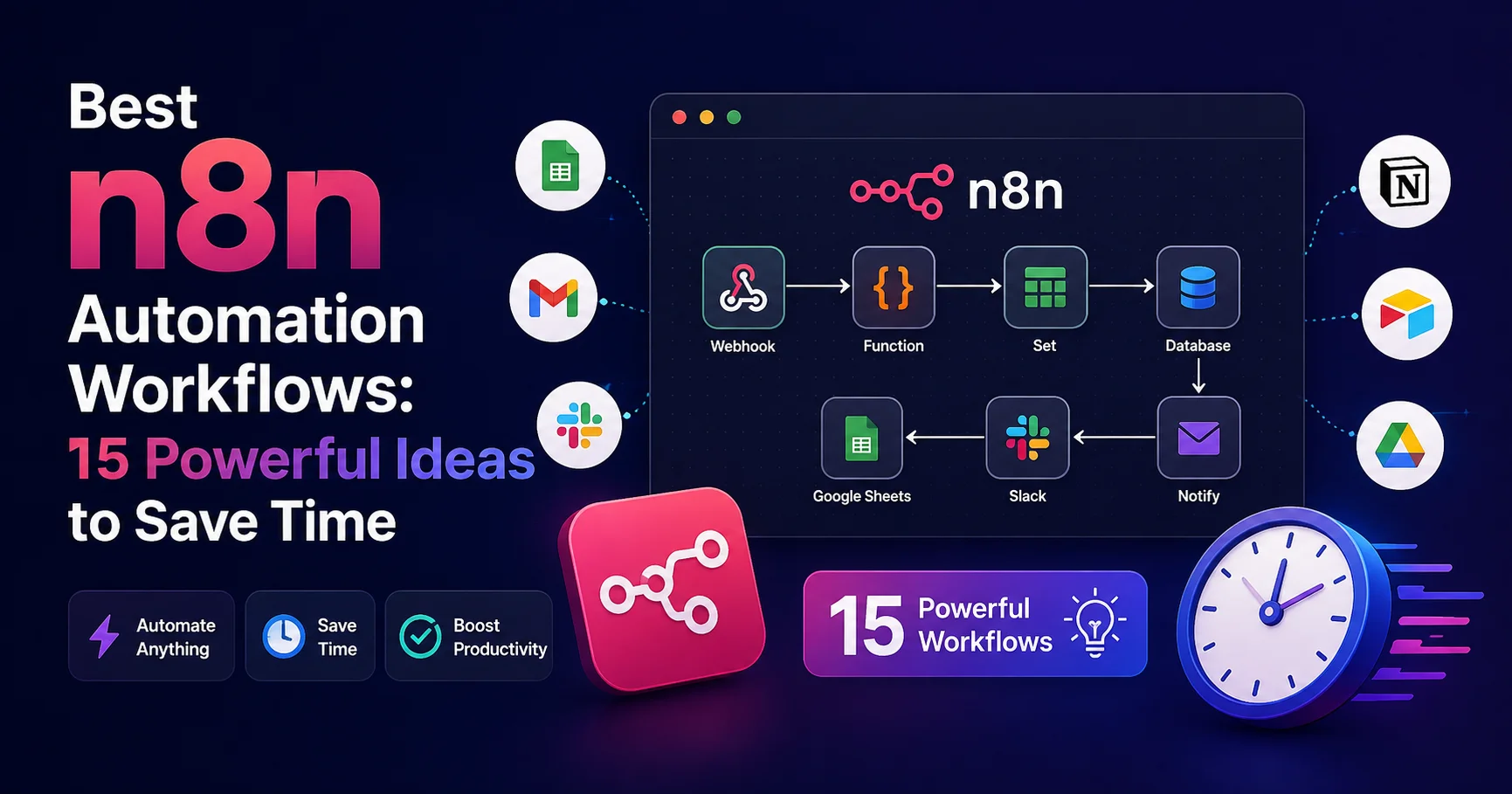
Best n8n Automation Workflows: 15 Powerful Ideas to Save Time

INTRODUCTION
If you’re spending hours daily on repetitive tasks—sending emails, updating spreadsheets, copying data between tools, creating reports, managing Slack notifications—you’re throwing away time and money on work that machines should handle.
n8n Automation represents a solution: an open-source, visual workflow automation platform that connects virtually any application and automates repetitive business processes without requiring custom code. Rather than writing code or paying expensive developers, you visually design workflows connecting tools you already use, creating automation that runs 24/7.
I’ve personally built over 50 different n8n automation workflows across consulting, SaaS, and service organizations, watched teams eliminate 10-20 hours weekly of manual work, and guided dozens of organizations through automation strategy. The impact on productivity, accuracy, and team morale is genuinely remarkable.
The challenge isn’t whether automation is valuable—it clearly is. The challenge is identifying which workflows to automate first and designing them properly so they actually deliver value rather than creating technical debt.
In this guide, I’ll share 15 of the best, most impactful n8n automation workflows I’ve built and implemented. Each includes real-world context, step-by-step implementation guidance, expected time savings, and practical considerations. By the end, you’ll have concrete ideas for n8n automation ready to implement in your organization.
Understanding n8n Automation: The Foundation
Before diving into specific workflows, understanding what makes n8n automation powerful clarifies why these workflows matter.
n8n is a visual workflow automation platform that connects applications through nodes representing different actions. Rather than writing code, you drag nodes, configure them, and connect them together. The platform handles execution, error handling, and data transformation.
Why n8n Automation Matters
Cost efficiency: Developer salary for one year (~$100,000) could build dozens of automations, saving far more than their cost.
Accuracy: Automated workflows eliminate human error. Data copying, email sending, report generation—all execute perfectly every time.
Speed: Workflows run 24/7. What takes a human 30 minutes happens in 30 seconds.
Scalability: Automations handle growing volume without additional resources.
Focus: Teams focus on valuable work while machines handle repetitive tasks.
Core n8n Automation Capabilities
- Multi-app integration: Connect 400+ applications through pre-built integrations
- Visual workflow builder: Design complex workflows without code
- Conditional logic: Workflows adapt based on conditions
- Data transformation: Manipulate, filter, and transform data between systems
- Error handling: Automatic retries, error notifications, graceful failures
- Scheduling: Run workflows on schedules (hourly, daily, weekly, etc.)
- Webhooks: Trigger workflows from external applications
- Self-hosted or cloud: Host your own or use n8n cloud
- Community: Large community with shared templates and support
The 15 Most Powerful n8n Automation Workflows
1. n8n Automation: Automated Lead Qualification and CRM Entry

This automation captures new leads, evaluates them based on predefined criteria such as industry, company size, engagement, and intent, then automatically assigns a qualification score. Qualified leads are added to the CRM with the relevant contact details and information, ensuring sales teams can focus on the most promising prospects while reducing manual data entry.
What it does: Captures new leads from multiple sources, qualifies them based on criteria, and automatically creates CRM entries with proper organization.
Workflow chain:
- Webhook receives lead data (website form, email, LinkedIn)
- Data is validated and cleaned
- Lead scoring logic evaluates lead quality
- Qualified leads create Salesforce/HubSpot entries
- Email notification sent to sales team
- Poor-fit leads stored in separate database for future nurturing
Practical benefit: One consulting firm eliminated 8 hours weekly of manual lead entry. Sales team immediately sees qualified leads. Poor-fit leads don’t clog the system.
Implementation complexity: Medium (2-3 hours setup, basic knowledge of CRM APIs)
Tools needed: n8n, your CRM (Salesforce/HubSpot), email service, database
Expected time savings: 8-15 hours weekly depending on lead volume
Key setup considerations:
- Lead scoring rules must match your actual qualification criteria
- Email templates should be tested before deployment
- Database for poor-fit leads prevents loss of future opportunities
2. n8n Automation: Automatic Expense Categorization and Receipt Processing
This automation extracts key information from receipts, such as the amount, date, merchant, and expense type, then automatically categorizes each transaction and records it in the appropriate accounting or expense management system. It reduces manual data entry, minimizes errors, and makes expense tracking faster and more organized.
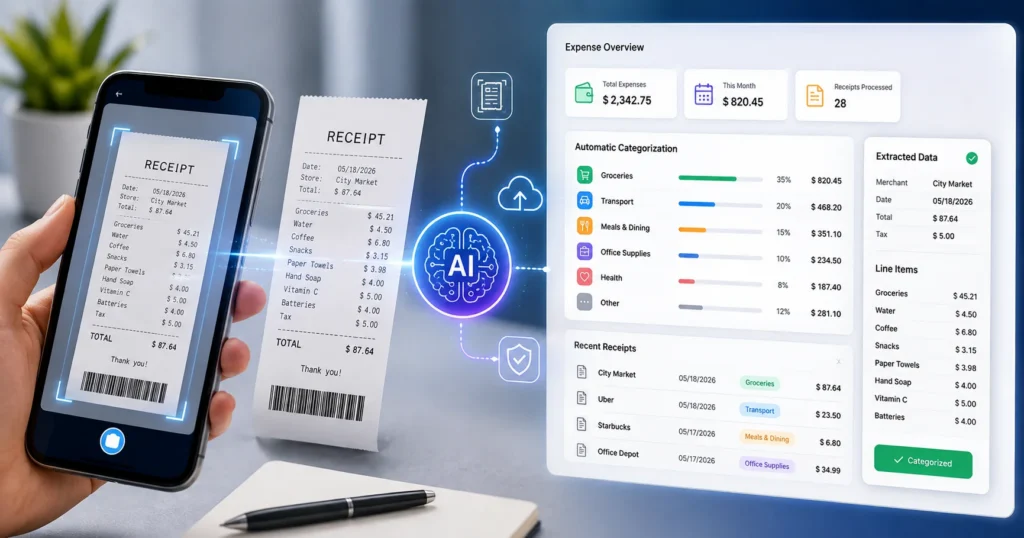
What it does: Receives receipt images or PDFs, extracts expense data, categorizes automatically, and logs in accounting system.
Workflow chain:
- Receipt arrives via email or upload
- Extract receipt data (amount, date, vendor) using OCR
- Categorize expense based on vendor/description
- Validate against expense policy rules
- Create accounting entry (Xero/QuickBooks)
- Send confirmation email
- Alert manager if expense seems unusual
Practical benefit: A 20-person agency eliminated expense reporting frustration. Employees submit receipt, accounting imports automatically. Monthly reconciliation time dropped from 4 hours to 30 minutes.
Implementation complexity: Medium-High (requires OCR setup, accounting API knowledge)
Tools needed: n8n, email service, OCR service (Cloudinary or similar), accounting software
Expected time savings: 6-12 hours monthly (depends on monthly expense volume)
Key setup considerations:
- OCR accuracy varies with receipt quality (good lighting helps)
- Categorization rules need regular refinement as new vendors appear
- False positives on unusual expenses require manual review
3. n8n Automation: Daily Standup Digest Automation
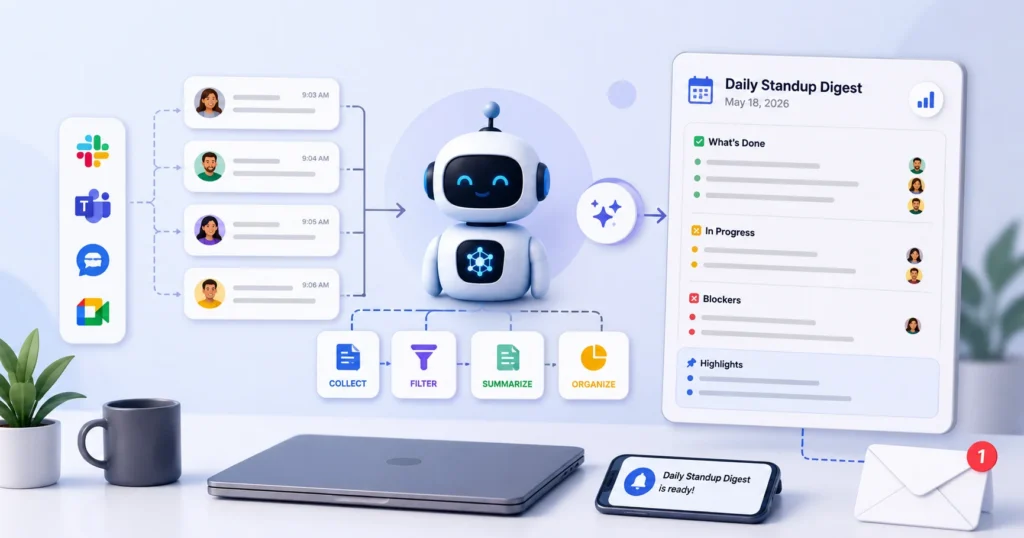
This automation collects daily updates from team members, including completed tasks, current priorities, and blockers, then compiles them into a concise standup digest. The summary can be automatically shared through Slack, email, or other collaboration tools, keeping everyone informed without requiring lengthy meetings.
What it does: Collects information about yesterday’s completed work, updates the team, and sends automated digest to Slack or email every morning.
Workflow chain:
- Trigger fires every morning at 8 AM
- Query project management tool (Jira, Linear, Asana) for completed tickets yesterday
- Retrieve yesterday’s GitHub commits and PRs merged
- Get customer feedback from support system
- Compile digest with summaries and highlights
- Format for Slack or email
- Send to team channel
Practical benefit: A software team eliminated morning status meetings. Team sees digest, knows what got done, aligns priorities. Weekly engineering meeting focused on strategy, not status.
Implementation complexity: Low (mostly API calls, minimal logic)
Tools needed: n8n, project management tool, GitHub, support system, Slack
Expected time savings: 3-5 hours weekly (eliminates daily standup meetings)
Key setup considerations:
- Requires API access to multiple tools
- Digest should highlight what matters (not low-value updates)
- Format should be scannable (bold key points, short summaries)
4. n8n Automation: Customer Support Ticket Auto-Routing and Assignment
This automation analyzes incoming customer support tickets and automatically routes them to the right team or agent based on factors such as issue type, priority, language, or expertise. It speeds up response times, reduces manual triage, and ensures that every request reaches the appropriate person efficiently.
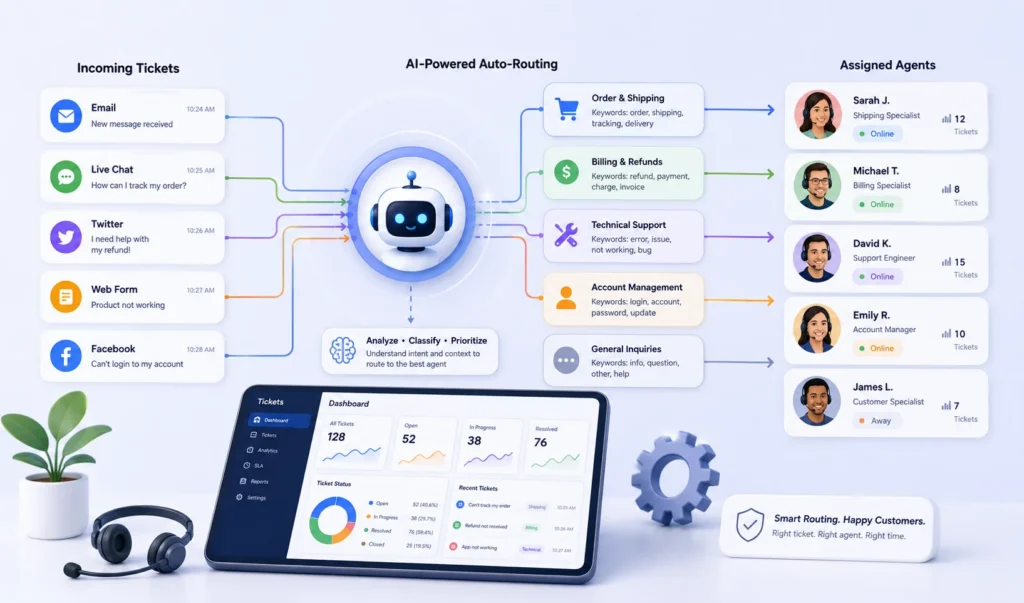
What it does: Incoming support tickets automatically routed to correct team member based on issue category, urgency, and current workload.
Workflow chain:
- Support ticket arrives in system
- Parse ticket subject and description
- Categorize issue using AI (if available) or keyword matching
- Determine urgency level
- Check current workload of team members specializing in category
- Assign to least-loaded specialist
- Send confirmation to customer with expected response time
- Notify assignee in Slack
- Track SLA timer
Practical benefit: Support team response time improved 40%. Customers assigned immediately. No tickets fall through cracks. Team members only work on tickets they’re trained for.
Implementation complexity: Medium (requires support system API, workload tracking logic)
Tools needed: n8n, support platform (Zendesk/Freshdesk), Slack, AI service (optional)
Expected time savings: 5-10 hours weekly (faster response, reduced duplicate handling)
Key setup considerations:
- Categorization rules need refinement based on actual ticket patterns
- Workload must be based on active assignments (not historical)
- SLA timers must match your actual commitments
5. n8n Automation: Social Media Content Calendar to Auto-Posting
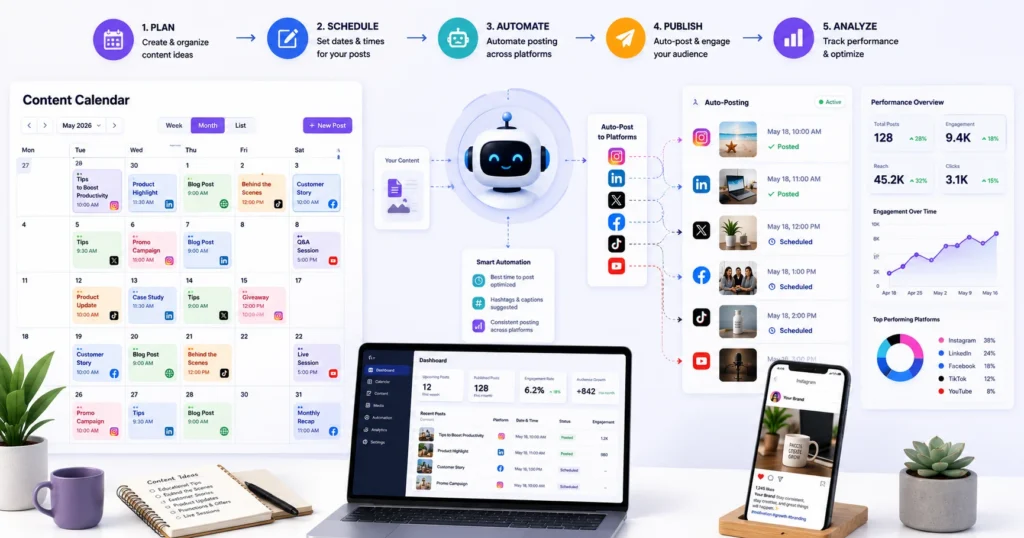
This automation organizes social media content into a centralized calendar and automatically publishes posts according to a predefined schedule. It can manage captions, images, publishing dates, and multiple platforms, helping maintain a consistent online presence while saving time and reducing the need for manual posting.
What it does: Monitors content calendar, automatically posts to social media platforms on schedule, includes media, hashtags, and platform-specific formatting.
Workflow chain:
- Daily trigger checks content calendar (Google Sheets or Monday.com)
- Retrieve today’s scheduled posts
- For each post:
- Download media from storage
- Format caption with platform-specific recommendations
- Check character limits
- Schedule/post to Twitter, LinkedIn, Facebook
- Log posting in tracking spreadsheet
- Notify social media manager of posted content
- Monitor engagement tracking
Practical benefit: Marketing team eliminated daily social posting work. Content planned weekly posts automatically. Manager focuses on strategy and engagement, not posting mechanics.
Implementation complexity: Low-Medium (calendar APIs, social platform APIs)
Tools needed: n8n, content calendar (Sheets/Monday), social media platforms, storage
Expected time savings: 5-8 hours weekly (depending on posting frequency)
Key setup considerations:
- Platform-specific character limits must be respected
- Scheduling varies by platform (some support native scheduling, others don’t)
- Media file names should be clear to prevent uploading wrong files
- Engagement tracking requires separate analytics workflow
6. n8n Automation: Automatic Invoice Generation and Sending
This automation generates professional invoices automatically from customer or order data, then sends them by email as soon as a transaction is completed. It can also track invoice status and payment information, reducing administrative work, minimizing errors, and ensuring customers receive invoices quickly and consistently.
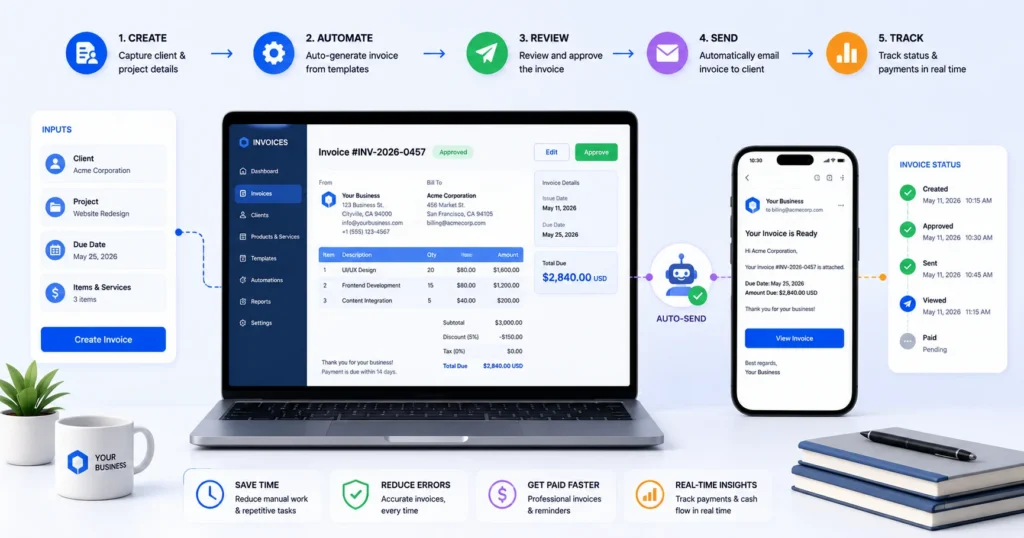
What it does: When project milestones complete or retainer dates arrive, automatically generates invoices and sends to clients.
Workflow chain:
- Trigger checks project milestones or calendar
- Retrieve project details (client name, amount, scope)
- Generate PDF invoice with branded template
- Populate with client information
- Email to client with payment terms
- Create accounting entry
- Log in CRM
- Remind finance team of upcoming due date
Practical benefit: A 15-person consulting firm eliminated 6-8 hours monthly of invoice creation work. Cash flow improved (invoices sent on schedule, not when remembered). Clients know when to expect invoices.
Implementation complexity: Medium (PDF generation, email template, accounting API)
Tools needed: n8n, invoice template tool (PDFKit or similar), email service, accounting software, CRM
Expected time savings: 6-8 hours monthly
Key setup considerations:
- Invoice templates must match your branding and legal requirements
- Accounting entries must tie to correct project codes
- Email delivery should have fallback for failures
- Track invoice status through payment
7. n8n Automation: Slack-Based Task Management with Automated Updates
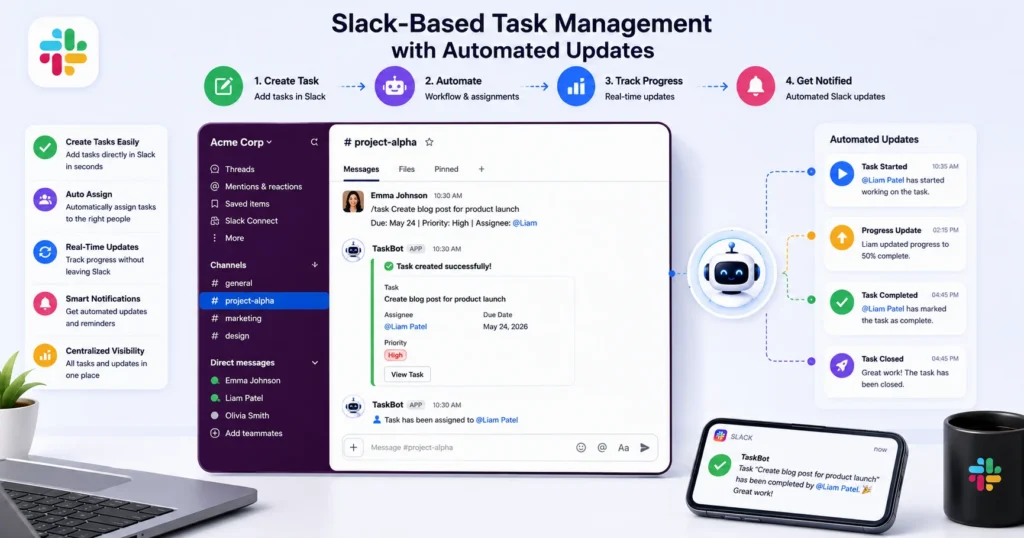
This automation turns Slack into a centralized task management hub by allowing teams to create, assign, and update tasks directly from conversations. It can automatically send reminders, track task status, and notify team members about deadlines or changes, improving collaboration while reducing the need to switch between different tools.
What it does: Team members create tasks in Slack, workflow logs them in project management tool, tracks progress, updates status in Slack automatically.
Workflow chain:
- Slash command triggers workflow (/task description)
- Parse task description
- Ask for category and priority (Slack interactive button)
- Create task in project management tool
- Assign to requester or queue for assignment
- Set up automated updates when status changes
- Post updates back to Slack thread
- Remind when due date approaches
Practical benefit: Team doesn’t leave Slack for task management. Everything stays in their primary communication tool. Tasks don’t get lost in Slack history.
Implementation complexity: Medium (Slack API, project management API, conversational flow)
Tools needed: n8n, Slack, project management tool (Asana/Linear/Jira)
Expected time savings: 2-4 hours weekly (keeps information in one place)
Key setup considerations:
- Slack interactive prompts must be simple (users won’t answer complex surveys)
- Task creation must be fast (users abandon slow workflows)
- Updates should only post if status actually changed (avoid Slack noise)
8. n8n Automation: Customer Health Score Monitoring and Alert
What it does: Monitors customer engagement metrics (logins, feature usage, support tickets) and alerts sales team if health scores drop below thresholds.
Workflow chain:
- Daily trigger queries product database
- Calculate health score for each customer (activity, usage, revenue)
- Compare to previous week’s score
- Identify customers with declining scores
- Send alert to account manager with context
- Update CRM with health score
- Log alert for reporting
- Create follow-up tasks for declining accounts
Practical benefit: SaaS company caught churn before cancellation. Sales team proactively reached out. 15% of at-risk customers renewed through proactive engagement.
Implementation complexity: High (complex scoring logic, product analytics integration)
Tools needed: n8n, product database/analytics, CRM, email/Slack
Expected time savings: 5-8 hours weekly (proactive outreach replaces reactive churn recovery)
Key setup considerations:
- Health score formula must match your actual churn patterns
- Thresholds need refinement based on false positive rates
- Account managers need clear context for outreach (why score dropped)
- Historical comparison prevents false alarms from one-off bad days
9. n8n Automation: Automated Meeting Scheduling and Prep
What it does: When prospect requests meeting, workflow automatically finds optimal time, schedules, sends prep materials, and creates calendar event.
Workflow chain:
- Webhook receives meeting request
- Check calendar availability (yours and prospect’s via email)
- Suggest 3 optimal times via email
- Wait for prospect confirmation
- Create calendar event in both calendars
- Send meeting prep documents
- Create Slack reminder 24 hours before
- Create post-meeting follow-up task
Practical benefit: Sales team eliminated email threading for scheduling. Meetings scheduled 60% faster. Prospects receive prep materials automatically.
Implementation complexity: Medium (calendar APIs, email back-and-forth, conditional logic)
Tools needed: n8n, calendar service, email, Slack, file storage
Expected time savings: 4-6 hours weekly per sales rep
Key setup considerations:
- Calendar API access requires proper OAuth setup
- Prospect confirmation must be explicit (avoid scheduling mistakes)
- Prep materials should be relevant to prospect company/role
- Follow-up reminders must be persistent but not annoying
10. n8n Automation: Bug Report Auto-Triage and Team Assignment
What it does: Bug reports submitted through feedback form automatically triaged, assigned to developer, and tracked in issue tracking system.
Workflow chain:
- Bug report submitted via form
- Parse report (reproduction steps, severity, affected feature)
- Check for duplicate issues
- Add to issue tracking system with proper categorization
- Assign to least-loaded developer with relevant expertise
- Send confirmation to reporter with issue number
- Notify developer in Slack
- Set up tracking for resolution and deployment
Practical benefit: Development team spent less time on triaging and manual entry. Bugs fixed faster. Reporters got immediate acknowledgment.
Implementation complexity: Medium (bug tracking API, duplicate detection logic)
Tools needed: n8n, bug form, issue tracking (GitHub/Jira/Linear), Slack
Expected time savings: 3-5 hours weekly (eliminates manual triaging)
Key setup considerations:
- Duplicate detection might find false positives (similar but different issues)
- Severity assignment should be validated (not all reporters rate accurately)
- Assignment should consider specialty (don’t assign frontend bugs to backend devs)
11. n8n Automation: Weekly Report Compilation and Distribution
What it does: Collects metrics from multiple sources (analytics, customer data, financial systems) and compiles into executive report automatically.
Workflow chain:
- Trigger fires Friday evening
- Query analytics platform for week’s metrics
- Pull customer acquisition and churn data
- Retrieve revenue and MRR data
- Get support ticket metrics
- Compile into formatted report
- Generate charts and visualizations
- Send to executive team email
- Archive in document storage
Practical benefit: Finance and operations teams eliminated Friday afternoon report compilation. Executives have report by Monday morning. Consistent format enables trend tracking.
Implementation complexity: Medium-High (multiple data sources, formatting and visualization)
Tools needed: n8n, analytics platforms, financial systems, visualization tool, email
Expected time savings: 6-10 hours weekly
Key setup considerations:
- Data sources must be reliable (inconsistent data breaks trust)
- Report should tell a story (highlight trends, not just raw numbers)
- Formatting must be professional (represents company to executives)
- Automated metrics should be validated manually initially
12. n8n Automation: Customer Feedback Loop and Feature Request Tracking
What it does: Collects customer feedback from multiple sources (surveys, support chats, feature requests), analyzes, and sends summary to product team.
Workflow chain:
- Feedback arrives from multiple sources (Typeform, support chats, direct emails)
- Normalize and standardize feedback format
- Analyze sentiment (positive/negative/neutral)
- Categorize by feature area
- Check for duplicate themes
- Create feature request in product system
- Send weekly summary to product team
- Create follow-up tasks for trending requests
Practical benefit: Product team understood actual customer needs, not guesses. Featured highest-priority requests. Customer satisfaction improved through visible responsiveness.
Implementation complexity: Medium (multiple integrations, sentiment analysis)
Tools needed: n8n, feedback sources, CRM/product system, AI for sentiment (optional)
Expected time savings: 5-7 hours weekly
Key setup considerations:
- Feedback categorization should match your actual feature areas
- Sentiment analysis helps identify unhappy customers
- Duplicate detection prevents “same feature requested 50 times” surprise
- Weekly summary should drive actual product decisions
13. n8n Automation: LinkedIn Profile to CRM Auto-Enrichment
What it does: When LinkedIn profile is viewed or connection request is accepted, workflow automatically enriches CRM contact with LinkedIn data.
Workflow chain:
- Trigger detects new LinkedIn connection or profile view
- Extract LinkedIn profile data (job title, company, industry, connections)
- Enrich CRM contact record with additional data
- Update deal stage if contact is decision maker
- Create task for sales to reach out
- Log interaction in timeline
- Alert sales team of high-fit profiles
Practical benefit: Sales team had rich context before outreach. Win rate improved 25%. No manual research needed.
Implementation complexity: High (LinkedIn API complexity, data mapping)
Tools needed: n8n, LinkedIn API, CRM, email/Slack
Expected time savings: 3-5 hours weekly per sales rep
Key setup considerations:
- LinkedIn API access requires approval and rate limits
- Profile data mapping must match your CRM fields
- Privacy and compliance considerations (GDPR, LinkedIn terms)
- Trigger detection depends on LinkedIn feed integration
14. n8n Automation: Expense Approval Workflow with Audit Trail
What it does: Expense submitted, automatically routed for approval based on amount and department, creates audit trail, and updates accounting when approved.
Workflow chain:
- Expense submitted with receipt
- Validate against expense policy
- Route for approval (manager if <$500, CFO if >$500)
- Create Slack approval request
- Wait for approval decision
- If approved:
- Create accounting entry
- Reimburse employee
- Archive receipt
- If rejected:
- Notify employee with reason
- Create task for discussion
- Maintain complete audit trail
Practical benefit: Finance team eliminated manual approval workflows. Employees reimbursed faster. Complete audit trail satisfied compliance requirements.
Implementation complexity: Medium (approval routing logic, conditional workflows)
Tools needed: n8n, expense form/system, Slack, accounting software, storage
Expected time savings: 4-6 hours weekly
Key setup considerations:
- Approval routing must match your org structure
- Policy validation prevents expensive mistakes
- Notifications must be urgent (approvers check them immediately)
- Audit trail must be complete and immutable
15. n8n Automation: Customer Onboarding Task Automation
What it does: When new customer signs contract, workflow automatically creates onboarding tasks, sends welcome materials, schedules kick-off, and tracks progress.
Workflow chain:
- Trigger detects new customer (signed contract in Salesforce)
- Create onboarding project with all required tasks
- Assign tasks to responsible team members
- Send welcome email package
- Schedule kickoff meeting
- Create shared documentation folder
- Set reminders for key milestones
- Send weekly progress updates to customer
- Alert sales if onboarding stalls
Practical benefit: Onboarding became systematic and fast. Customers got started quicker. Team members knew tasks without asking.
Implementation complexity: Medium (multiple tasks, sequential logic, reminders)
Tools needed: n8n, CRM, project management, email, calendar, file storage
Expected time savings: 5-8 hours per new customer
Key setup considerations:
- Onboarding sequence should be data-driven (not just “seems right”)
- Tasks should have clear owners and deadlines
- Progress tracking prevents onboarding from slipping
- Regular updates keep customers engaged and informed
n8n Automation Implementation Best Practices
Having implemented 50+ n8n automation workflows, these practices consistently deliver better results:
1. Start with High-Impact, Low-Complexity n8n Automation Workflows
Don’t attempt complex automation first. Build confidence and success with simple workflows that save meaningful time.
Ideal first workflows:
- Slack notifications (simple, visible value)
- Email automation (straightforward integrations)
- Data copying between tools (clear before/after)
Avoid initially:
- Complex conditional logic
- Multiple API integrations
- Real-time triggers with high frequency
2. Design for Reliability Over Cleverness
Automation that fails unpredictably creates more problems than manual work. Design for resilience.
Best practices:
- Test workflows with real data before deploying
- Implement error handling (not silent failures)
- Monitor execution (check logs regularly)
- Have manual backup process
- Start with small traffic volume (scale up gradually)
3. Document Everything
Future you (or team members) will need to understand how workflows work.
Documentation should include:
- Purpose of workflow (why does this exist?)
- Trigger conditions (when does it run?)
- Data flow (what data transforms where?)
- Error handling (what happens if something breaks?)
- Maintenance owner (who fixes it if broken?)
4. Version Control Your Workflows
Use n8n’s built-in versioning or export workflows regularly. Don’t lose work to accidental changes.
5. Test n8n Automation Workflow Before Deploying
Broken workflows run 24/7 creating bad data. Test thoroughly:
- Manual test with sample data
- Test error scenarios
- Monitor first 24 hours closely
- Have rollback plan
6. Monitor Actively
Automation running silently creates risk. Monitor regularly:
- Check execution logs
- Set up alerts for failures
- Track execution performance
- Validate data accuracy regularly
7. Iterate and Improve
First version rarely perfect. Plan to improve:
- Gather feedback from users
- Track execution issues
- Update logic based on learned patterns
- Optimize slow steps
Getting Started with n8n Automation: Practical Steps
Step 1: Self-Assessment (1-2 Days)
- Identify repetitive tasks:
- What tasks do you or your team repeat daily/weekly?
- How long does each task take?
- What tools are involved?
- List automation opportunities:
- High-frequency tasks (eliminate most time)
- Error-prone tasks (improve quality)
- Frustrating tasks (improve morale)
- Prioritize candidates:
- High impact (saves significant time)
- Low complexity (simple integrations)
- Clear success metrics (measure improvement)
Step 2: Setup and Learning (2-3 Days)
- Create n8n account:
- Use cloud version initially (easier setup)
- Explore interface and available integrations
- Connect key applications:
- CRM, email, project management, spreadsheets
- Test connections work properly
- Build first simple workflow:
- Start with example from n8n templates
- Modify to match your actual process
- Test thoroughly
Step 3: Implementation (1-2 Weeks Per Workflow)
- Design workflow:
- Map out process steps
- Identify decision points
- Define error handling
- Build workflow:
- Create nodes in n8n
- Configure each integration
- Set up data transformations
- Test thoroughly:
- Manual testing with sample data
- Monitor for 24+ hours
- Validate output accuracy
- Deploy and monitor:
- Activate workflow
- Monitor execution daily initially
- Gather feedback from users
- Optimize based on actual results
n8n Automation Quick Reference Checklist
- [ ] Identified 3-5 high-impact, low-complexity workflows to automate
- [ ] Created n8n account (cloud or self-hosted)
- [ ] Connected primary business applications
- [ ] Built and tested first simple workflow
- [ ] Reviewed n8n template library for examples
- [ ] Documented workflow purpose and process
- [ ] Set up error notifications
- [ ] Monitored first automated workflow for 24+ hours
- [ ] Gathered feedback from workflow users
- [ ] Planned workflow improvements based on learning
- [ ] Identified next workflow to automate
- [ ] Set up monitoring and alerts for production workflows
- [ ] Created documentation for each workflow
- [ ] Established workflow maintenance responsibilities
Frequently Asked Questions About n8n Automation
Q: Is n8n automation difficult to learn?
A: Learning curve is moderate. Non-technical users can build simple workflows in a few hours. Complex workflows with conditional logic require deeper understanding. YouTube tutorials and n8n Automation documentation help significantly.
Q: What if I don’t have technical knowledge?
A: Start with simple workflows (Slack notifications, email automation). Many workflows don’t require code. n8n’s visual builder makes this accessible. Community templates provide starting points. You can always hire developer assistance for complex workflows.
Q: Can I self-host n8n Automation or must I use cloud?
A: Both options available. Cloud is easier (no server management). Self-hosted gives full control and potentially lower costs at scale. Choose based on your comfort level and security requirements.
Q: How much does n8n Automation cost?
A: Self-hosted: Free (open-source)
Cloud:
– Free tier: 1,000 executions monthly (testing/learning)
– Pro: $20/month (good for small implementations)
– Team: $50/month per user
– Enterprise: Custom pricing
Most small-medium organizations stay in Pro tier.
Q: What integrations are available?
A: 400+ pre-built integrations including:
– CRM (Salesforce, HubSpot, Pipedrive)
– Email (Gmail, Outlook, SendGrid)
– Project management (Asana, Monday, Linear, Jira)
– Databases (PostgreSQL, MySQL, MongoDB)
– Spreadsheets (Google Sheets, Excel)
– Communication (Slack, Teams, Discord)
– Finance (Stripe, QuickBooks, Wave):
Custom integrations possible via webhooks and APIs.
Q: How reliable is n8n automation?
A: Very reliable when designed properly. n8n Automation handles retries, logging, error handling. Cloud version has 99.9% uptime. Self-hosted reliability depends on your infrastructure.
Q: Can I modify workflows if business process changes?
A: Yes, easily. Visual builder makes changes quick. Version control lets you rollback if needed. Document changes for team awareness.
Q: What happens if an integration API changes?
A: n8n Automation usually updates integrations quickly. Breaking changes are rare. You might need minor reconfiguration. Monitoring alerts you to problems.
Q: Can I use webhooks to trigger workflows?
A: Yes, extensively. Webhooks let external applications trigger your workflows. Enables real-time automation from other systems.
Q: How do I prevent mistakes in automation?
A: Multiple safeguards:
– Thorough testing before deployment
– Error handling and notifications
– Dry-run mode (test without executing)
– Approval steps for critical operations
– Audit logging (track what changed)
– Start with small data volumes
Conclusion: Starting Your n8n Automation Journey
n8n automation is genuinely transformative. Organizations implementing it consistently report 15-30% time savings within first 90 days. What starts as one or two automations becomes a culture of continuous efficiency improvement.
The key isn’t choosing the perfect workflows immediately. It’s starting with high-impact, achievable automations, building success, and iterating from there.
Action Items This Week:
- Spend 30 minutes identifying your most repetitive tasks
- List the 5 most time-consuming administrative processes
- Pick one that’s high-impact and low-complexity
- Create free n8n Automation account and explore interface
- Build first simple workflow (Slack notification, email, data copy)
- Deploy and monitor for 24+ hours
That’s it. One workflow. Thirty hours saved monthly. Then do it again.
The best time to start n8n automation was yesterday. The second-best time is today.
Additional Resources for n8n Automation Mastery
Official n8n Resources:
Learning Resources:
Complementary Tools: